
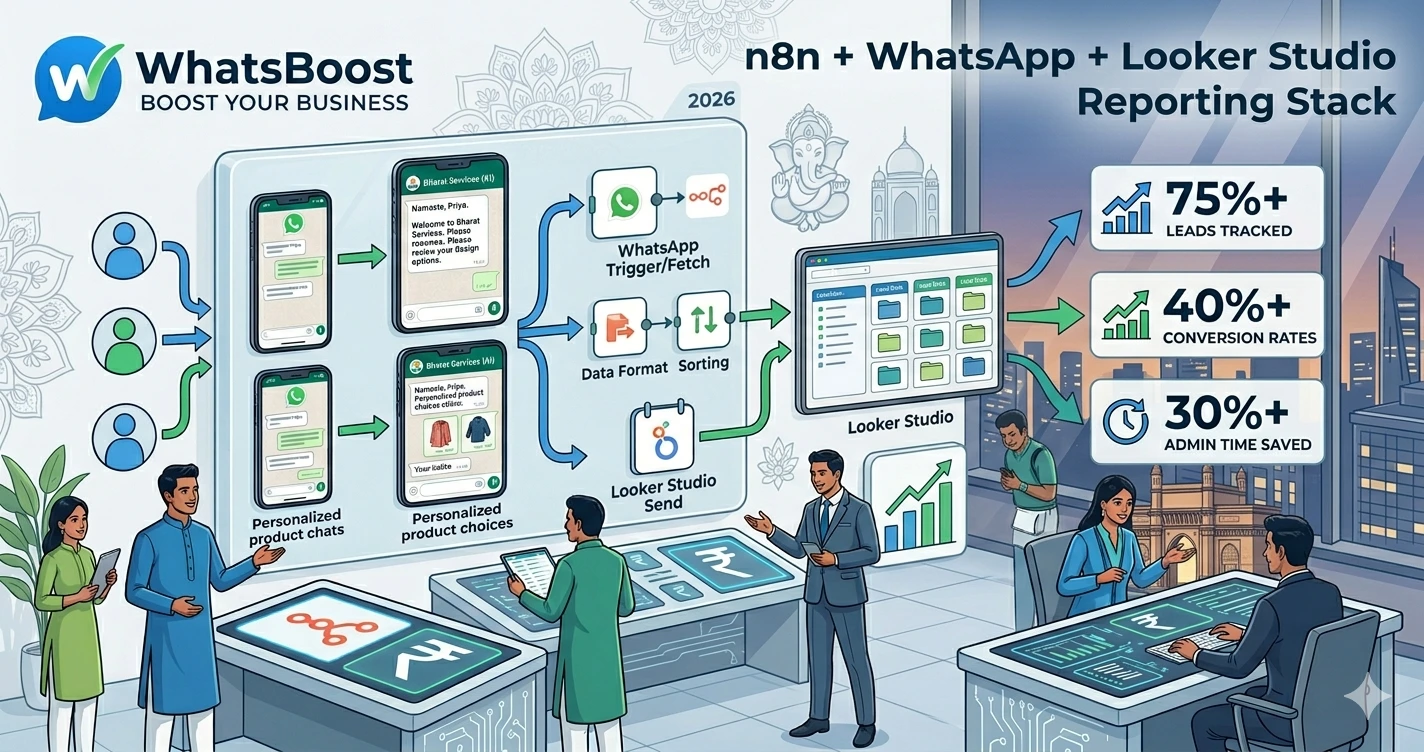
Using n8n to Fetch WhatsApp Chats and Send Data to Looker Studio
Learn how to use n8n to fetch WhatsApp chats, store conversation data in Google Sheets, and visualize business insights in Looker Studio. Build automated reporting dashboards for lead tracking, customer support, sales performance, and WhatsApp analytics.
Using n8n to Fetch WhatsApp Chats and Send Data to Looker Studio
Most businesses use WhatsApp as their primary communication channel.
Customers send enquiries.
Leads ask questions.
Sales teams follow up.
Support teams resolve issues.
But there's one major challenge.
All that valuable business data remains trapped inside conversations.
As a result:
❌ Managers cannot measure performance accurately
❌ Sales teams lack visibility into lead activity
❌ Customer support trends go unnoticed
❌ Reporting becomes manual and time-consuming
❌ Important business insights get lost
The reality is simple.
If your WhatsApp conversations aren't being tracked, you're missing valuable business intelligence.
That's why more businesses are using n8n to automatically fetch WhatsApp conversations and send the data into reporting systems like Looker Studio.
👉 The businesses that scale efficiently are the ones that turn conversations into measurable data.
Why WhatsApp Reporting Matters
Imagine your business receives:
- 50 enquiries per day
- 200 support messages per week
- Hundreds of follow-ups every month
Now ask yourself:
- Which campaigns generated those enquiries?
- How many conversations became customers?
- What questions are customers asking most often?
- Which team members are handling the most enquiries?
- How quickly are prospects receiving responses?
Without reporting, these answers are difficult to find.
This is why many businesses first implement systems similar to How to Automatically Save WhatsApp Conversations to Google Sheets for Reporting, creating a structured data source before building dashboards.
Why Use n8n for WhatsApp Reporting?
n8n acts as the automation layer between your systems.
Its job is to move information automatically.
Instead of manually exporting data from WhatsApp, n8n can:
✔ Capture incoming messages
✔ Process conversation data
✔ Categorize interactions
✔ Update Google Sheets
✔ Update CRM systems
✔ Trigger notifications
✔ Feed reporting dashboards
This eliminates repetitive manual work.
Businesses exploring workflow automation often start with setups similar to n8n WhatsApp Integration Without API, allowing multiple business tools to communicate automatically.
The Reporting Architecture
A typical reporting stack looks like this:
WhatsApp → n8n → Google Sheets → Looker Studio
Each component plays a specific role.
Generates customer conversations.
n8n
Processes and transfers data.
Google Sheets
Stores structured reporting information.
Looker Studio
Visualizes business performance.
Together, they create a complete analytics ecosystem.
Step 1: Capture WhatsApp Conversation Data
The first step is collecting data from WhatsApp.
Businesses commonly track:
- Customer name
- Phone number
- Message content
- Conversation timestamp
- Lead source
- Assigned team member
- Enquiry category
- Customer status
This information becomes the foundation of your reporting system.
Many businesses combine this with lead qualification workflows similar to How Indian Businesses Use WhatsApp Lead Qualification to Improve CRM Conversion Rates to improve reporting accuracy.
Step 2: Process Data Using n8n
Once messages are captured, n8n processes the information.
Example workflow:
New WhatsApp Message → Extract Customer Details → Categorize Conversation → Update Google Sheet
This happens automatically.
No copying.
No spreadsheets being updated manually.
No human intervention.
Step 3: Store Data in Google Sheets
Google Sheets acts as the reporting database.
A typical sheet may contain:
| Customer Name | Phone Number | Category | Date | Status |
| Rahul Sharma | 9876543210 | Sales Enquiry | 05/05/2026 | Qualified |
| Priya Gupta | 9876500000 | Support Request | 05/05/2026 | Resolved |
Businesses often start with structures similar to How to Build a WhatsApp Lead Tracking System Using Claude AI and Google Sheets, allowing them to track customer interactions in a simple format.
Google Sheets provides flexibility without requiring complex infrastructure.
Step 4: Connect Google Sheets to Looker Studio
Once data is stored, Looker Studio can visualize it.
Instead of reading rows and columns, businesses see:
✔ Lead trends
✔ Support volume
✔ Conversion rates
✔ Campaign performance
✔ Team productivity
✔ Customer engagement metrics
Dashboards update automatically whenever Google Sheets receives new data.
What Metrics Should You Display?
Many businesses overload dashboards with unnecessary information.
Focus on actionable metrics.
Lead Generation Metrics
- New enquiries
- Qualified leads
- Conversion rates
- Appointment bookings
Organizations that connect WhatsApp to CRM systems often gain deeper visibility through workflows similar to How to Integrate CRM With WhatsApp for Automation.
Customer Support Metrics
Track:
- Total support conversations
- Resolution times
- Escalation rates
- Frequently asked questions
These metrics reveal operational bottlenecks.
Sales Performance Metrics
Monitor:
- Follow-up activity
- Proposal requests
- Closed deals
- Revenue opportunities
This helps sales managers identify performance trends.
Use AI to Categorize Conversations Automatically
As conversation volume grows, manually tagging messages becomes unrealistic.
AI can classify conversations into categories such as:
- Lead enquiry
- Customer support
- Appointment request
- Billing issue
- Product enquiry
Businesses implementing AI workflows often follow strategies similar to Building an AI WhatsApp Coach Using Claude AI and n8n.
This improves reporting quality while reducing administrative work.
Real Workflow Example
A complete workflow might look like:
Customer Sends WhatsApp Message → WhatsBoost Receives Message → n8n Extracts Data → AI Categorizes Conversation → Google Sheet Updated → CRM Updated → Looker Studio Dashboard Refreshed
Everything happens automatically.
This creates a real-time reporting environment.
Before vs After WhatsApp Reporting Automation
| Before Automation | After Automation |
| Manual reports | Automated dashboards |
| Spreadsheet updates by hand | Real-time reporting |
| Scattered conversation data | Centralized analytics |
| Delayed business insights | Instant visibility |
| Limited performance tracking | Actionable KPIs |
Why Combine WhatsBoost With n8n?
WhatsBoost handles communication.
n8n handles automation.
Together they create a powerful reporting infrastructure.
Businesses can:
✔ Capture conversations automatically
✔ Track lead activity
✔ Monitor customer interactions
✔ Update reporting systems
✔ Trigger follow-up workflows
Companies looking to build more advanced automation ecosystems often expand into setups discussed in WhatsApp + n8n + Claude: 50 Automation Ideas for Indian Businesses in 2026.
The result is a scalable operational system.
Common Mistakes to Avoid
Tracking Too Much Data
Focus on metrics that influence business decisions.
No Lead Categorization
Without categories, reporting becomes difficult to interpret.
No CRM Integration
Customer data should flow into a centralized system.
No Automated Follow-Ups
Reporting is most effective when paired with action.
Businesses often strengthen this area using systems similar to Why Businesses Need Smarter Task Follow-Up Systems.
Final Conclusion
WhatsApp contains some of the most valuable business data your company generates.
But without proper reporting, that data remains hidden inside conversations.
By using n8n to fetch WhatsApp chats, Google Sheets to organize information, and Looker Studio to visualize insights, businesses can build a powerful reporting system that improves decision-making and operational visibility.
Combined with WhatsBoost, CRM integrations, AI categorization, and workflow automation, organizations can transform everyday conversations into actionable business intelligence.
👉 The future is: WhatsApp + AI + Automation = Scalable Business Operations 🚀
Want to automate WhatsApp for your business?
Set up campaigns, replies, and follow-ups in minutes.