

Automating Client Pre-Screening With WhatsApp Lead Qualification Button Chatbot in 2026 | Whatsboost
Learn how to automate client pre-screening using a WhatsApp lead qualification button chatbot in 2026. Discover setup steps, practical workflows, and how Whatsboost helps Indian businesses qualify leads intelligently on WhatsApp.
Every service business, agency, consultant, and sales team in India faces the same hidden productivity drain: pre-screening clients manually. Hours each week are consumed by initial discovery conversations that follow the exact same pattern — same questions, same information collection, same assessment of whether this prospect is actually worth pursuing. The conversations are necessary. The manual effort behind them is not.
In 2026, a WhatsApp lead qualification button chatbot automates this entire pre-screening process — collecting the right information, assessing fit, and routing prospects to the right outcome, all without a human being involved until the pre-screening is complete. And because it runs on WhatsApp, where Indian clients are most responsive and most comfortable, completion rates are dramatically higher than web forms or email-based screening processes.
This blog explains how to automate client pre-screening using a WhatsApp lead qualification button chatbot, and how Whatsboost makes it accessible for Indian businesses of every size.
What Is a WhatsApp Lead Qualification Button Chatbot?
A WhatsApp lead qualification button chatbot is an automated conversation flow that uses WhatsApp's interactive button message feature to guide prospects through a pre-screening process. Instead of asking open-ended questions that require typing, the chatbot presents each question with two to three tap-to-reply button options — making it frictionless for clients to respond and ensuring the data collected is structured and actionable.
The "button" element is what separates this from a standard chatbot or a text-based qualification flow. WhatsApp's interactive buttons — available through the WhatsApp Business API — appear as tappable options below each message. Clients respond with a single tap, the chatbot registers their selection, and the next question or action is triggered automatically based on what they chose.
The result is a pre-screening experience that feels fast, conversational, and effortless for the client — while delivering precisely structured qualification data to your business behind the scenes.
Whatsboost provides the WhatsApp Business API and no-code button chatbot builder that makes this level of interactive pre-screening automation available to Indian businesses without a development team. Explore the platform at Whatsboost.in.
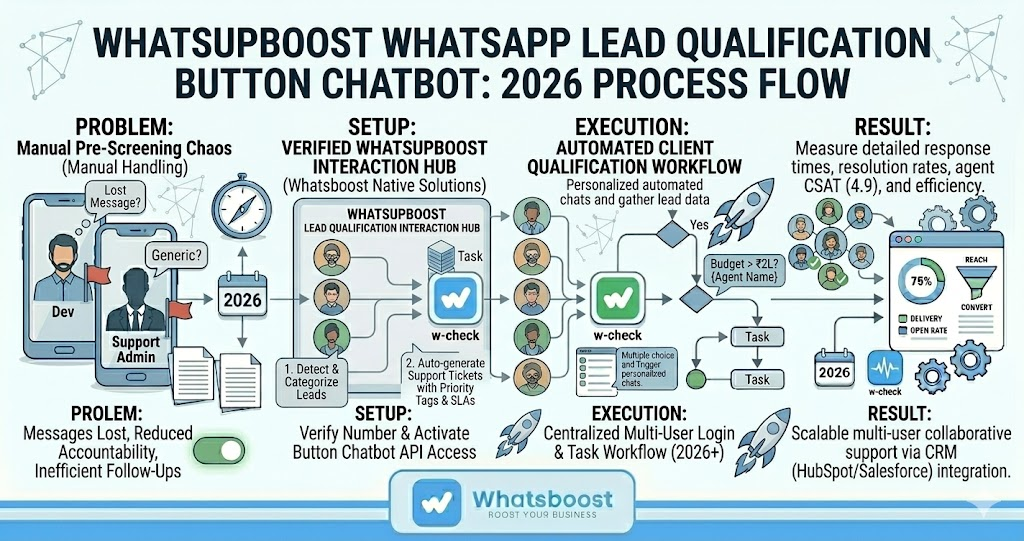
Why Button-Based Chatbots Outperform Text-Based Qualification on WhatsApp
The distinction between button-based and text-based WhatsApp qualification flows is not cosmetic — it has a meaningful impact on both completion rates and data quality.
Higher completion rates — Responding to a tap-to-select button requires one interaction. Typing a response to an open question requires thought, effort, and time. On mobile — where the majority of Indian WhatsApp users operate — the difference in friction is significant. Button-based chatbots consistently achieve higher flow completion rates than text-based alternatives.
Structured, actionable data — When a client types a free-text answer, interpreting and categorising that response for routing or CRM logging requires additional processing. When a client taps a button, their response is already structured — a defined value that can immediately trigger conditional logic, update a CRM field, or route the lead without any interpretation step.
Reduced drop-off at each question — Each additional step in a qualification flow risks losing the prospect's attention. Button options that are clearly labelled and immediately relevant reduce the cognitive load of each question — keeping clients engaged through to the final question.
For Indian service businesses, agencies, and sales teams where pre-screening quality directly impacts how well the actual client engagement performs, these advantages translate directly into better-qualified leads and more productive sales conversations.
Building a WhatsApp Lead Qualification Button Chatbot With Whatsboost
Step 1: Define Your Pre-Screening Criteria
Start with the business outcome. What does a qualified client look like for your specific business? Identify the four to five criteria that determine whether a prospect is worth your team's time — service fit, budget range, timeline, decision-making authority, and geographic location are the most common for Indian service businesses.
Each criterion becomes one question in your button chatbot flow. Keep the total number of questions between four and six — enough to gather meaningful qualification data without losing the client's attention before the flow is complete.
Step 2: Activate WhatsApp Business API via Whatsboost
WhatsApp's interactive button messages are only available through the WhatsApp Business API — not the standard WhatsApp Business app. Whatsboost is an authorised WhatsApp Business Solution Provider that activates your API quickly with full onboarding support, giving you immediate access to button message capabilities and the automation infrastructure your chatbot runs on.
Step 3: Build the Button Chatbot Flow in Whatsboost's No-Code Builder
Use Whatsboost's visual no-code workflow builder to construct your pre-screening chatbot. For each question in your flow:
Create a message node with your qualification question written in natural, conversational language — avoiding corporate or clinical phrasing that would feel out of place in a WhatsApp conversation.
Add button options — two to three clearly labelled tap-to-reply choices that cover the range of likely responses. For a budget question, buttons might read "Under ₹50,000," "₹50,000 – ₹2,00,000," and "Above ₹2,00,000." For a timeline question: "This month," "Next 1–3 months," "Just exploring."
Configure conditional branches — Based on the client's button selection, define what happens next. A client who selects "This month" and "Above ₹2,00,000" might immediately trigger a notification to your senior sales rep. A client who selects "Just exploring" might be added to a nurture sequence. Whatsboost's conditional logic handles this routing automatically based on the combination of button selections across all questions.
Step 4: Set Up Lead Routing and CRM Integration
At the end of the pre-screening flow, configure Whatsboost to take the appropriate action based on the client's overall qualification profile:
Qualified leads — Send an immediate WhatsApp message confirming their pre-screening is complete, share the next step — a calendar booking link, a consultation confirmation, or a direct message from your team — and simultaneously notify the assigned sales rep or account manager via Whatsboost's shared team inbox with a full pre-screening summary.
Partially qualified leads — Route to a nurture WhatsApp sequence that delivers relevant content and re-qualifies automatically at a future point.
Unqualified leads — Send a polite, helpful WhatsApp message explaining that the service may not be the right fit at this stage and offering an alternative resource or referral. This professional handling of unqualified prospects protects your brand reputation while freeing your team entirely from manual decline conversations.
Use Whatsboost's webhook integrations to push all pre-screening data automatically to your CRM — HubSpot, Zoho, Freshsales — or Google Sheets, ensuring your pipeline is updated the moment each pre-screening is completed. Visit Whatsboost.in for integration details.
Step 5: Test Every Conversation Path Before Going Live
Run through every possible combination of button selections in your chatbot flow before deploying to real clients. Confirm that all conditional branches route correctly, that CRM data pushes are working accurately, that the qualified lead notification reaches the right sales rep, and that each automated WhatsApp response reads naturally and professionally. A well-tested flow creates a seamless client experience from the first tap.
Industries Where WhatsApp Button Chatbot Pre-Screening Delivers the Highest Impact
Digital marketing agencies — Pre-screen prospective clients on monthly budget, current challenges, business type, and timeline before a discovery call — so every call starts with a fully briefed account manager rather than 20 minutes of basic information gathering.
Legal and financial consultants — Qualify prospects on the nature of their legal or financial need, their urgency, their location, and their preferred service format — phone, in-person, or video — before any consultant time is invested in an initial consultation.
Real estate developers and agents — Pre-screen leads on property type preference, budget range, location priority, and purchase timeline — automatically routing serious buyers to agents and long-term researchers to a nurture campaign.
EdTech and coaching businesses — Qualify learners on their current skill level, learning goal, preferred schedule, and budget before recommending a specific course or programme — reducing enrolment mismatches and improving completion rates.
Best Practices for WhatsApp Lead Qualification Button Chatbots
Keep button labels short and specific. Buttons with four or more words are harder to read on mobile. Aim for two to three words per button option — clear enough to be self-explanatory, brief enough to display cleanly on any device.
Open with a warm, low-friction first question. The first message and first button question set the tone for the entire pre-screening flow. Start with the easiest, least sensitive question — such as service type or goal — rather than jumping straight to budget. Build rapport before asking for commercially sensitive information.
Always confirm what happens after the pre-screening is complete. Every client completing your button chatbot flow should receive a clear, immediate WhatsApp message confirming what happens next — whether that is a callback, a consultation booking link, or a follow-up from your team within a specific timeframe. Transparency builds trust and reduces anxiety about sharing information.
Review drop-off data weekly using Whatsboost analytics. Whatsboost's analytics show exactly at which question clients are abandoning the flow. Use this data to refine question wording, reorder the sequence, or simplify button options — continuously improving the completion rate over time.
Every Discovery Call Should Start With a Pre-Qualified Client
The most valuable thing a WhatsApp lead qualification button chatbot does is not qualification itself — it is what qualification enables. When every client your team speaks to has already answered your pre-screening questions, every discovery call is more focused, every proposal is more targeted, and every conversion rate improves.
With Whatsboost powering your interactive button chatbot, automating client pre-screening on WhatsApp is no longer a complex technical project — it is a practical, buildable system that any Indian business can have live within days.
Visit Whatsboost.in and start automating your client pre-screening today.
Want to automate WhatsApp for your business?
Set up campaigns, replies, and follow-ups in minutes.