
How to Automate Lead Qualification on WhatsApp Using Interactive Questions in 2026 | Whatsboost
Learn how to automate lead qualification on WhatsApp using interactive questions in 2026. Discover step-by-step setup, qualification frameworks, and how Whatsboost powers intelligent lead scoring for Indian businesses.
Not every lead is a good lead. Every Indian sales team knows this — but most teams still spend a disproportionate amount of their time having the same initial qualification conversations with prospects who will never convert. "What is your budget?" "When are you looking to buy?" "What is your company size?" — these questions need to be asked, but they do not need to be asked by a human sales rep every single time.
In 2026, automating lead qualification on WhatsApp using interactive questions is one of the most impactful efficiency gains available to Indian businesses. It ensures that your sales team only invests time in leads that have already demonstrated genuine intent and met your qualification criteria — while every other lead is nurtured automatically until they are ready.
This blog walks you through exactly how to build an automated WhatsApp lead qualification system using interactive questions, and how Whatsboost makes it possible without a single line of code.
Why WhatsApp Is the Ideal Channel for Automated Lead Qualification
Lead qualification conversations happen best where leads are most engaged. In India, that means WhatsApp. With open rates consistently above 90% and response times measured in minutes, WhatsApp delivers qualification conversations that email forms and web chatbots simply cannot replicate.
When a lead receives a WhatsApp message from a business asking a few relevant, well-framed questions, it feels like a real conversation — not a form to fill in. Leads respond more honestly, more completely, and more quickly on WhatsApp than any other digital channel. For Indian businesses in real estate, EdTech, insurance, SaaS, and professional services — industries where lead quality directly drives revenue — this response quality is the difference between shallow data and actionable lead intelligence.
Whatsboost provides the WhatsApp Business API and no-code automation tools that make automated, interactive lead qualification not only possible but genuinely intelligent — adapting the conversation path based on each lead's responses in real time.
What Automated Lead Qualification on WhatsApp Looks Like
A well-built WhatsApp lead qualification flow using interactive questions does not feel like an interrogation. It feels like a helpful, personalised intake conversation — guided by the lead's own responses, delivering value at every step, and routing the lead to the right outcome automatically.
Here is what the experience looks like from a lead's perspective:
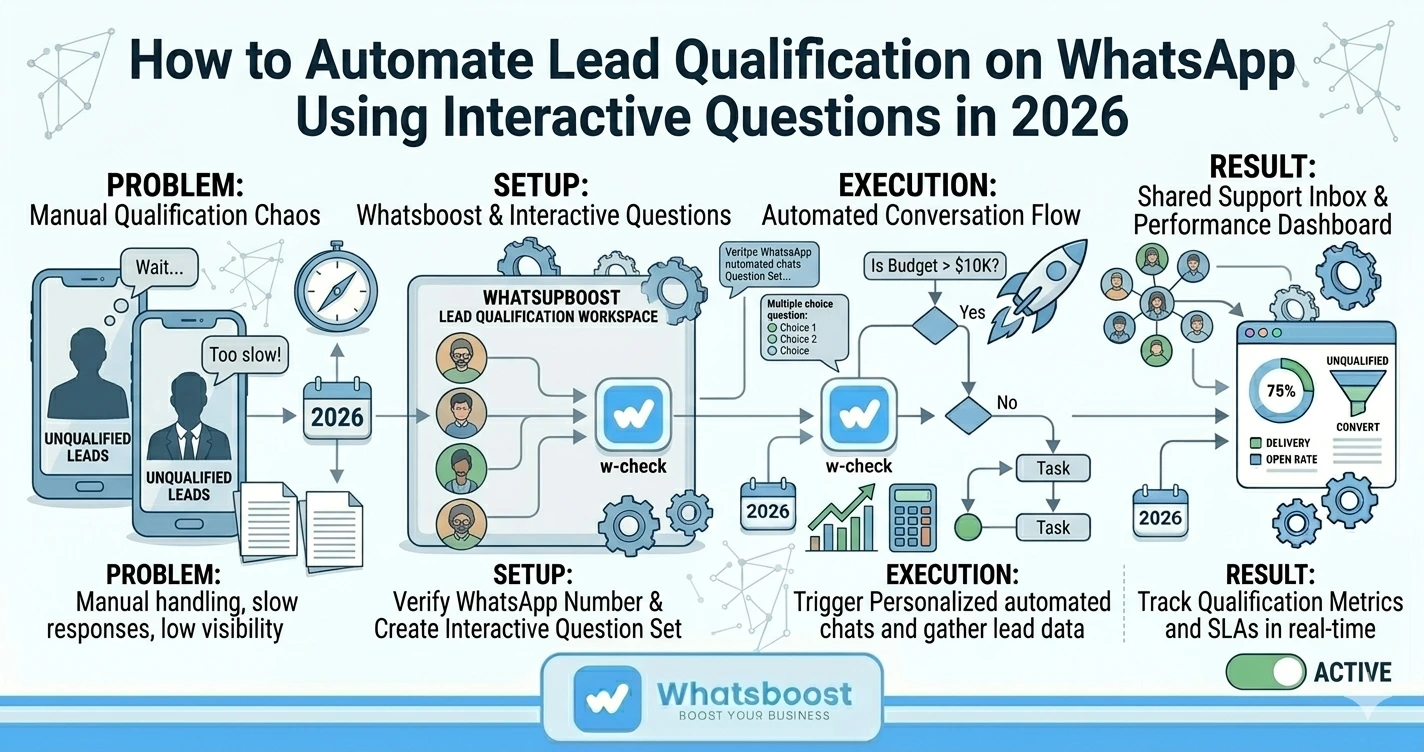
A prospect submits a Facebook Lead Ad form or clicks a WhatsApp link on your website. Within seconds, they receive a personalised WhatsApp message from your business — addressing them by name and opening with a single, low-friction question relevant to their specific interest.
Based on their response, the next question is triggered automatically — not a fixed menu of options, but a contextually relevant follow-up that builds on what they just shared. Over three to five exchanges, the lead has revealed their budget range, timeline, specific need, and decision-making authority — without ever feeling like they are being assessed.
At the end of the flow, two things happen simultaneously. The lead's qualification data is automatically captured and logged — in your CRM, a Google Sheet, or a ClickUp task via Whatsboost's webhook integrations. And based on their qualification score, the lead is routed automatically — high-intent leads to a senior sales agent's WhatsApp inbox, lower-intent leads to a nurture sequence.
Building Your WhatsApp Lead Qualification Flow: Step by Step
Step 1: Define Your Qualification Criteria
Before building any WhatsApp automation, be precise about what makes a lead qualified for your business. Most Indian sales teams qualify on four dimensions:
Budget — Does the lead have the financial capacity to purchase your product or service? Need — Does the lead have a genuine, current need that your offering addresses? Timeline — Is the lead looking to make a decision within a timeframe that makes them a viable near-term opportunity? Authority — Is the lead the decision-maker, or are they an influencer who needs to involve someone else?
These four criteria — often called BANT — form the backbone of your interactive question flow. Each question in your WhatsApp sequence should be designed to elicit one of these four data points clearly and conversationally.
Step 2: Design Your Interactive Question Sequence in Whatsboost
Whatsboost's no-code workflow builder lets you create multi-step WhatsApp conversation flows with conditional branching. Here is how to structure a five-question lead qualification flow:
Question 1 — Need Assessment "Hi [Name], thanks for your interest in [Product/Service]. To make sure we can help you in the best way, could you tell us — what is the main challenge you are trying to solve?"
This open question reveals genuine need and gives the lead a chance to express themselves before any structured options are presented.
Question 2 — Budget Range "Thanks for sharing that. To match you with the right solution, which budget range best describes your current investment capacity?" — Followed by three to four tap-to-reply options covering your actual pricing tiers.
Interactive button options here are critical. They reduce friction, increase response rates, and deliver structured data your automation can act on immediately.
Question 3 — Timeline "When are you looking to get started?" — Options: "Within the next 2 weeks," "1–3 months," "3–6 months," "Just researching for now."
Timeline data segments your leads between hot, warm, and cold — determining whether they route to a sales agent or enter a nurture sequence.
Question 4 — Authority "Are you the primary decision-maker for this, or will others be involved in the process?" — Options: "Yes, I decide," "Joint decision," "I need to check with my team."
This question is often skipped in manual qualification and consistently reveals leads that need a different follow-up approach — such as stakeholder-specific content or a team demonstration rather than an individual consultation.
Question 5 — Preferred Next Step "Based on what you have shared, would you like to: Book a 15-minute call with our team / Receive more information via WhatsApp / Speak to someone right now?"
This final question converts the qualification flow into an immediate action — while simultaneously revealing the lead's preferred engagement style.
Step 3: Configure Conditional Routing Based on Responses
Within Whatsboost's workflow builder, set up conditional branches that trigger different outcomes based on how a lead answers each question:
- Lead indicates budget within range + timeline within 3 months + is decision-maker → Route to senior sales agent WhatsApp notification, log as "Hot Lead" in CRM
- Lead indicates budget within range + timeline 3–6 months → Add to WhatsApp nurture sequence, log as "Warm Lead"
- Lead indicates budget below range or timeline beyond 6 months → Send helpful content, add to long-term nurture, log as "Cold Lead"
Visit Whatsboost.in to see how the no-code conditional branching builder works in practice.
Step 4: Integrate With Your CRM and Sales Tools
Use Whatsboost's webhook support to push qualified lead data — name, number, qualification responses, lead score — to your CRM, Google Sheets, or ClickUp automatically at the end of each qualification flow. The sales rep who receives the hot lead notification already has a complete qualification brief before making their first contact.
Step 5: Build a Nurture Sequence for Non-Qualified Leads
Not every lead that enters your qualification flow will be ready to convert. Configure Whatsboost to automatically enrol non-qualified leads in a scheduled WhatsApp follow-up sequence — delivering relevant content, case studies, or offers at timed intervals that re-engage leads when their circumstances change.
Best Practices for WhatsApp Lead Qualification With Interactive Questions
Keep each question focused on one data point. Multi-part questions on WhatsApp reduce response rates significantly. One clear question per message, with tap-to-reply options where possible, delivers the highest completion rates.
Use natural, conversational language throughout. The qualification flow should read like a helpful intake conversation — not a survey. Leads who feel understood are more likely to complete the flow and more likely to convert.
Set a maximum of five questions. Research consistently shows that qualification flows beyond five questions see significant drop-off on mobile. Five well-designed questions can capture all the BANT data you need while respecting the lead's time and attention.
Always offer a human escalation option. Some leads want to skip the questions and speak to someone immediately. Include an "I'd prefer to speak to someone now" option at every stage — and make sure that path routes directly to a live agent in Whatsboost's shared team inbox.
Stop Qualifying Leads Manually — Start Qualifying Them Intelligently
In 2026, the Indian sales teams closing the most deals are not necessarily the largest or the best-funded — they are the ones whose systems ensure that every rep invests their time exclusively in leads worth investing in.
Automating lead qualification on WhatsApp using interactive questions, built on Whatsboost, gives your business that system. Every lead that reaches your sales team has already answered your qualification questions, revealed their intent, and been scored automatically — so your team can focus entirely on converting, not qualifying.
Visit Whatsboost.in and build your automated WhatsApp lead qualification flow today.
Want to automate WhatsApp for your business?
Set up campaigns, replies, and follow-ups in minutes.