
The WhatsApp Automation Stack for a One-Person Digital Marketing Agency How Solopreneurs Handle Client Work Without Drowning in Messages
Learn how solo digital marketers, freelancers, and consultants use WhatsApp automation, AI workflows, CRMs, and n8n to manage clients, leads, follow-ups, reporting, and task management without hiring a large team.
Most digital marketers don't start with a team.
They start alone.
One laptop.
A few clients.
And a lot of WhatsApp messages.
At first, it feels manageable.
Then more clients arrive.
More leads come in.
More projects start.
And suddenly...
Your entire day is spent replying to messages.
❌ Client follow-ups
❌ Lead enquiries
❌ Project updates
❌ Payment reminders
❌ Content approvals
❌ Meeting scheduling
❌ Team coordination with freelancers
Instead of doing marketing work...
You're managing conversations.
This is where many freelancers and solopreneurs hit a growth ceiling.
Not because they lack skills.
But because communication starts consuming all their time.
That's why smart agency owners are building WhatsApp automation systems.
Because scaling a business doesn't always require more employees.
Sometimes it requires better workflows.
👉 The goal is simple:
Spend less time managing messages and more time delivering results.
Why Most Solo Agencies Get Stuck
A typical freelancer or one-person agency handles:
- Lead generation
- Sales calls
- Client onboarding
- Project delivery
- Reporting
- Invoicing
- Customer support
All alone.
As client volume increases...
Communication becomes the bottleneck.
Common Problems Solopreneurs Face
| Problem | What Happens |
| Too many WhatsApp messages | Important conversations get missed |
| Manual follow-ups | Leads go cold |
| No client tracking system | Work becomes disorganized |
| Repetitive questions | Time gets wasted |
| Payment delays | Cash flow suffers |
| Multiple tools | Information becomes scattered |
Eventually...
The business feels busy but not scalable.
Why WhatsApp Becomes the Center of Operations
Most clients prefer WhatsApp.
They send:
- Questions
- Approvals
- Feedback
- Meeting requests
- Payment confirmations
- Project discussions
Which means WhatsApp becomes the operational hub.
The challenge?
Managing it efficiently.
This is why many businesses are moving toward structured WhatsApp workflows.
Related reading:
- How to Run a 5-Person Business Like a 50-Person Team Using WhatsApp Automation
- Your Customers Are Ghosting Emails and Calls — Why WhatsApp Follow-Ups Work
The same principles help freelancers scale too.
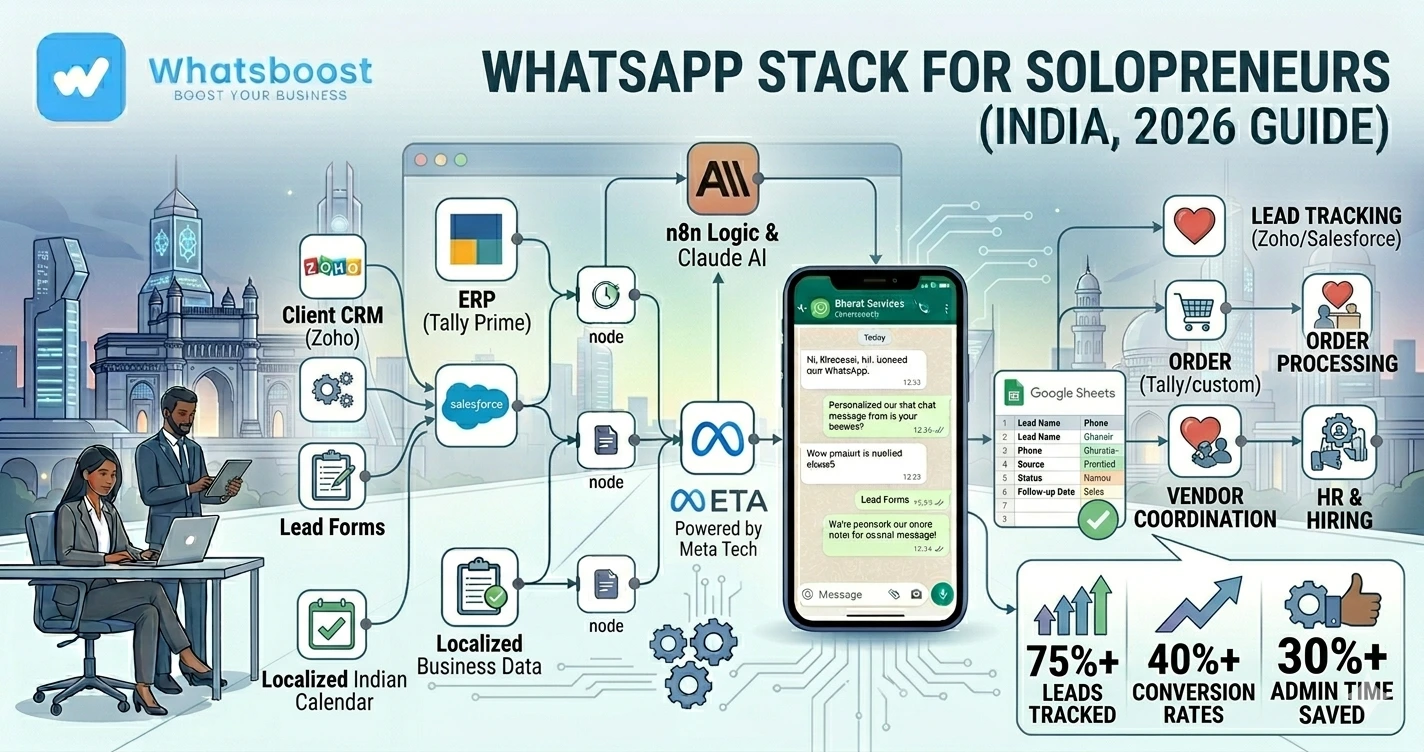
The Ideal WhatsApp Automation Stack for Solopreneurs
A modern one-person agency often uses:
WhatsApp + CRM + AI + Automation + Google Sheets
Together these tools create a virtual operations team.
Core Component #1: WhatsApp for Client Communication
WhatsApp becomes the primary communication layer.
Used for:
✔ Client onboarding
✔ Project updates
✔ Approvals
✔ Support
✔ Reporting
✔ Follow-ups
Instead of jumping between multiple platforms...
Everything stays centralized.
Core Component #2: CRM for Client Tracking
One of the biggest mistakes freelancers make:
Tracking everything in memory.
As clients increase...
That becomes impossible.
A CRM helps track:
- Leads
- Active clients
- Proposal status
- Follow-up history
- Project progress
Related reading:
- How to Integrate CRM With WhatsApp for Automation
- Best Platforms to Track Conversations and Deal Progress
Core Component #3: Automated Lead Management
Most freelancers lose leads because follow-ups stop.
Example workflow:
Lead Enquiry → WhatsApp Auto Reply → Lead Qualification → CRM Entry → Follow-Up Sequence Starts
No lead gets forgotten.
This is similar to the systems discussed in:
- How Indian Businesses Use WhatsApp Lead Qualification to Improve CRM Conversion Rates
- How to Build a WhatsApp Lead Tracking System Using Claude AI and Google Sheets
Core Component #4: Google Sheets as an Operations Dashboard
Many solopreneurs don't need expensive software initially.
Google Sheets can manage:
✔ Leads
✔ Clients
✔ Content calendars
✔ Reporting
✔ Tasks
✔ Revenue tracking
When connected with WhatsApp automation...
The system becomes surprisingly powerful.
Related reading:
- Free Google Sheets to WhatsApp Group Messaging Automations
- How to Automate WhatsApp Replies From Google Forms
Core Component #5: AI for Client Communication
AI can handle repetitive tasks that normally consume hours every week.
Examples:
- Answering FAQs
- Qualifying leads
- Sending onboarding information
- Scheduling appointments
- Providing status updates
This reduces response workload dramatically.
Related blogs:
- Building an AI WhatsApp Coach Using Claude AI and n8n
- How to Integrate Gemini With WhatsApp
- WhatsApp + n8n + Claude Automation Ideas
Core Component #6: n8n for Workflow Automation
n8n connects everything together.
Example workflow:
New Lead → CRM Updated → WhatsApp Message Sent → Google Sheet Updated → Task Created
Without manual work.
This creates a scalable business infrastructure.
Related reading:
- n8n WhatsApp Integration Without API
- Multi-Client Automation Management Using n8n Self Hosted Infrastructure
- How to Turn Your Make.com Scenario into a WhatsApp Notification Machine
Real Solopreneur Workflow Example
New Client Acquisition Workflow
Lead Enquiry → Auto Reply Sent → Discovery Call Scheduled → Proposal Shared → Client Onboarded → Project Tracker Created → Weekly Updates Automated
Everything flows automatically.
Client Onboarding Automation
Most freelancers repeat the same onboarding process.
Again and again.
Automation can instantly send:
✔ Welcome message
✔ Project timeline
✔ Required information checklist
✔ Payment details
✔ Communication guidelines
This creates a professional experience.
Automated Project Updates
Clients often ask:
- "Any updates?"
- "What's the status?"
- "When will this be completed?"
Instead of replying manually every time...
Automation can send:
Weekly progress updates.
Automatically.
This improves client satisfaction significantly.
Payment Reminder Automation
One of the most frustrating parts of freelancing:
Chasing payments.
Automation can send:
✔ Invoice reminders
✔ Due date notifications
✔ Overdue payment alerts
Without awkward manual follow-ups.
Related reading:
- How to Send Payment Reminders on WhatsApp Automatically
- Best Payment Reminder Automation for B2B Exporters
Task Management Through WhatsApp
As projects increase...
Tasks become harder to track.
Automation can trigger:
- Client task alerts
- Internal reminders
- Freelancer notifications
- Deadline updates
Related blogs:
- Why Businesses Need Smarter Task Follow-Up Systems
- Task Delegation on WhatsApp
- Automated Employee Alerts via WhatsApp
Even solo businesses benefit from these systems.
Before vs After WhatsApp Automation
| Before Automation | After Automation |
| Manual follow-ups | Automated workflows |
| Lost leads | Structured lead tracking |
| Repetitive onboarding | Automated onboarding |
| Payment chasing | Reminder automation |
| Disorganized communication | Centralized operations |
Advanced Automation Ideas for Solopreneurs
1. Content Approval Automation
Client receives:
- Draft content
- Approval request
- Reminder if no response
Automatically.
2. Meeting Scheduling Automation
Clients can:
✔ Book calls
✔ Reschedule meetings
✔ Receive reminders
Without manual coordination.
3. Lead Scoring System
AI automatically identifies:
- Hot leads
- Warm leads
- Low-priority leads
Based on responses.
4. Client Retention Campaigns
Past clients receive:
- Service updates
- Case studies
- Upsell offers
- Follow-up campaigns
Automatically.
Why Solopreneurs Are Adopting Automation Faster Than Ever
The goal is no longer:
"Work harder."
The goal is:
"Build systems."
Modern freelancers want:
✔ More clients
✔ Less admin work
✔ Better organization
✔ Faster response times
✔ Higher profitability
Automation helps achieve all of these.
The Complete One-Person Agency Automation Stack
A practical stack looks like this:
| Tool | Purpose |
| Client communication | |
| WhatsBoost | Automation workflows |
| CRM | Lead & client management |
| Google Sheets | Operations dashboard |
| n8n | Workflow automation |
| Claude AI | Client support & lead qualification |
| Google Forms | Data collection |
Together they create a scalable operating system for a one-person business.
How WhatsBoost Helps Solopreneurs Scale
WhatsBoost helps freelancers and solo agencies automate:
✔ Lead qualification
✔ Client onboarding
✔ Follow-ups
✔ Payment reminders
✔ Task notifications
✔ Reporting workflows
✔ Client communication
Using:
- WhatsApp automation
- CRM integrations
- AI workflows
- Google Sheets automation
- n8n workflows
A one-person business can operate like a much larger team.
Final Conclusion
Most solopreneurs don't struggle because of a lack of clients.
They struggle because communication becomes overwhelming.
As business grows:
❌ Messages increase
❌ Follow-ups get missed
❌ Tasks become scattered
❌ Administrative work consumes valuable time
That's why successful freelancers are increasingly building automation systems around WhatsApp.
Using WhatsApp, AI, CRMs, Google Sheets, and tools like n8n...
A one-person agency can manage leads, clients, projects, payments, and reporting without drowning in messages.
👉 The future is: WhatsApp + AI + Automation = Scalable Business Operations 🚀
Want to automate WhatsApp for your business?
Set up campaigns, replies, and follow-ups in minutes.