

WhatsApp Group Ticketing System: Managing Customer Issues Efficiently with WhatsApp Automation
Learn how a WhatsApp Group Ticketing System helps businesses manage customer issues efficiently. Discover how WhatsApp Automation with Whatsboost improves support workflows and response times.
Customer support expectations have changed dramatically in the last few years. Customers no longer want to send emails or fill out long support forms—they prefer quick conversations on messaging platforms like WhatsApp.
For many businesses, WhatsApp Groups have become an informal support channel where customers raise issues, ask questions, and request assistance.
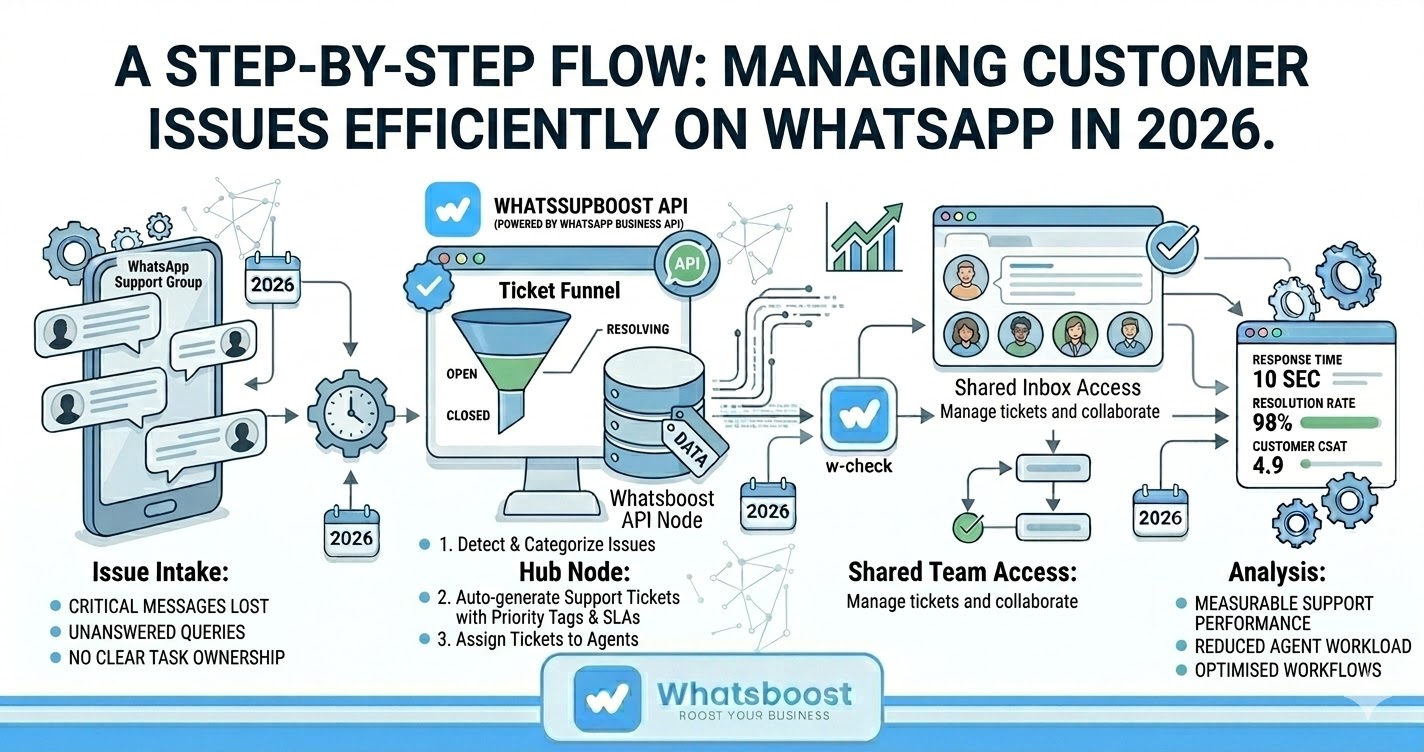
However, when multiple customers and team members interact in the same group, problems quickly appear:
Important messages get lost in conversations
Customer issues go unanswered
Multiple team members respond to the same query
No clear ownership of tasks
Support performance becomes difficult to measure
This is where a WhatsApp Group Ticketing System becomes essential. Instead of chaotic conversations, businesses can convert WhatsApp messages into structured tickets and manage them efficiently through automation and team workflows.
Why Businesses Struggle to Manage Customer Issues on WhatsApp Groups
WhatsApp is convenient for customers, but managing support inside group chats can quickly become overwhelming.
Without a structured ticketing workflow, businesses often face several operational challenges.
1. Missed Customer Queries
In active WhatsApp Groups, dozens of messages can appear within minutes. Critical support requests can easily get buried under unrelated conversations.
2. Lack of Accountability
When multiple team members are part of a group, it becomes unclear who is responsible for resolving a customer issue.
3. No Tracking or Status Updates
Traditional WhatsApp conversations lack structured tracking. Teams cannot easily monitor whether an issue is pending, in progress, or resolved.
4. Inefficient Team Collaboration
Support agents often need to switch between WhatsApp, CRM systems, and internal dashboards to coordinate responses.
Without a ticketing structure, customer support becomes reactive instead of organized.
What Is a WhatsApp Group Ticketing System?
A WhatsApp Group Ticketing System converts messages from WhatsApp Groups into structured tickets that support teams can track, assign, and resolve.
Instead of treating conversations as random chat messages, each support request becomes a manageable task.
Typical ticketing features include:
Automatic ticket creation from WhatsApp messages
Ticket assignment to specific team members
Priority tagging and labels
Resolution tracking
Status updates and notifications
When WhatsApp messages are converted into tickets, support teams gain a structured workflow similar to traditional helpdesk systems. Helpdesk integrations ensure customer requests can be tracked and managed systematically so that no issue is left unresolved.
How WhatsApp Automation Improves Support Ticket Management
Adding WhatsApp Automation to a ticketing system significantly improves efficiency and response times.
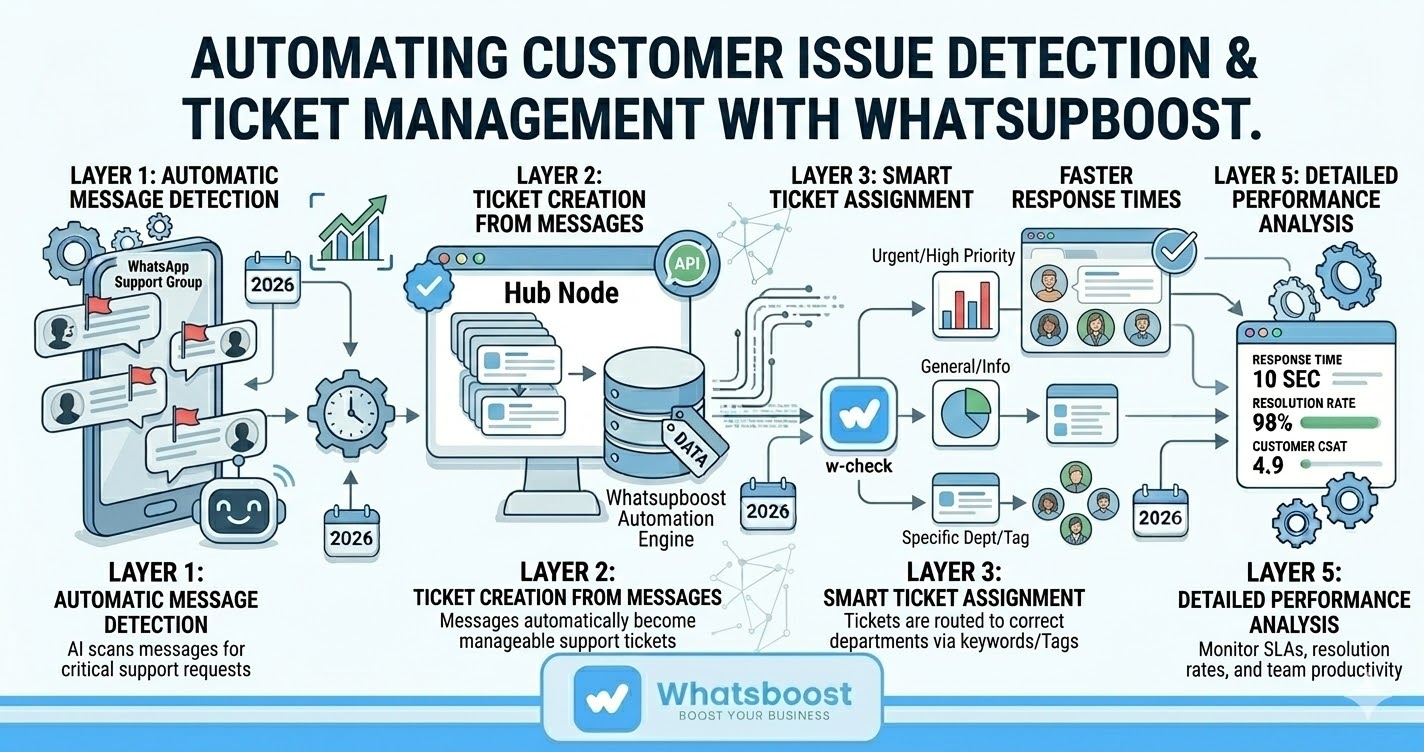
Automation allows businesses to detect, categorize, and assign customer issues automatically.
Automatic Message Detection
Automation tools can analyze incoming messages and identify questions, complaints, or requests that require support action.
Ticket Creation from Messages
Instead of manually logging issues, the system automatically converts WhatsApp messages into support tickets.
Smart Ticket Assignment
Tickets can be routed to the correct department based on keywords or issue type.
Faster Response Times
WhatsApp messaging enables real-time support interactions, which helps customers receive faster responses compared to traditional email-based helpdesks.
Reduced Support Workload
Automation handles repetitive tasks and allows support agents to focus on complex issues that require human attention.
The result is a more organized, responsive, and scalable support system.
Key Features of an Effective WhatsApp Group Ticketing System
To manage customer issues efficiently, businesses should look for several core capabilities in a ticketing platform.
AI-Based Query Detection
Advanced systems automatically identify actionable customer messages within group chats and flag them for support teams.
Structured Ticket Creation
Support agents should be able to convert messages into tickets quickly with details such as:
Priority
Assignee
Labels
Due date
Emoji-Based Ticket Creation
Some systems allow agents to create tickets directly inside WhatsApp using reactions or labels, reducing the need to switch between platforms.
CRM and Helpdesk Integration
Tickets can be synchronized with CRM systems such as Zoho, HubSpot, or Freshdesk to maintain centralized customer records.
Shared Team Inbox
A shared workspace allows multiple agents to collaborate without overlapping responses.
These features transform WhatsApp from a simple messaging app into a structured customer support platform.
How Whatsboost Helps Manage Customer Issues Efficiently
Businesses looking to implement a WhatsApp Group Ticketing System can use platforms like Whatsboost to automate and organize support workflows.
Whatsboost is designed specifically for teams managing customer conversations at scale.
AI-Powered Message Detection
Whatsboost automatically identifies customer queries inside WhatsApp Groups and flags them as actionable tickets.
Instant Ticket Creation
Agents can convert WhatsApp messages into support tickets directly from the dashboard.
Emoji-Based Ticketing
Team members can react to a message with a predefined emoji to instantly create a ticket without leaving WhatsApp.
CRM Integration
Whatsboost allows tickets to sync with CRM and helpdesk platforms such as HubSpot or Zoho, ensuring centralized customer data.
Performance Tracking
Support managers can measure response times, resolution rates, and team productivity.
You can explore more about these features at
https://whatsboost.in
Business Benefits of a WhatsApp Group Ticketing System
Implementing structured ticketing workflows inside WhatsApp Groups delivers several strategic advantages.
Faster Issue Resolution
Customer requests are instantly converted into tickets and assigned to the right agent.
Better Customer Experience
Customers receive timely responses and status updates for their issues.
Improved Team Productivity
Support teams spend less time searching through chats and more time solving problems.
Clear Accountability
Each ticket has a clear owner responsible for resolving the issue.
Scalable Support Operations
Businesses can manage growing volumes of customer inquiries without chaos.
In high-growth environments where WhatsApp is the primary communication channel, a ticketing system becomes essential for maintaining service quality.
Want to automate WhatsApp for your business?
Set up campaigns, replies, and follow-ups in minutes.