AI WhatsApp Auto Responders vs Traditional Chatbots: What Businesses Should Choose
A practical look at why traditional rule-based chatbots frustrate Indian buyers, and how modern AI-driven WhatsApp responders help local businesses scale their customer operations without losing the human touch.
If you run a growing business in India—whether it’s a real estate agency in Gurgaon, a manufacturing unit in Surat, a clinic, or a B2B distribution network—your biggest headache isn't getting leads. It's managing them before they go cold.
When you run Meta ads, leads land in your WhatsApp inbox at 11:00 PM. But your sales team goes home at 7:00 PM. By 9:00 AM the next morning, that prospect has already messaged three of your competitors.
To fix this, businesses try to automate. But they usually get stuck choosing between two completely different tools: Traditional Rule-Based Chatbots and AI WhatsApp Auto Responders.
Choosing the wrong one doesn't just waste money; it actively annoys your customers and drives them away. Let’s break down the practical differences so you can make the right call for your operations.
The Core Difference: "Press 1" vs Natural Conversation
To understand which tool fits your business, you have to look at how they handle a real customer message.
1. Traditional Chatbots (The Rigid Menu)
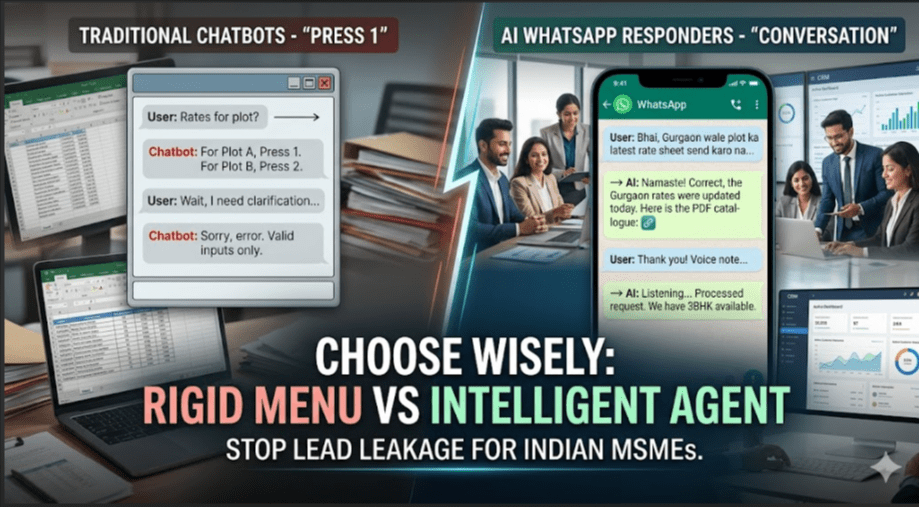
Traditional chatbots work like an old-school phone banking menu. They rely on "if-this-then-that" logic. They force your customer to click specific buttons or type exact words like "Price" or "Catalog."
If a customer types anything unexpected, the chatbot gets confused and gets stuck in a loop, repeating: "Sorry, I didn't get that. Please press 1 for Sales or 2 for Support."
2. AI WhatsApp Auto Responders (The Intelligent Assistant)
AI Auto Responders don't look for exact keyword matches. They read and understand the intent behind a message, even if it's full of typos, written as a long paragraph, or sent as a voice note.
Instead of forcing the customer into a strict menu, the AI reads their question, checks your business document or product list, and replies instantly with the exact answer they need.
Real-World Comparison: How They Handle Daily Business Tasks
| Business Need | Traditional Chatbots (Rule-Based) | AI WhatsApp Auto Responders (AI Agents) |
| Handling Hinglish | Fails frequently. Cannot parse mixed language or casual text. | Succeeds. Understands the context of mixed languages perfectly. |
| Answering FAQs | Only answers if the question matches an exact keyword you pre-programmed. | Answers any question based on your company's product sheets or FAQs. |
| Setting Up | Complex. You have to manually map out every single conversation path and button. | Simple. You train it by giving it your catalog, price list, and basic rules. |
| When It Doesn't Know | Repeats an error message or drops the conversation completely. | Summarizes the issue and hands it over smoothly to your live team. |
Why Traditional Chatbots Struggle with Indian Customers
Western software is built for customers who type short, grammatically correct sentences. The Indian market operates entirely differently.
[Traditional Chatbot]
Customer: "Bhai, rate sheet send karo na" ──> Doesn't match "Price" ──> "Error: Please press 1 or 2"

[AI Auto Responder]
Customer: "Bhai, rate sheet send karo na" ──> Understands intent ──> Pulls pricing PDF ──> Sends instantly
1. The "Hinglish" Barrier
An Indian buyer rarely messages a business in formal English. A typical message sent to a real estate firm or B2B supplier looks like this:
"Bhai, structural layouts share karo aur price kya h plot ka?"
The Chatbot Problem: Because the customer didn't click a button or type the exact word "Brochure," the chatbot breaks. The customer feels ignored and closes the chat.
The AI Solution: The AI understands exactly what the customer wants—a layout map and a price. It automatically pulls the correct document from your system and replies politely in the same tone.
2. "Menu Fatigue"
Nobody likes clicking through five layers of buttons just to get a simple answer. If a distributor wants to know if a specific item is in stock, or a patient wants to check if a doctor is available on Saturday, they want to type it and get an answer. Forcing them to navigate a deep menu feels like being trapped in an automated customer care call.
Go Deeper: If you want to see how to bypass these rigid menus entirely using intelligent workflows, read our step-by-step guide on
. How to Set Up WhatsApp Automation for Your Business
Decision Matrix: What Should Your Business Choose?
You don't always need complex AI, but you do need the right tool for the job. Here is a simple framework to help you decide.
Choose Traditional Chatbots If:
Your Process is 100% Predictable: If you are running an e-commerce store where people only check their order status or initiate a return, simple buttons work perfectly.
You Need Strict Data Collection: If you just want to collect a phone number, an email, or a binary choice (e.g., "Are you looking for a 2BHK or a 3BHK?"), buttons keep the data clean and uncorrupted.
Choose AI WhatsApp Auto Responders If:
You Do Consultative Selling: If you are a coach, consultant, high-end agency, or clinic where customers ask highly specific, open-ended questions before buying.
You Need 24/7 Lead Qualification: If you spend thousands on ads and want an automated system to talk to late-night leads, answer their technical questions, and book a meeting directly onto your sales team’s calendar before they wake up.
Your Prices or Inventory Change Often: Instead of rebuilding a massive chatbot tree every time you change your rates, you just update a single central document, and the AI learns the new information instantly.
Operational Insight: If your business receives a heavy volume of inquiries daily from platforms like IndiaMART or local directories, managing them manually is impossible. See how to route these automatically in our guide on
. IndiaMART WhatsApp CRM Integration and Lead Qualification
The Best of Both Worlds: The Hybrid Setup
For most mid-sized businesses, the absolute best setup is a combination of both, running on an official WhatsApp Business API:
The Welcome Buttons: When a customer first messages, give them 2 or 3 quick buttons to segment them ("New Inquiry", "Existing Client", "Support").
The AI Assistant: If they select "New Inquiry" or type a custom question, the AI takes over to converse, answer FAQs, and qualify the lead.
The Human Hand-off: The moment the AI detects that the customer is a hot prospect ready to buy, or if they ask something too complex, it instantly stops automating and alerts your sales team via a shared live chat inbox.
This keeps your operations smooth, prevents your team from burning out on repetitive FAQs, and ensures you never lose a hot lead to a competitor again.
Next Step: Ready to fix your team's lead leakage problem? Explore how our centralized
brings your conversations, team tracking, and automation into a single dashboard. WhatsBoost WhatsApp CRM Tool
Want to automate WhatsApp for your business?
Set up campaigns, replies, and follow-ups in minutes.