End-to-End Enterprise Automation Services for Businesses.
A practical guide explaining how mid-sized businesses can connect their disconnected tools into a single automated workflow to save time and reduce errors.
If you run a growing business in India—whether you are managing a real estate firm, a manufacturing plant, a B2B distribution network, or a busy medical clinic—you already know that growth brings chaos.
When you start out, managing everything manually is easy. But as your daily orders or leads scale from 10 to 100, things begin to break. Your sales team forgets to follow up with hot prospects, your warehouse doesn't know what orders are paid for, your accounts team is drowning in manual billing reconciliations, and your personal WhatsApp is flooded with unread messages.
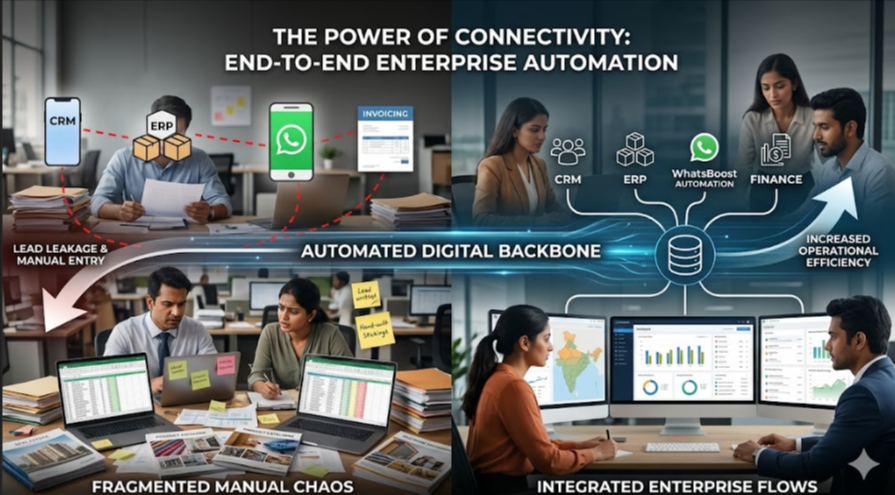
Most business owners try to fix this by buying five different software tools. But now you have a new problem: none of these tools talk to each other. Your team spends hours copy-pasting data from one screen to another.
True end-to-end automation fixes this completely. It connects all your separate software apps together so your business can run smoothly on its own, without needing constant manual data entry.
How Complete Automation Works Across Your Business
Instead of thinking of automation as a complex technical setup, look at how it simplifies a single customer's journey across your different departments:
[Step 1: Sales] Lead lands from an ad ──> Automatically logged into your CRM database
                                                      │
                                                      ▼
[Step 2: Communication] Welcome message sent ──> Customer books a meeting automatically
                                                      │
                                                      ▼
[Step 3: Finance] Deal is marked "Won" ──> Invoice and payment link generated instantly
                                                      │
                                                      ▼
[Step 4: Operations] Payment cleared ──> Dispatch team alerted & tracking link sent to client
1. The Entry Point (Saving the Data)
When a new customer fills out a form on your website, Facebook ads, or local business directories, no one should have to download an Excel sheet. The system should automatically capture the name, phone number, and requirements, and immediately save it securely inside your central database.
2. The Communication Trigger (Talking to the Client)
The second the data is saved, the system tells your messaging channel to act. It instantly fires a personalized message to the customer. For instance, you can automatically send a welcome note with your pricing or catalog to start qualifying them immediately before they lose interest and check out a competitor.
3. The Backend Connection (Updating the Books and Dispatch)
When a customer decides to buy, your sales rep changes their status to "Deal Closed" inside the system. Instead of your rep calling the accounts team to make an invoice, the system automatically talks to your billing software, creates the payment link, sends it to the customer, and alerts the packing team to prepare the order for dispatch the moment the payment is cleared.
Daily Operations: Manual Chaos vs Automated Freedom
Let’s look at how your daily business operations change when your systems are fully connected.
| Business Task | The Old, Manual Way | The Modern, Automated Way |
| Handling New Leads | Team downloads Excel sheets once a day, manually assigns them to reps, and calls them late. | Leads hit your system instantly, triggering automatic qualification sequences to sort serious buyers. |
| Order Status Updates | Customers call your team to ask where their order is; your staff calls the warehouse to check. | Changing the order status in your system automatically sends a WhatsApp update with a live tracking link. |
| Chasing Payments | Accounts team spends days looking at bank statements and calling clients for outstanding bills. | System checks due dates and automatically sends polite payment reminders with a direct payment link. |
| Team Hand-offs | Sales team has to email or message the operations team manually to start working on a closed deal. | Marking a deal as "Closed" automatically assigns tasks to your operations team inside their dashboard. |
Real-World Examples in Indian Industries
Here is how local businesses use smart setups to save time and stop losing revenue.
1. Real Estate & Property Developers
When someone shows interest in a property, they want details immediately. A connected system logs the lead, checks which of your sales executives is free, and sends the customer a WhatsApp containing an interactive calendar. The moment the client picks a time, the slot is locked, the executive is notified, and a confirmation message with the exact office location map is sent directly to the customer.
2. Manufacturing & Distribution Setup
When a dealer or retailer places an bulk order, manual checks create massive delays. With automation, the second an order is logged, the system checks your live warehouse stock. If the items are ready, it automatically creates a tax invoice, alerts the transport team, and loops the customer into the tracking cycle so your staff doesn't waste hours answering status calls.
3. Training, Coaching, and Clinics
No-shows are a major revenue drain. When a student or patient registers, the system sets up an automatic reminder chain. They receive a reminder notice the day before, a final confirmation button a few hours early, and their digital reports or course materials sent straight to them after the session ends—all without a human clicking a single button.
How to Start Automating Your Business Safely
You do not need to rewrite your entire operational structure overnight. The safest way to upgrade your business is to do it in simple, logical stages:
Find the Copy-Paste Bottlenecks: Sit down with your team and list the tasks where they spend hours manually typing the same data from one app into another. Fix these areas first.
Centralize Your Customer Chats: Move your team away from personal mobile phones and bring your communication into a single dashboard. You can read our detailed guide on
how to set up WhatsApp automation for your business Link Your Main Tools: Use simple workflow platforms like n8n or Zapier to build direct bridges between your primary lead sources and your internal CRM. If you get a lot of inquiries from third-party portals, check out our walkthrough on
setting up an IndiaMART WhatsApp CRM integration Test and Expand: Run your new automated flow alongside your old manual process for a few days to make sure everything works perfectly before turning off the manual sheets entirely.
Want to automate WhatsApp for your business?
Set up campaigns, replies, and follow-ups in minutes.