
How to Turn WhatsApp Messages Into Tasks Automatically in Hive in 2026 | Whatsboost
Learn how to turn WhatsApp messages into tasks automatically in Hive in 2026. Discover step-by-step workflows, practical setup tips, and how Whatsboost helps Indian teams connect WhatsApp to Hive project management for seamless task automation.
How to Turn WhatsApp Messages Into Tasks Automatically in Hive in 2026
Indian project teams that use Hive for project management face a challenge that every modern service business recognises: clients and colleagues communicate on WhatsApp, but the work gets done in Hive. The two systems operate in parallel — one flowing with real-time conversational instructions and the other tracking structured, accountable task delivery — with a human bridge between them that is both time-consuming and unreliable.
A client sends a revision request on WhatsApp. A team member flags a blocker in a WhatsApp group. A manager sends a voice note with sprint instructions. Each of these messages contains a clear, actionable task — but unless someone manually creates it in Hive, it does not exist in the system that tracks delivery, assigns ownership, and measures completion. And in a busy working day, "manually creating it in Hive" gets repeatedly deferred until the task is forgotten entirely.
In 2026, automating the conversion of WhatsApp messages into Hive tasks eliminates this dependency completely. This blog explains how to build this automation — and how Whatsboost provides the WhatsApp Business API layer that makes the connection between WhatsApp communication and Hive project management seamless, real-time, and reliable.
Why the WhatsApp to Hive Gap Costs Indian Teams More Than They Realise
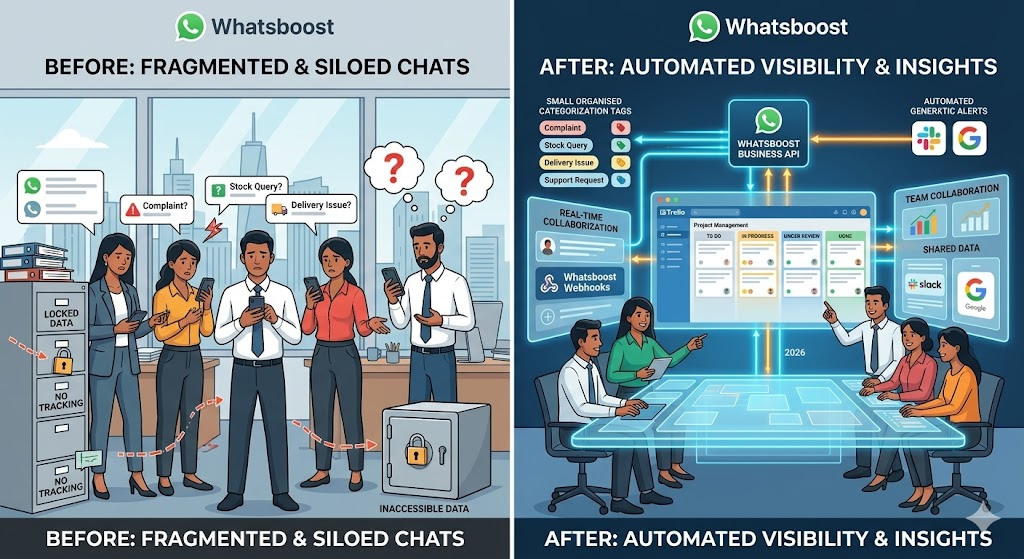
The cost of the gap between WhatsApp communication and Hive task management is not always visible on a project report — but it is consistently felt in delivery outcomes. Understanding the specific ways this gap creates operational damage is the clearest argument for automating the bridge between them.
Missed deliverables from undocumented instructions. When a client's WhatsApp instruction does not become a Hive task, there is no assignee, no deadline, and no accountability. The instruction exists only in the memory of whoever read the message — and human memory, under the pressure of a full project schedule, is not a reliable delivery system.
No audit trail for scope and timeline disputes. When change requests and additional instructions arrive via WhatsApp and are never formally documented in Hive, the project has no structured record of what was requested, when, and by whom. This absence of documentation is consistently the root cause of scope disputes and delayed payment conversations between Indian agencies and their clients.
Team members working from incomplete information. When some tasks are in Hive and others are buried in WhatsApp threads, team members have an incomplete picture of everything that needs to be done. They prioritise based on what they can see — which means WhatsApp-only tasks are perpetually at the bottom of the pile.
Whatsboost solves this by connecting the WhatsApp Business API to Hive through a real-time automation pipeline — ensuring every qualifying WhatsApp message becomes a structured Hive task the moment it arrives. Visit Whatsboost.in to explore the platform.
How WhatsApp to Hive Task Automation Works
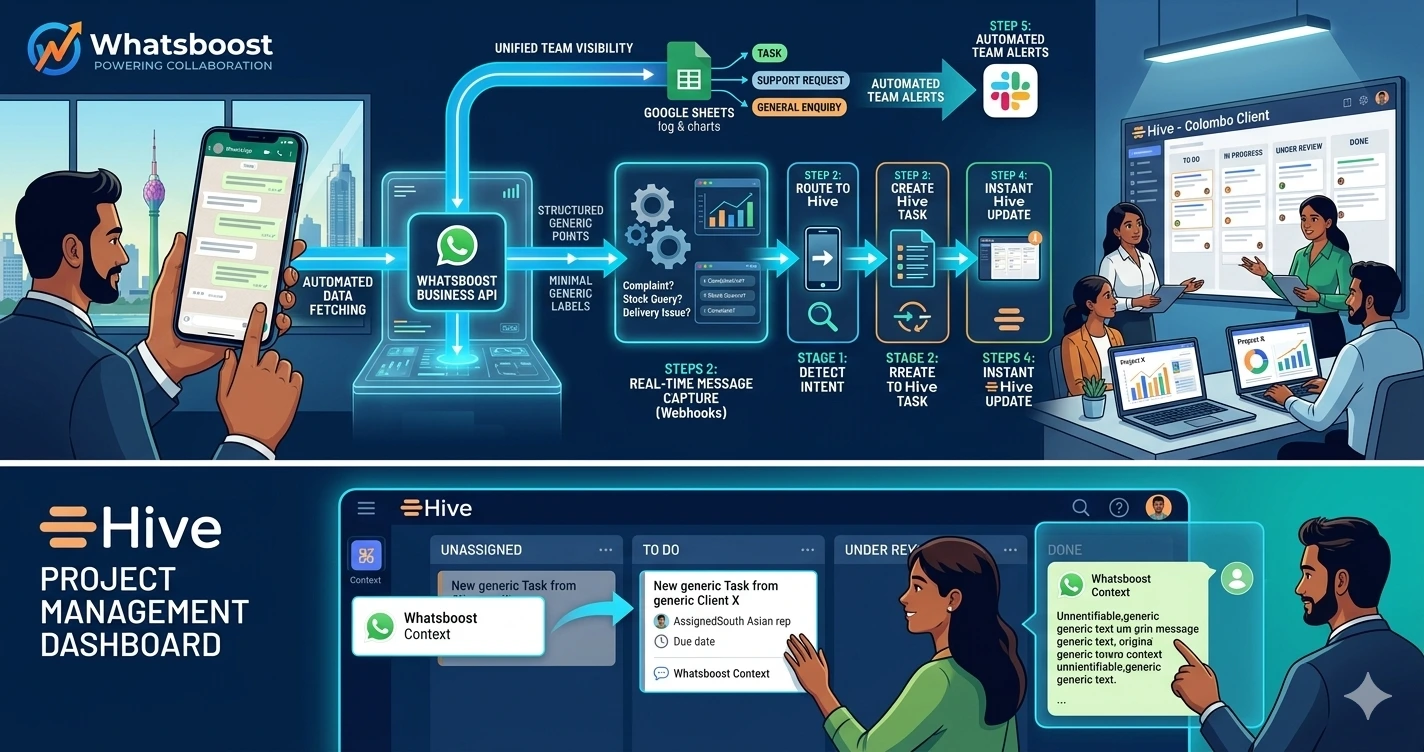
The automation runs on three connected components: Whatsboost's WhatsApp Business API capturing every incoming message and firing a structured webhook, an automation platform processing the webhook and applying task creation logic, and Hive's API receiving the task data and creating the task in the correct project.
When a qualifying WhatsApp message arrives — identified by a keyword, a conversation label, or a sender category — Whatsboost fires a webhook payload containing the sender details, message content, timestamp, and conversation metadata. The automation platform receives this payload, extracts the task data, identifies the correct Hive project based on the client or conversation context, and creates a new Hive action card — pre-populated with the message content, the sender as the requester, a calculated due date, and the appropriate project assignee.
The original WhatsApp sender receives an automatic acknowledgement confirming their message has been actioned. The assigned team member receives a WhatsApp notification that a new Hive task has been created from a client message — with a direct link to the action card. The entire sequence takes under 30 seconds from message receipt to Hive task creation.
Building the WhatsApp to Hive Task Automation With Whatsboost
Step 1: Activate WhatsApp Business API via Whatsboost
The WhatsApp Business API is the non-negotiable foundation. Whatsboost is an authorised WhatsApp Business Solution Provider that activates your API with guided onboarding — giving your team the webhook infrastructure that connects WhatsApp to Hive in real time. Start at Whatsboost.in.
Step 2: Set Up Whatsboost Shared Team Inbox and Conversation Labels
Centralise all WhatsApp client and team communication in Whatsboost's shared team inbox. Configure conversation labels that classify the type of action each message requires — "Change Request," "New Task," "Approval," "Bug Report," "Urgent Action" — and set up keyword auto-detection rules that suggest or apply these labels automatically when trigger phrases are detected in incoming messages.
These labels become the routing mechanism for your Hive task creation automation — determining which Hive project the task is created in, what priority level it receives, and which team member is assigned to it.
Step 3: Connect Whatsboost to Hive via Zapier or Make
Hive integrates with Zapier and Make through its native API — enabling external triggers to create action cards in any Hive project workspace. In your automation platform, build the following workflow:
Trigger — Whatsboost webhook fires when a conversation label matching your task trigger list is applied to an incoming WhatsApp message.
Action 1 — Parse the webhook payload — Extract the message content, sender name, phone number, conversation label, and timestamp from the Whatsboost webhook data.
Action 2 — Identify the Hive project — Use the conversation label or client identifier to map the incoming message to the correct Hive project workspace. A message from Client A routes to Client A's project. A message labelled "Bug Report" routes to the development project. A message from the operations team routes to the internal operations project.
Action 3 — Create the Hive action card — In Hive, create a new action card with the conversation label as the task category, the message content as the action card description, the sender's name in the requester field, the default assignee based on project assignment rules, and a due date calculated from the task category's standard timeline.
Action 4 — Attach WhatsApp context — Add the full original WhatsApp message, sender contact details, and conversation thread link as a note on the Hive action card — preserving complete context for the assigned team member without requiring them to search through WhatsApp for the original instruction.
Action 5 — Send dual WhatsApp notifications — Trigger Whatsboost to send two WhatsApp messages simultaneously: an acknowledgement to the original sender confirming their request has been logged as a Hive task with a reference number, and a task alert to the assigned team member with the task summary and a direct link to the Hive action card.
Step 4: Configure Hive Status Changes to Trigger WhatsApp Updates
Close the loop by setting up reverse notifications — Hive action card status changes triggering WhatsApp messages via Whatsboost to the original requester. When a task moves from "In Progress" to "Complete," Whatsboost sends the client or colleague who originally raised the request a WhatsApp confirmation — including what was done and any relevant delivery notes.
For Indian agencies managing multiple client projects simultaneously, this completion notification eliminates the need for project managers to send individual WhatsApp updates for every delivered task — saving significant daily communication time while maintaining a high-quality client experience. Visit Whatsboost.in for reverse notification configuration details.
Step 5: Build a Priority Escalation Layer for Urgent WhatsApp Messages
Configure Whatsboost's keyword detection to identify urgency signals in incoming WhatsApp messages — "urgent," "ASAP," "critical," "by today," "immediately" — and apply an "Urgent Action" label that triggers a modified task creation workflow: the Hive action card is created with a same-day due date and a "Critical" priority flag, and a simultaneous WhatsApp alert is sent to the team lead rather than just the standard assignee.
This urgency escalation layer ensures that time-sensitive client instructions are never treated as standard tasks — they surface immediately in Hive with the correct priority and reach the right decision-maker on WhatsApp within seconds of the original message.
Hive Features That Make WhatsApp Integration Particularly Valuable
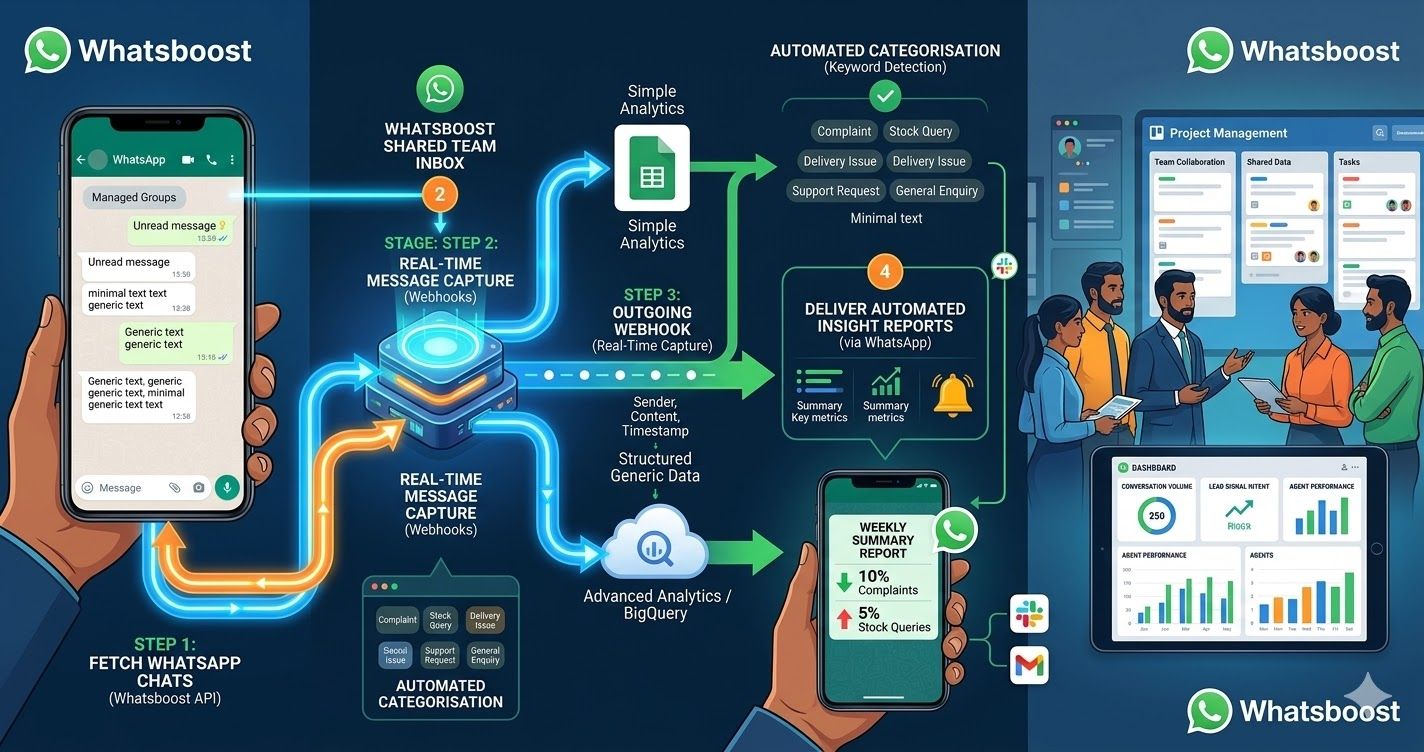
Hive's project management structure — with its flexible action card system, project timeline views, workload management, and team member assignments — is especially well-suited to receiving WhatsApp-generated tasks because of how naturally the WhatsApp message context maps to Hive's action card fields.
The description field on a Hive action card can hold the complete WhatsApp message text with full formatting. The assignee field maps directly to the team member responsible for the relevant project area. The due date field accepts calculated dates from the task creation automation. And Hive's commenting system provides a permanent home for the original WhatsApp conversation context — keeping the full instruction visible alongside the task progress without requiring the team member to leave Hive to find it.
For Indian teams that have already invested in Hive as their project management platform, this structural compatibility means the WhatsApp to Hive automation requires minimal workflow redesign — it enhances the existing Hive system rather than replacing any part of it.
Best Practices for WhatsApp to Hive Task Automation
Start with one client or project before scaling to all. The most common implementation mistake is activating the automation across all clients and projects simultaneously. Begin with your most active client account or your highest-priority project, validate that the task creation, routing, and notification workflows all function correctly, and then scale to additional clients and projects progressively.
Align Hive project naming with Whatsboost conversation labels. The routing logic that maps WhatsApp conversations to Hive projects is most reliable when Hive project names and Whatsboost conversation labels use consistent naming conventions. A Whatsboost label of "Client X — Design" should map to a Hive project named "Client X — Design" without any ambiguity in the automation platform's routing logic.
Review Hive action cards created from WhatsApp messages in the daily standup. Incorporate WhatsApp-generated Hive tasks into your team's daily standup review — ensuring every auto-created task is acknowledged, accurately prioritised, and assigned to the correct team member before work begins. This daily review catches any routing errors or missing context before they affect delivery.
Hive Tracks What Gets Done — WhatsApp Is Where It Gets Requested
In 2026, Indian project teams that have automated the bridge between WhatsApp and Hive operate with a delivery accountability and project visibility that manually managed WhatsApp communication simply cannot provide. Every instruction is documented. Every task is assigned. Every completion is confirmed. And every team member works from a complete, accurate Hive workspace that reflects all client and internal instructions — not just the ones someone remembered to manually log.
With Whatsboost connecting your WhatsApp Business API to Hive in real time, this operational standard is achievable for any Indian project team — without a developer, without complex infrastructure, and without asking your clients to change how they communicate.
Visit Whatsboost.in and start turning every WhatsApp message into a tracked Hive task automatically today.
Want to automate WhatsApp for your business?
Set up campaigns, replies, and follow-ups in minutes.