
How Event Photographers Are Using WhatsApp Automation to Deliver Previews, Collect Approvals, and Upsell Albums
Learn how event photographers use WhatsApp automation to deliver photo previews, collect client approvals, automate follow-ups, manage bookings, and increase album sales using AI and workflow automation.
Most photographers think their job ends after the event.
In reality...
That's when the communication work begins.
After every wedding, corporate event, birthday party, or engagement shoot, photographers spend hours managing:
❌ Client follow-ups
❌ Preview delivery
❌ Photo selection approvals
❌ Album discussions
❌ Payment reminders
❌ Revision requests
❌ Upselling premium packages
And when multiple projects are running at the same time...
Things quickly become overwhelming.
Many photography businesses lose revenue not because of poor photography.
But because post-event communication is completely manual.
That's why event photographers are increasingly adopting WhatsApp automation.
Because the faster and smoother the client experience becomes...
The easier it is to close approvals, increase referrals, and sell premium albums.
👉 Modern photography businesses are no longer just delivering photos.
They are delivering a complete customer journey.
Why Manual Photography Workflows Break Down
A typical photography project includes:
- Lead enquiry
- Consultation
- Booking confirmation
- Event coverage
- Preview sharing
- Client selections
- Editing approvals
- Album delivery
- Upselling
When handled manually...
Communication becomes the bottleneck.
Common Problems Photographers Face
| Problem | What Happens |
| Delayed preview delivery | Client excitement drops |
| Approval confusion | Editing timelines get delayed |
| Lost follow-ups | Upsell opportunities disappear |
| Manual reminders | Hours wasted every week |
| Multiple client chats | Important messages get missed |
As client volume increases...
The chaos grows.
Why WhatsApp Is Perfect for Photography Businesses
Most clients already use WhatsApp every day.
Which means:
✔ Faster responses
✔ Easier approvals
✔ Better engagement
✔ Quick file sharing
✔ Higher upsell opportunities
Compared to email:
❌ Lower open rates
❌ Delayed responses
❌ Longer approval cycles
WhatsApp keeps the client engaged throughout the project.
This is similar to why businesses increasingly use WhatsApp for customer communication.
Related reading:
- Your Customers Are Ghosting Emails and Calls — Why WhatsApp Follow-Ups Work
- How to Run a 5-Person Business Like a 50-Person Team Using WhatsApp Automation
The Complete Photography Automation Workflow
A modern workflow often looks like:
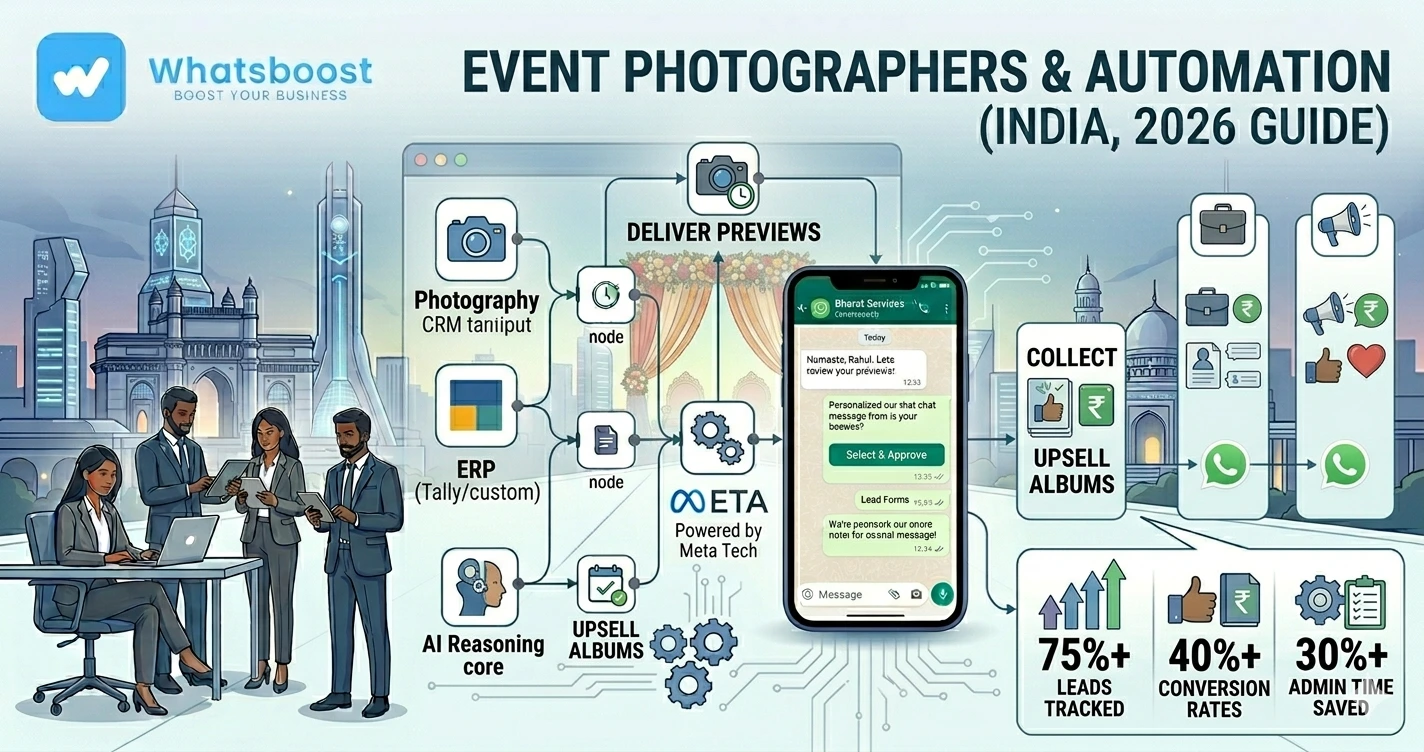
Lead Enquiry → Booking Confirmation → Event Completed → Preview Delivered → Client Selects Favorites → Editing Approved → Album Upsell Triggered → Final Delivery
Most of this process can be automated.
Step 1: Automate Lead Enquiries
Many photographers receive enquiries through:
- Website forms
- Google Business Profile
- Referrals
Instead of manually responding...
WhatsApp automation can instantly send:
✔ Package details
✔ Pricing guides
✔ Portfolio links
✔ Consultation booking links
Example workflow:
New Lead → Auto Reply Sent → Lead Qualification → Consultation Scheduled
Related blogs:
- How Indian Businesses Use WhatsApp Lead Qualification to Improve CRM Conversion Rates
- How to Build a WhatsApp Lead Tracking System Using Claude AI and Google Sheets
Step 2: Automate Client Onboarding
After booking confirmation...
Clients usually ask:
- What happens next?
- What is the timeline?
- When will photos be delivered?
Automation can instantly send:
✔ Welcome message
✔ Timeline details
✔ Payment schedule
✔ Event checklist
✔ Communication process
This creates a more professional client experience.
Step 3: Deliver Photo Previews Automatically
One of the most important moments after an event is preview delivery.
Clients are excited.
They want to see photos quickly.
Instead of manually sending updates...
Automation can trigger:
Event Completed → Preview Gallery Ready → WhatsApp Notification Sent
Example:
"Hi Sarah 👋
Your wedding preview gallery is ready.
Click below to view your highlights."
This keeps engagement high.
Step 4: Collect Photo Selection Approvals
Many photographers spend days chasing clients for selections.
Example:
"Which photos would you like in the album?"
"Did you review the gallery?"
"Can you confirm your final selections?"
Automation can simplify this process.
Workflow:
Gallery Shared → Selection Reminder Sent → Approval Received → Editing Starts
This reduces delays significantly.
Step 5: Automate Editing Status Updates
Clients often ask:
- Have edits started?
- When will delivery happen?
- Is the album ready?
Instead of answering repeatedly...
Automated updates can be sent at key stages.
Example:
✔ Editing Started
✔ Editing Completed
✔ Album Design Ready
✔ Final Delivery Scheduled
This improves transparency.
Step 6: Upsell Premium Albums Automatically
This is where many photographers leave money on the table.
After clients receive previews...
Excitement is at its highest.
This is the perfect moment to introduce:
✔ Premium albums
✔ Additional prints
✔ Canvas packages
✔ Parent albums
✔ Extended photo collections
Automation can trigger upsell messages automatically.
Example workflow:
Gallery Viewed → Album Offer Sent → Client Interested → Consultation Scheduled
Real Photography Workflow Example
Wedding Photography Workflow
Wedding Booked → Client Onboarded → Event Completed → Preview Shared → Photo Selection Collected → Album Design Approved → Upsell Campaign Triggered → Final Delivery
This creates a structured client experience.
Using WhatsApp Flows for Client Approvals
WhatsApp Flows can simplify approval collection.
Clients can:
- Select favorite photos
- Confirm album preferences
- Choose print packages
- Approve designs
All inside WhatsApp.
No complicated email threads.
Related reading:
- How to Automate WhatsApp Replies From Google Forms
- What is Meta Coexistence
Using CRM Systems for Photography Businesses
As client numbers increase...
Tracking everything inside WhatsApp becomes difficult.
A CRM helps organize:
✔ Leads
✔ Active projects
✔ Payment status
✔ Approval progress
✔ Upsell opportunities
Related blogs:
- How to Integrate CRM With WhatsApp for Automation
- Best Platforms to Track Conversations and Deal Progress
How AI Helps Event Photographers
AI can automate many repetitive interactions.
Clients frequently ask:
- When will photos be ready?
- How do I select images?
- What album options are available?
- What is the delivery timeline?
AI can answer these instantly.
Related reading:
- Building an AI WhatsApp Coach Using Claude AI and n8n
- How to Integrate Gemini With WhatsApp
- WhatsApp + n8n + Claude Automation Ideas
Tools Commonly Used by Photography Businesses
| Tool | Purpose |
| WhatsApp API | Client communication |
| WhatsBoost | Workflow automation |
| CRM | Lead & project tracking |
| Google Sheets | Workflow management |
| n8n | Process automation |
| Claude AI | Client support automation |
| Google Drive | Gallery delivery |
Together these tools create a scalable photography workflow.
Before vs After WhatsApp Automation
| Before Automation | After Automation |
| Manual preview delivery | Automated notifications |
| Repeated approval requests | Structured approval workflows |
| Lost upsell opportunities | Automated album offers |
| Client confusion | Real-time updates |
| High administrative workload | Streamlined operations |
Advanced Automation Ideas for Photographers
1. Event Day Updates
Clients automatically receive:
✔ Coverage started notification
✔ Team arrival updates
✔ Event completion confirmation
2. Payment Reminder Automation
Payment collection can be automated.
Related reading:
- How to Send Payment Reminders on WhatsApp Automatically
- Best Payment Reminder Automation for B2B Exporters
3. Internal Team Notifications
Whenever:
- Client approves edits
- New booking arrives
- Payment is received
The team gets notified instantly.
Related blogs:
- Why Businesses Need Smarter Task Follow-Up Systems
- Task Delegation on WhatsApp
- Automated Employee Alerts via WhatsApp
4. Referral Campaign Automation
Happy clients can automatically receive:
✔ Referral offers
✔ Review requests
✔ Testimonial requests
after project completion.
Why Photography Businesses Are Embracing Automation
Photography is becoming more competitive every year.
Clients expect:
✔ Faster communication
✔ Faster delivery
✔ Better transparency
✔ Professional workflows
That's why photographers are increasingly adopting:
✔ WhatsApp automation
✔ CRM systems
✔ AI assistants
✔ Workflow automation
to improve both client experience and profitability.
How WhatsBoost Helps Event Photographers
WhatsBoost helps photography businesses automate:
✔ Lead management
✔ Client onboarding
✔ Preview delivery notifications
✔ Approval workflows
✔ Album upselling
✔ Payment reminders
✔ Client follow-ups
Using:
- WhatsApp automation
- CRM integrations
- AI workflows
- Google Sheets automation
- n8n workflows
Photographers can manage more projects without spending their day chasing clients.
Final Conclusion
Most photographers don't lose revenue because of photography quality.
They lose revenue because post-event communication becomes difficult to manage.
As project volume grows:
❌ Follow-ups get missed
❌ Approvals get delayed
❌ Album sales get lost
❌ Administrative work increases
That's why modern photography businesses are building automated WhatsApp workflows.
Using WhatsApp automation, AI assistants, CRM systems, Google Sheets, and tools like n8n...
Photographers can deliver previews faster, collect approvals more efficiently, and increase album sales without adding extra administrative work.
👉 The future is: WhatsApp + AI + Automation = Scalable Business Operations 🚀
Want to automate WhatsApp for your business?
Set up campaigns, replies, and follow-ups in minutes.