How to Design a Hinglish WhatsApp Chatbot That Understands How Indians Actually Type
Stop losing leads to rigid text-based bots. Learn how to architect an intuitive Hinglish WhatsApp chatbot that understands phonetic shortcuts, Hinglish slang, and real customer conversations.
If you’ve ever looked at live chat logs of Indian consumers talking to a standard WhatsApp bot, you know the exact moment things fall apart:
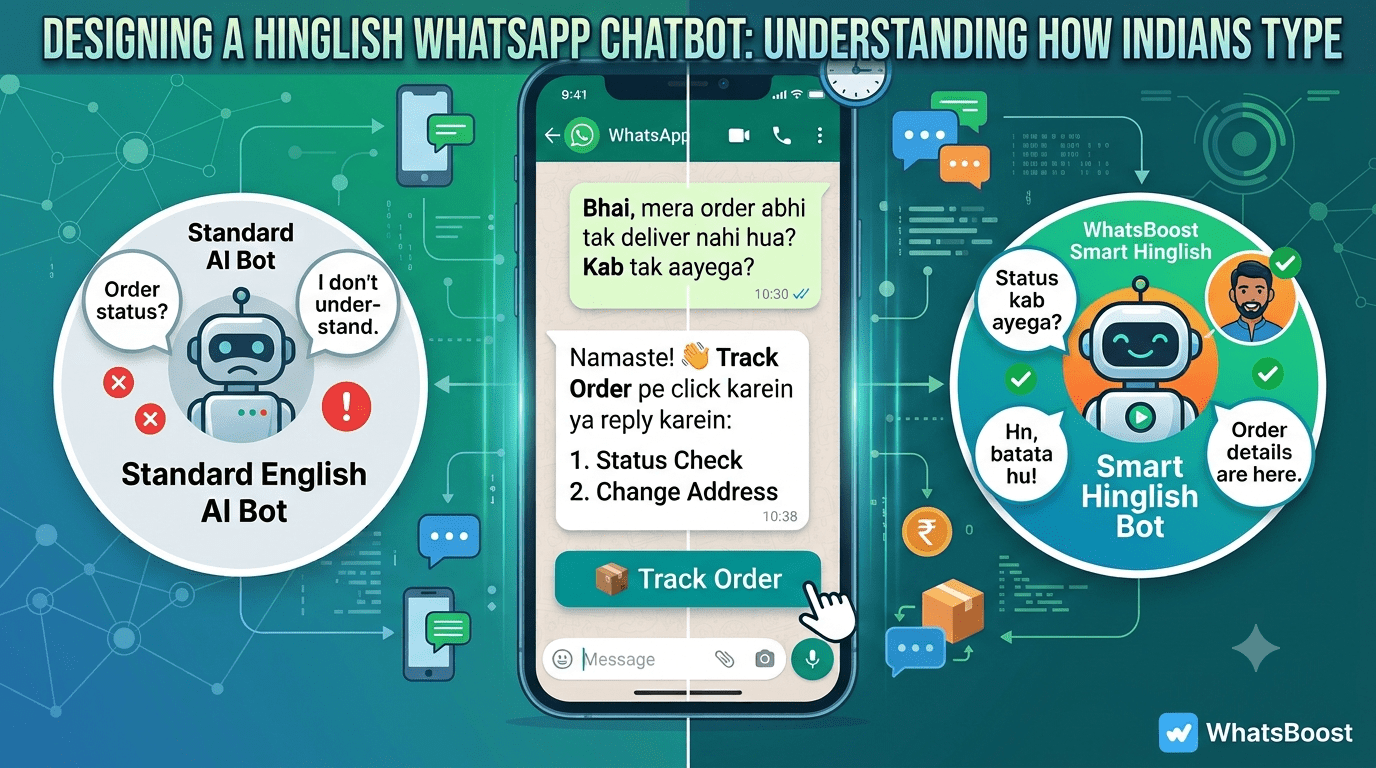
User: "Bhai, mera order abhi tak ship nahi hua? Kab tak aayega?"Standard Bot: "I’m sorry, I didn't get that. Please select an option: 1. Track Order 2. Contact Support"User: "Arey yaar... live agent se baat karao!"
Indian users don't communicate with brands using structured, textbook language. They type in Hinglish—a hybrid blend of Hindi words, English vocabulary, regional phonetics, and heavy texting shorthand (like "plz", "kya scene hai", or "chahiye").
When a standard NLU (Natural Language Understanding) model built for western markets meets Hinglish, standard intent recognition fails.
In this actionable guide, we’ll unpack how Hinglish text actually works, how to architect intent matching that doesn't drop leads, and how to build a intuitive Hinglish WhatsApp Chatbot using WhatsBoost without touching a single line of code.
1. The Anatomy of How Indians Type on WhatsApp
To build a chatbot that feels human, you first need to understand the linguistic patterns of Indian WhatsApp users:
A. Phonetic Spelling Variations
Unlike English, Hinglish has no standardized spelling dictionary. A user asking for price details might type:
- "Price kitna hai?"
- "Kitne ka h?"
- "Rate kya hai boss?"
B. Code-Switching Mid-Sentence
Indian buyers jump back and forth between languages in a single message:
- "Mera refund status check kardo, payment fail ho gaya tha."
C. Phonetic Shortcuts & Micro-Words
WhatsApp conversations thrive on brevity. Common shortcuts include:
- Hn / Ha / Haan = Yes
- Nahi / Nop / Ni = No
- Plz / Pls = Please
- Abhi / Urgently = Immediately
If your chatbot relies on rigid exact-string matching, it will trigger fallback errors 60–70% of the time.
2. Structural Framework: Hybrid Flow Design
The key to high conversion on WhatsApp in India isn't forcing AI to guess every sentence; it's using a Hybrid Chatbot Architecture.
                           [ User Sends Message ]
                                     │
                    ┌────────────────┴────────────────┐
                    ▼                                 ▼
         [ Interactive UX First ]           [ NLP Keyword Intent ]
        (Buttons / List Messages)          (Fallback NLU Engine)
                    │                                 │
                    └────────────────┬────────────────┘
                                     ▼
                        [ Instant Resolution / Handoff ]
Rule 1: Anchor with Interactive UI Elements
Don't make users type everything from scratch. Use WhatsApp Interactive Buttons (up to 3 option buttons) and List Menus (up to 10 options).
Example Welcome Greeting:"Namaste! 👋 Welcome to [Brand Name]. Aapki kaise help karu aaj?"🔘 [ Track Order 📦 ]🔘 [ Explore Catalog 🛒 ]🔘 [ Talk to Agent 🎧 ]
Rule 2: Train NLP Synonym Buckets for Free Text
When users do type custom text, your NLP model should classify inputs into core intent buckets using synonym mapping.
| Core Intent | English Keywords | Hinglish & Vernacular Variations |
| Price Inquiry | price, cost, rate, how much | kitna hai, kitne ka hai, price kya h, kitna padega, discount h kya |
| Order Tracking | track order, status, shipping | mera order kab aayega, delivery kab hogi, tracking link do, dispatch hua? |
| Support / Help | help, agent, representative | baat karni hai, calling number do, agent se connect karo, bhai help kardo |
3. Step-by-Step: Setting Up Hinglish Chatbots in WhatsBoost
With WhatsBoost's No-Code Drag-and-Drop Visual Flow Builder
┌─────────────────────────────────────────────────────────────────┐
│                    WhatsBoost Visual Builder                    │
├─────────────────────────────────────────────────────────────────┤
│ [ User Triggers: "bhai price" / "cost kya hai" ]                │
│                            │                                    │
│                            ▼                                    │
│ [ Match Intent Node: "Pricing_Inquiry" ]                        │
│                            │                                    │
│                            ▼                                    │
│ [ Interactive Response: "Humare Plans ₹999 se start hote hain!" ]│
│ ├── Button 1: [ Starter Plan ]                                  │
│ └── Button 2: [ Talk to Sales ]                                 │
└─────────────────────────────────────────────────────────────────┘
Step 1: Define Intent Triggers with Keyword Matching
Inside the WhatsBoost dashboard, navigate to AI Chatbot -> Intent Triggers. Add keyword variations for every common query, covering both standard English and Hinglish variations.
Step 2: Write Conversational Hinglish Copy
Keep your bot's personality friendly, empathetic, and clear. Avoid overly formal pure Hindi ("Kripya pratiksha karein") or stiff English ("Kindly hold while I retrieve details").
- Too Formal: "Aapki samasya darj kar li gayi hai."
- Too Stiff: "Your request has been logged successfully."
- Natural Hinglish (Recommended): "Got it! 👍 Aapki request log ho gayi hai. Humari team 15 mins me reply karegi."
Step 3: Implement Smart Fallback & Human Handoff
No bot understands 100% of colloquial queries. When your Hinglish bot hits a query it doesn't recognize, do not let it loop infinitely.
Set up a 2-Step Fallback Rule in WhatsBoost:
- First Attempt: "Samajh nahi aaya! Key options choose karein neeche se:" (Show Quick Reply Buttons).
- Second Attempt: Automatically tag the chat as
Needs Human Supportand assign it to a team member in the WhatsBoost Shared Multi-Device Inbox.
4. Best Practices for High-Converting Hinglish WhatsApp Bots
- Use Emojis Judiciously: Emojis help break up long text blocks and guide the eye across mixed Hinglish scripts (e.g., Order, Price, Call).
- Keep Messages Under 3 Sentences: WhatsApp is a fast-paced medium. Keep responses short, readable, and action-oriented.
- Integrate Real-Time Data: Connect your Hinglish chatbot directly to Google Sheets or your CRM via WhatsBoost Integrations.
That way, when a customer types "Status kya hai?", the bot pulls real-time order data automatically.
Ready to Automate Your WhatsApp Marketing?
Designing a Hinglish WhatsApp chatbot bridges the gap between customer expectations and automated convenience. When your business speaks the language your customers actually type, conversion rates go up and support costs drop.
Get started with WhatsBoost today: Build high-converting WhatsApp workflows, run bulk broadcasts, and manage customer inquiries with zero code and zero per-message conversation markup fees.
Advertisement
Want to automate WhatsApp for your business?
Set up campaigns, replies, and follow-ups in minutes.