
How Interior Designers and Architects Use WhatsApp Automation to Manage Client Projects Without Losing Context
Learn how interior designers and architects use WhatsApp automation to manage client communication, approvals, site updates, project tracking, vendor coordination, and follow-ups without losing important project context.
Most interior designers and architects don't struggle with design work.
They struggle with communication.
A typical project can last:
- 2 months
- 6 months
- Sometimes over a year
And during that period...
Hundreds of messages get exchanged.
Clients send ideas.
Designers send concepts.
Architects share drawings.
Vendors send updates.
Site teams ask questions.
Approvals happen across multiple conversations.
Eventually...
.Nobody remembers where a decision was made.
❌ Design approvals get buried in chats
❌ Clients ask for updates repeatedly
❌ Site teams miss instructions
❌ Vendor conversations become scattered
❌ Important files get lost
❌ Project timelines become difficult to track
The problem isn't the project.
The problem is communication fragmentation.
That's why more interior designers and architects are building WhatsApp automation systems.
Because successful projects require organized communication.
👉 The goal is simple:
Keep every stakeholder informed without creating communication chaos.
Why Project Communication Breaks Down
Most design businesses use:
- Phone calls
- Google Drive
- Excel sheets
- Site visits
Individually, these tools work.
But together...
Information becomes scattered.
A single project might involve:
- Homeowners
- Architects
- Interior designers
- Contractors
- Carpenters
- Electricians
- Vendors
- Project managers
Without a structured system...
Important decisions get lost.
Common Communication Problems in Design Projects
| Problem | What Happens |
| Multiple WhatsApp chats | Project information gets fragmented |
| Approval confusion | Work gets delayed |
| Missing updates | Clients become frustrated |
| Vendor miscommunication | Errors increase |
| No project tracking | Teams lose visibility |
As project size increases...
The communication challenge grows.
Why WhatsApp Has Become the Primary Project Communication Tool
Most clients prefer WhatsApp.
Instead of logging into project management software...
They simply send a message.
Typical client messages include:
- Design feedback
- Material approvals
- Budget questions
- Site update requests
- Timeline discussions
This makes WhatsApp the natural communication hub.
The challenge is managing it efficiently.
Related reading:
- How to Run a 5-Person Business Like a 50-Person Team Using WhatsApp Automation
- Your Customers Are Ghosting Emails and Calls — Why WhatsApp Follow-Ups Work
The same operational principles apply to project management.
How WhatsApp Automation Helps Interior Designers and Architects
Instead of manually managing every interaction...
Automation creates structure.
Example workflow:
Client Question → WhatsApp Response → CRM Updated → Task Assigned → Project Status Updated → Client Notification Sent
This keeps communication organized.
The Complete Project Management Workflow
A modern design workflow often looks like:
Lead Enquiry → Consultation → Proposal Approval → Project Kickoff → Design Review → Client Approval → Site Execution → Final Handover
Automation supports each stage.
Step 1: Automate Lead Qualification
Many interior designers receive enquiries through:
- Referrals
- Websites
- Property portals
Instead of manually collecting information...
Automation can ask:
✔ Project type
✔ Property size
✔ Budget range
✔ Location
✔ Timeline
This helps qualify leads faster.
Related blogs:
- How Indian Businesses Use WhatsApp Lead Qualification to Improve CRM Conversion Rates
- How to Build a WhatsApp Lead Tracking System Using Claude AI and Google Sheets
Step 2: Automate Client Onboarding
After a project is confirmed...
Clients usually need:
- Project timeline
- Communication process
- Documentation checklist
- Payment schedule
Automation can send this instantly.
This creates a professional onboarding experience.
Step 3: Centralize Design Approvals
One of the biggest causes of project delays:
Waiting for approvals.
Examples:
- Layout approvals
- Material approvals
- Furniture selections
- Color schemes
- Lighting plans
Automation can organize approval workflows.
Example:
Design Shared → Reminder Sent → Approval Received → Team Notified
This reduces project delays significantly.
Step 4: Automate Site Progress Updates
Clients constantly ask:
- What is the current status?
- Has installation started?
- Is painting completed?
- When is handover expected?
Instead of manually sending updates...
Automation can provide regular progress notifications.
Example:
Site Update Added → WhatsApp Update Sent → Client Acknowledges
This improves transparency.
Step 5: Manage Vendor Communication
Large projects involve multiple vendors.
Examples:
- Furniture suppliers
- Contractors
- Electricians
- Fabricators
- Flooring companies
Automation can trigger:
✔ Work reminders
✔ Material arrival alerts
✔ Deadline notifications
✔ Task assignments
This improves coordination dramatically.
Real Interior Design Workflow Example
Residential Project Workflow
Lead Enquiry → Consultation Scheduled → Proposal Approved → Design Concepts Shared → Client Approvals Collected → Site Work Starts → Progress Updates Sent → Project Delivered
Every stage can be tracked automatically.
Using CRM Systems to Preserve Context
The biggest challenge in long projects:
Remembering previous decisions.
A CRM helps maintain:
✔ Client conversations
✔ Approval history
✔ Project notes
✔ Meeting records
✔ Timeline updates
This prevents important information from getting lost.
Related reading:
- How to Integrate CRM With WhatsApp for Automation
- Best Platforms to Track Conversations and Deal Progress
Using WhatsApp Flows for Project Approvals
WhatsApp Flows simplify approvals.
Clients can:
- Review concepts
- Select options
- Confirm materials
- Approve changes
All inside WhatsApp.
No long email chains.
Related reading:
- How to Automate WhatsApp Replies From Google Forms
- What is Meta Coexistence
How AI Helps Interior Designers and Architects
AI can automate repetitive communication.
Examples:
Clients ask:
- What's the project status?
- When is the next milestone?
- Which materials were approved?
- What is the payment schedule?
AI can answer instantly.
This reduces administrative workload.
Related blogs:
- Building an AI WhatsApp Coach Using Claude AI and n8n
- How to Integrate Gemini With WhatsApp
- WhatsApp + n8n + Claude Automation Ideas
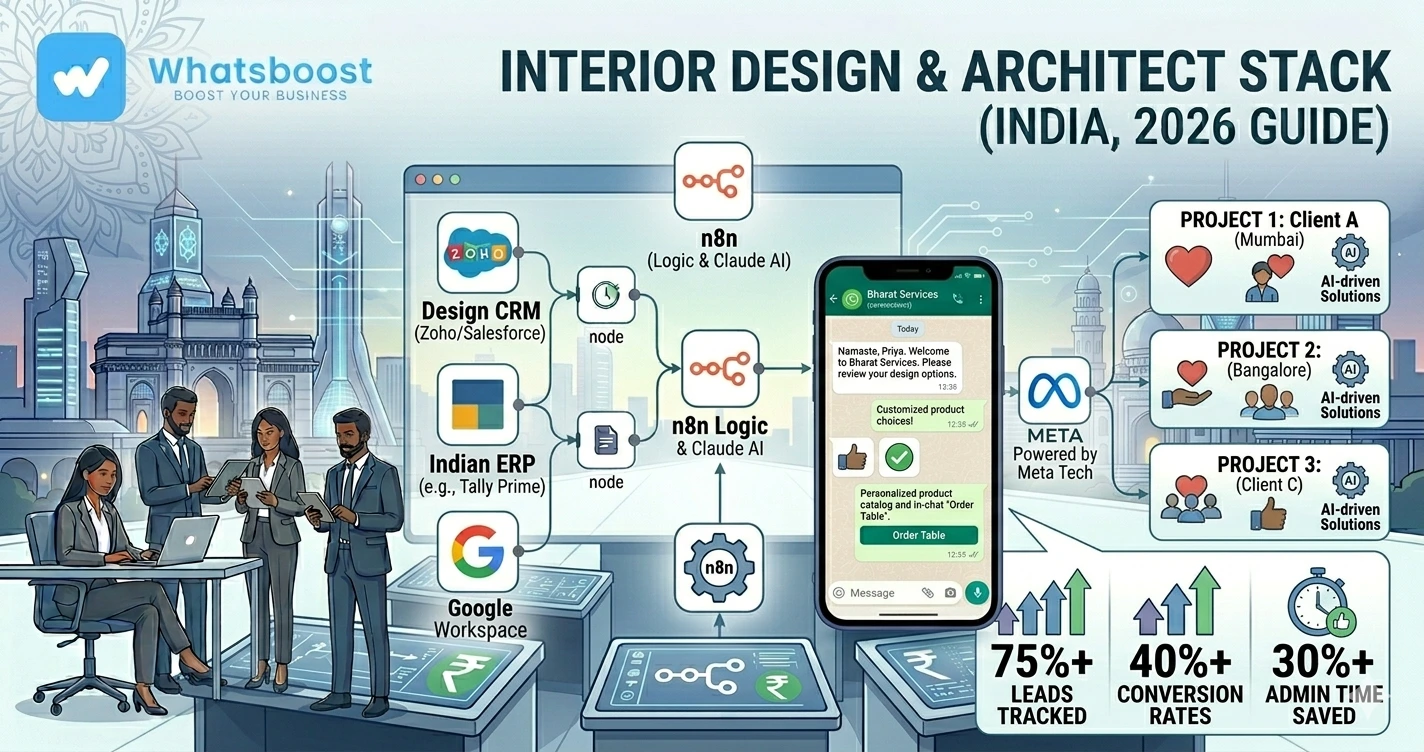
Tools Commonly Used by Design Businesses
| Tool | Purpose |
| WhatsApp API | Client communication |
| WhatsBoost | Workflow automation |
| CRM | Project management |
| Google Sheets | Tracking and reporting |
| n8n | Workflow automation |
| Claude AI | Communication assistance |
| Google Drive | File management |
Together these tools create a centralized project communication system.
Before vs After WhatsApp Automation
| Before Automation | After Automation |
| Scattered conversations | Centralized communication |
| Lost approvals | Structured approval workflows |
| Repeated client questions | Automated updates |
| Vendor coordination issues | Automated reminders |
| Context loss | Complete project visibility |
Advanced Automation Ideas for Architects and Designers
1. Material Approval Automation
Clients can review and approve:
✔ Tiles
✔ Furniture
✔ Paints
✔ Lighting
✔ Fixtures
through automated workflows.
2. Payment Reminder Automation
Project payments can be tied to milestones.
Automation sends reminders automatically.
Related reading:
- How to Send Payment Reminders on WhatsApp Automatically
- Best Payment Reminder Automation for B2B Exporters
3. Internal Team Notifications
Whenever:
- A design is approved
- A payment is received
- A task is completed
Relevant team members receive notifications instantly.
Related blogs:
- Why Businesses Need Smarter Task Follow-Up Systems
- Task Delegation on WhatsApp
- Automated Employee Alerts via WhatsApp
4. Handover and Testimonial Automation
After project completion:
Clients can automatically receive:
✔ Handover documentation
✔ Feedback requests
✔ Review requests
✔ Referral offers
Why Design Businesses Are Investing in Automation
Client expectations are increasing.
Projects are becoming more complex.
Communication volume is growing.
That's why successful firms increasingly use:
✔ WhatsApp automation
✔ CRM systems
✔ AI assistants
✔ Workflow automation
to improve project execution.
How WhatsBoost Helps Interior Designers and Architects
WhatsBoost helps automate:
✔ Client onboarding
✔ Design approvals
✔ Site updates
✔ Vendor coordination
✔ Payment reminders
✔ Client communication
✔ Project tracking
Using:
- WhatsApp automation
- CRM integrations
- AI workflows
- Google Sheets automation
- n8n workflows
Design businesses can manage more projects without losing important context.
Final Conclusion
Most interior designers and architects don't lose productivity because of design complexity.
They lose productivity because project communication becomes fragmented.
As projects grow:
❌ Context gets lost
❌ Approvals get delayed
❌ Vendors become misaligned
❌ Clients ask for constant updates
That's why modern design businesses are building structured WhatsApp automation systems.
Using WhatsApp, CRM integrations, AI assistants, Google Sheets, and tools like n8n...
Interior designers and architects can manage projects more efficiently while keeping every stakeholder informed.
👉 The future is: WhatsApp + AI + Automation = Scalable Business Operations 🚀
Want to automate WhatsApp for your business?
Set up campaigns, replies, and follow-ups in minutes.