
How to Automate WhatsApp Chat Data Collection for Team Collaboration in 2026 | Whatsboost
Learn how to automate WhatsApp chat data collection for team collaboration in 2026. Discover step-by-step workflows, setup tips, and how Whatsboost helps Indian businesses centralise WhatsApp conversations for better teamwork and decision-making.
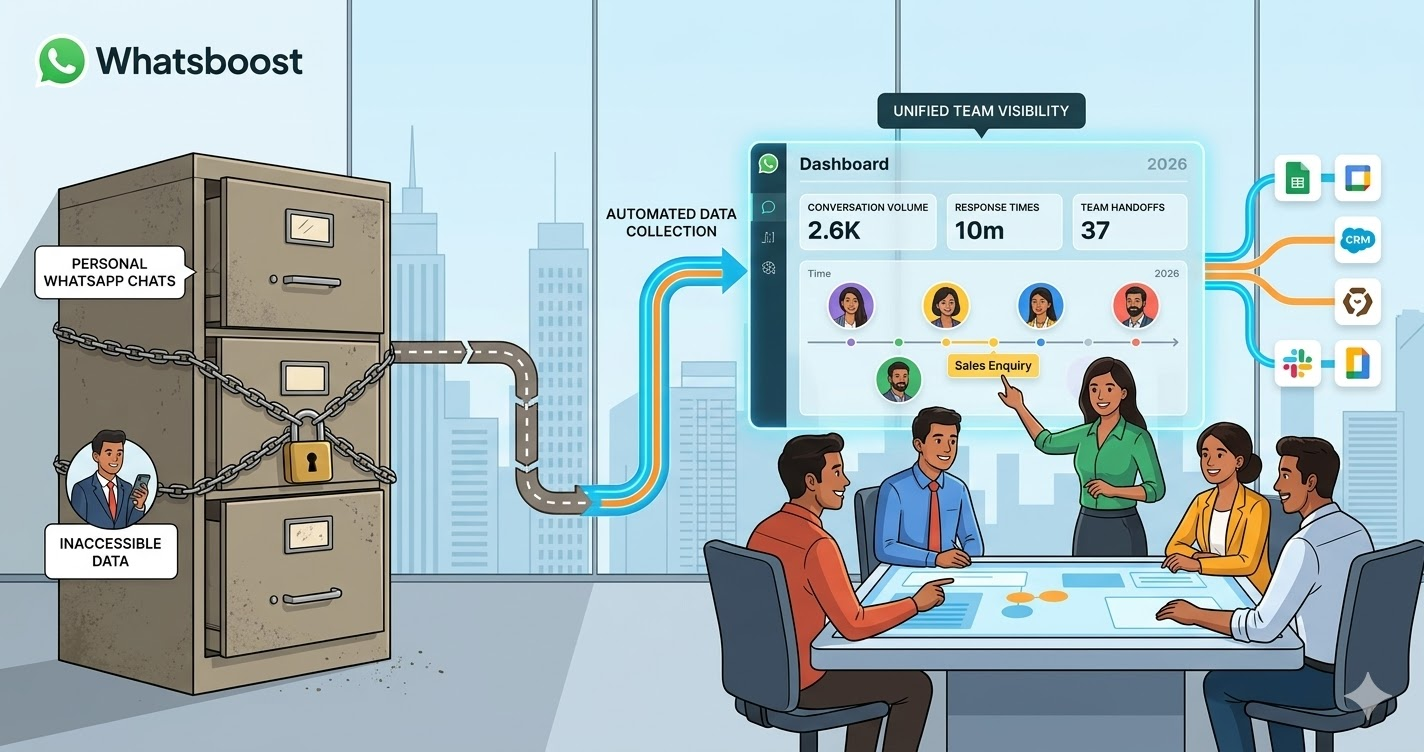
Indian business teams communicate on WhatsApp constantly — and yet, for most organisations, that communication is completely invisible to the people who need it most. A sales rep has a critical conversation with a prospect on their personal device. A support agent resolves a complex customer issue in a WhatsApp thread that only they can see. A field operations team exchanges updates in a group that management has no visibility into. When that rep leaves, that agent is on leave, or that operations team moves on to the next task, the data from those conversations is effectively gone.
The problem is not that teams are using WhatsApp. WhatsApp is fast, familiar, and deeply embedded in Indian professional culture. The problem is that the data generated by WhatsApp communication is not being collected, organised, or shared in a way that enables genuine team collaboration.
In 2026, automating WhatsApp chat data collection for team collaboration is one of the most direct investments Indian businesses can make in their operational intelligence and teamwork. This blog explains how to build this automation — and how Whatsboost provides the infrastructure that makes it work reliably at every scale.
Why Automated WhatsApp Chat Data Collection Transforms Team Collaboration
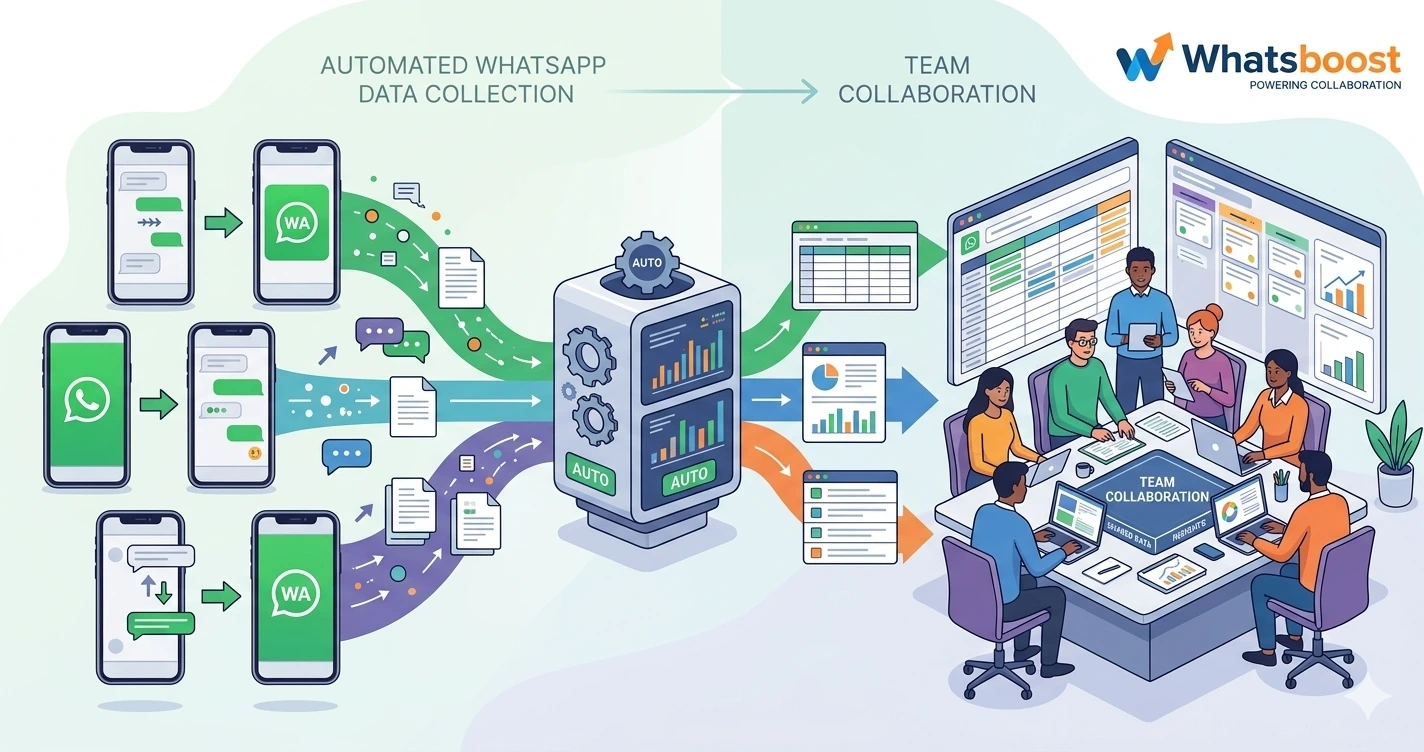
The link between data collection and collaboration is direct. Teams collaborate better when they have shared access to the same information — when the context from a customer's previous WhatsApp conversation is visible to the agent picking up the next one, when the sales manager can see which lead conversations are progressing and which are stalled, and when the support team lead can review message volumes and response times without asking each agent to manually compile a report.
When WhatsApp chat data is collected automatically and made accessible to the whole team, several things change:
No conversation context is ever lost between team members. When a lead or customer contacts your business on WhatsApp, any team member assigned to that conversation has full access to every previous exchange — regardless of which colleague handled it previously. Handoffs become seamless. Customers are never asked to repeat themselves.
Managers gain real-time visibility without micromanaging. Instead of asking team members to report on their WhatsApp conversations — a process that is both time-consuming and inherently selective — managers access the collected data directly, seeing message volumes, response times, and conversation outcomes as they happen.
Cross-functional teams work from the same data. When the sales team's WhatsApp lead conversations are automatically collected and accessible, the marketing team can see which messages generated the most engagement. The product team can see which queries recur most frequently. Data collection becomes a collaborative intelligence asset, not just an operational log.
Whatsboost enables Indian businesses to build this shared data foundation on their WhatsApp communication — without requiring individual team members to change how they work. Visit Whatsboost.in to explore the platform.
How Automated WhatsApp Chat Data Collection Works With Whatsboost
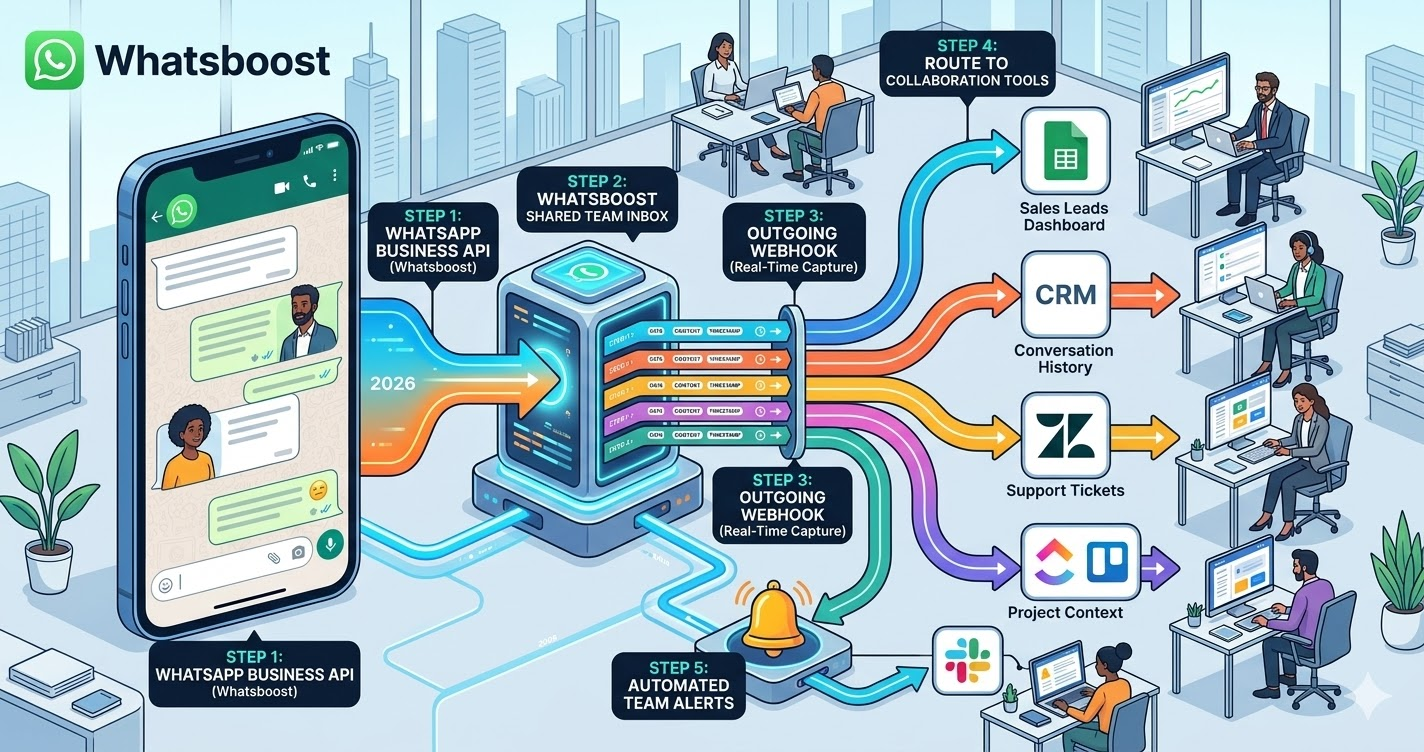
The automation runs on a simple but powerful technical architecture. Whatsboost's WhatsApp Business API captures every inbound and outbound message across your business WhatsApp number in real time. Each message fires an outgoing webhook — a structured data event containing the sender details, message content, timestamp, conversation label, and assigned agent identifier.
This webhook stream is the raw material for your team collaboration data layer. An automation platform — Zapier, Make, or Pabbly Connect — receives each webhook and routes the data to the collaboration and storage tools your team already uses: Google Sheets for accessible shared reporting, a CRM for customer conversation history, a project management tool like ClickUp or Trello for task-linked communication logs, or a team communication platform like Slack for real-time conversation alerts.
The result is a WhatsApp chat data pipeline that collects every message automatically, organises it by category and conversation, and delivers it to the right tool for the right team — without any manual effort from individual agents or managers.
Building Your WhatsApp Chat Data Collection System: Step by Step
Step 1: Activate WhatsApp Business API via Whatsboost
Automated chat data collection requires the WhatsApp Business API — the enterprise-grade messaging infrastructure that exposes message events through webhooks. Whatsboost activates your API as an authorised WhatsApp Business Solution Provider, with guided onboarding that gets your business number live quickly. This is the non-negotiable first step.
Step 2: Move Team WhatsApp Communication Into Whatsboost's Shared Team Inbox
Centralising your team's WhatsApp communication in Whatsboost's shared inbox is the step that makes data collection possible across the whole team — not just from individual devices. Every agent handles their WhatsApp conversations through Whatsboost, which means every message — sent and received — is captured, labelled, and available for the webhook stream regardless of which team member handled it.
Configure role-based access so each team member sees the conversations relevant to their function, while managers retain visibility across all conversations. Set up standard conversation labels — Sales Enquiry, Support Request, Complaint, Partner Communication, General — that all team members apply consistently when handling conversations.
Step 3: Configure Outgoing Webhooks for Real-Time Data Capture
Enable Whatsboost's outgoing webhooks to fire on every message event. Configure the webhook payload to include all the data fields your collaboration tools need — timestamp, contact name, phone number, message direction, message content, message type, conversation label, assigned agent, and a unique conversation ID that links all messages in the same thread.
This real-time webhook stream is the data pipeline that feeds every downstream collaboration tool simultaneously.
Step 4: Route Collected Data to Your Team's Collaboration Tools
Using your automation platform, build separate data routing workflows for each team function:
For the sales team — Route WhatsApp lead conversation data to Google Sheets and your CRM simultaneously. Sales managers see a live Google Sheet dashboard showing new leads, conversation progress, and response times. CRM records are enriched with WhatsApp conversation history the moment each message is received.
For the support team — Route customer support conversation data to your helpdesk platform — Zendesk or Freshdesk — automatically creating or updating tickets for each new WhatsApp support interaction. Support team leads see ticket volumes, response time metrics, and category distribution in their helpdesk dashboard without any manual data entry.
For operations and management — Route summary conversation data to a management Google Sheet or BI dashboard, providing a cross-team view of WhatsApp communication volume, category distribution, agent performance, and trend patterns in real time.
For project-linked communication — When WhatsApp conversations relate to specific projects or client accounts, route the conversation data to the relevant ClickUp task or Trello card via webhook — ensuring project managers have complete WhatsApp communication context alongside their task management data. Visit Whatsboost.in to explore integration options.
Step 5: Build Automated Team Alerts for High-Priority Conversations
Configure keyword-based detection in Whatsboost to identify high-priority messages — those containing escalation language, competitor mentions, urgent requests, or complaint signals — and automatically send a real-time alert to the relevant team lead via their preferred channel: a Slack message, a WhatsApp notification through Whatsboost, or a high-priority ticket in your helpdesk.
This automated alerting layer ensures that the most important WhatsApp conversations surface immediately to the team members who need to act on them — without relying on agents to manually flag or escalate critical messages.
Team Collaboration Use Cases for Automated WhatsApp Data Collection
Sales and marketing alignment — When sales team WhatsApp lead conversations are automatically collected and accessible to the marketing team, marketers can see which messaging resonates with prospects, which objections recur most frequently, and which lead sources generate the highest-quality conversations — informing campaign refinements with real conversation data rather than anecdotal feedback.
Support quality assurance — When all customer support WhatsApp conversations are automatically collected and accessible to the QA team, support managers can review conversation samples, identify coaching opportunities, and monitor whether team members are following communication standards — without requesting individual agents to share their conversation history manually.
Remote team management — For Indian businesses managing distributed or remote teams who use WhatsApp for client communication, automated data collection gives team leaders complete visibility into customer interactions across all locations — ensuring consistent service quality and enabling data-driven performance conversations with remote team members.
Best Practices for Team-Wide WhatsApp Chat Data Collection
Standardise conversation labels across your entire team before activating the automation. Label-based routing is only as useful as the labels are consistent. Run a brief team training session before going live — ensuring every team member understands which label applies to which conversation type and why accurate labelling directly improves the quality of the collaboration data the whole team benefits from.
Build a shared data dictionary for your Google Sheets columns. When multiple team members and managers access the same collected WhatsApp data, column names and data field meanings need to be unambiguous. Create a simple data dictionary — a second sheet in your Google Sheets document — that defines what each column contains and how it should be interpreted.
Review data completeness weekly for the first month. Automated data collection systems occasionally miss messages due to webhook delivery failures or automation platform errors. During the first month, compare Whatsboost conversation counts to your Google Sheets row counts weekly — identifying and resolving any data gaps before they compound into significant reporting inaccuracies.
Shared Data Is the Foundation of Genuine Team Collaboration
In 2026, Indian businesses whose teams are all working from the same WhatsApp conversation data — rather than from individual, isolated inboxes — make faster decisions, serve customers more consistently, and identify opportunities and risks earlier. The difference between a team that collaborates on shared intelligence and one that operates in data silos is not talent or effort. It is the system that collects, organises, and distributes the data the team needs.
Automating WhatsApp chat data collection with Whatsboost builds that system — transforming your team's most active communication channel from a series of individual conversations into a shared, searchable, actionable intelligence layer that the whole organisation benefits from.
Visit Whatsboost.in and start building the WhatsApp data foundation your team collaboration needs today.
Want to automate WhatsApp for your business?
Set up campaigns, replies, and follow-ups in minutes.