
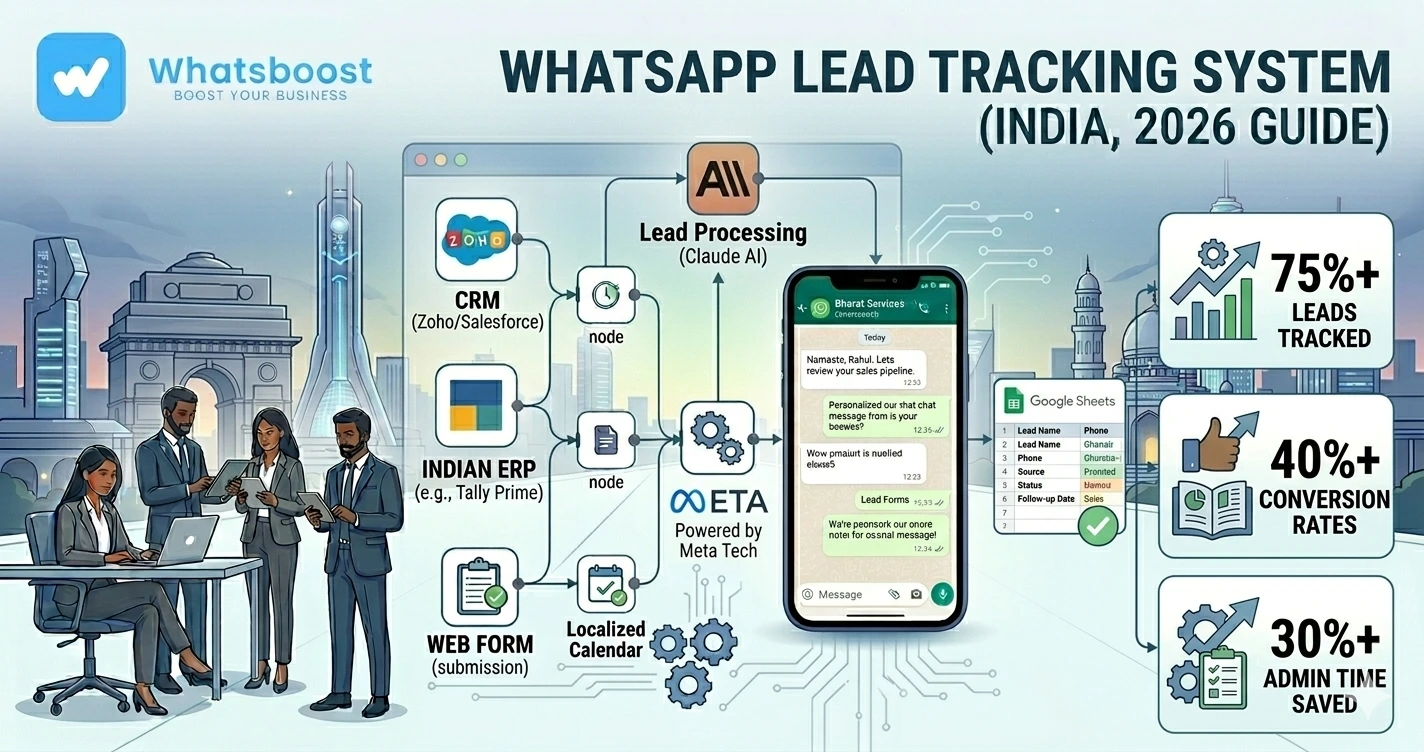
How to Build a WhatsApp Lead Tracking System Using Claude AI + Google Sheets (2026)
Learn how businesses can build a WhatsApp lead tracking system using Claude AI and Google Sheets to automate lead management, follow-ups, qualification, and sales workflows.
Most Businesses Lose Leads Because Their Tracking System Is Broken
Not because they don’t get enquiries.
But because:
❌ Leads are scattered everywhere
❌ Follow-ups get forgotten
❌ Sales teams lack visibility
❌ No system exists to prioritize hot leads
And surprisingly…
Many businesses still track leads manually using:
- Random spreadsheets
- WhatsApp chats
- Sticky notes
- Sales rep memory
👉 That approach no longer works in 2026.
Why Businesses Need Smarter Lead Tracking
Modern businesses deal with:
✔ Higher enquiry volumes
✔ Faster customer expectations
✔ Multiple communication channels
Without proper systems:
❌ Leads go cold quickly
❌ Teams become disorganized
❌ Revenue opportunities are lost
That’s why businesses are now combining:
👉 WhatsApp + Claude AI + Google Sheets
to build lightweight but powerful lead tracking systems.
Why This Combination Works So Well
Each tool handles a specific role.
WhatsApp Handles Communication
Customer conversations happen naturally.
Google Sheets Handles Data Tracking
Leads stay organized centrally.
Claude AI Adds Intelligence
AI analyzes conversations and lead quality.
👉 Together, this creates an intelligent lead management workflow.
What is Claude AI?
Anthropic created Claude, an AI assistant businesses use for:
✔ Summarization
✔ Lead analysis
✔ Qualification
✔ Smart responses
✔ Workflow intelligence
Claude helps businesses turn raw conversations into actionable insights.
Why Google Sheets Still Works Extremely Well
Many businesses assume they need expensive CRM systems immediately.
But in reality:
👉 Google Sheets is often enough for early-stage and growing businesses.
It offers:
✔ Simplicity
✔ Flexibility
✔ Collaboration
✔ Automation compatibility
Especially when combined with AI workflows.
What a WhatsApp Lead Tracking System Actually Does
Simple explanation 👇
Whenever a lead interacts on WhatsApp:
✔ Lead information gets stored
✔ Conversation details are tracked
✔ AI analyzes the lead
✔ Follow-ups get organized automatically
👉 The entire process becomes structured.
Common Problems Businesses Face Without a Tracking System
❌ Follow-Ups Depend on Memory
Sales reps forget.
Leads disappear.
❌ Hot Leads Get Missed
No prioritization exists.
❌ No Visibility Across Teams
Managers can’t track performance clearly.
❌ Conversations Stay Unorganized
Important customer information gets buried inside chats.
👉 This creates operational chaos.
How the Full Workflow Works
Simple workflow 👇
Lead messages business → WhatsApp workflow triggered → Google Sheet updated → Claude analyzes lead → Follow-up actions created automatically
👉 Intelligent lead tracking in real time.
Step-by-Step: Building the System
Step 1: Capture WhatsApp Leads Automatically
The first step is:
👉 Collecting incoming enquiries automatically.
Leads can come from:
- Ads
- Landing pages
- IndiaMART
- JustDial
- Google Forms
- Websites
Businesses often automate this using Google Forms to WhatsApp workflows
Step 2: Store Leads in Google Sheets
Every new enquiry automatically gets added to a spreadsheet.
Example columns:
| Name | Phone | Source | Status | Priority | Last Follow-Up |
|---|
👉 This creates centralized visibility.
Step 3: Connect Claude AI for Lead Analysis
Claude can analyze:
✔ Customer intent
✔ Urgency
✔ Budget signals
✔ Buying readiness
Example:
Customer message:
“I need automation urgently for my sales team.”
Claude may categorize:
👉 High-intent lead
This helps sales teams prioritize better.
👉 Businesses improve conversions using WhatsApp lead qualification systems
Step 4: Build Automated Follow-Up Logic
Most businesses lose leads because:
❌ Follow-ups stop too early.
Automation helps create structured sequences.
Example Workflow
Day 1 → Initial response
Day 2 → Reminder
Day 4 → Case study
Day 7 → Final follow-up
👉 Consistency improves conversion rates dramatically.
That’s why businesses need smarter task follow-up systems instead of relying only on manual effort.
Step 5: Add Lead Status Tracking
Your system should track:
✔ New lead
✔ Contacted
✔ Qualified
✔ Proposal sent
✔ Closed
✔ Lost
👉 This improves sales visibility.
Step 6: Automate Team Notifications
Sales teams should receive alerts when:
✔ Hot leads appear
✔ Follow-ups are overdue
✔ Leads become inactive
👉 Businesses improve coordination using automated employee alerts via WhatsApp
Step 7: Build Task Delegation Workflows
As teams grow:
❌ Ownership becomes unclear
Automation helps:
✔ Assign leads
✔ Notify responsible reps
✔ Track pending actions
👉 Learn how task delegation on WhatsApp improves accountability.
Step 8: Add AI Summaries
Claude can summarize long conversations automatically.
Instead of reading entire chats:
Sales teams receive:
✔ Key customer needs
✔ Budget indicators
✔ Conversation summary
✔ Suggested next actions
👉 This saves enormous time.
Step 9: Build Re-Engagement Campaigns
Old leads should not stay inactive forever.
Automation can re-engage:
✔ Cold leads
✔ Missed enquiries
✔ Inactive customers
Example:
“Hi 👋 Just checking if you still need assistance with your enquiry.”
👉 Lead recovery improves significantly.
Real Workflow Example
| Trigger | Google Sheets Action | Claude AI Action | WhatsApp Workflow |
| New enquiry | Lead added | Lead analyzed | Instant reply |
| Lead inactive | Status updated | Re-engagement suggested | Reminder sent |
| Hot lead detected | Priority marked | Intent summarized | Sales team notified |
| Proposal shared | Follow-up date tracked | Conversation summarized | Reminder scheduled |
Why Small Businesses Love This Setup
Compared to heavy CRM systems:
✔ Lower cost
✔ Faster setup
✔ Easier customization
✔ Simpler workflows
👉 Especially useful for Indian businesses scaling gradually.
Industries Benefiting Most
🏢 Agencies
Lead nurturing systems
🏭 B2B Companies
Sales pipeline tracking
🎓 Coaches & Consultants
Consultation lead management
🛒 Service Businesses
Enquiry tracking workflows
🧑💼 Automation Agencies
Multi-client lead management
Advanced Features You Can Add
🧠 AI Lead Scoring
Claude ranks leads automatically based on buying intent.
📊 Performance Dashboards
Track:
- Lead sources
- Response speed
- Conversion rates
- Sales productivity
🔁 Multi-Step Automation Workflows
Example:
Lead → Qualification → Proposal → Follow-up → Upsell
👉 This creates scalable systems.
🔗 CRM Integrations
As businesses grow:
Google Sheets workflows can later connect with:
✔ CRM systems
✔ Email tools
✔ Payment systems
✔ Analytics platforms
👉 Automation becomes expandable.
Before vs After Automation
| Factor | Manual Lead Tracking | AI + WhatsApp Tracking |
| Lead visibility | ❌ Weak | ✔ Centralized |
| Follow-up consistency | ❌ Poor | ✔ Automated |
| Lead prioritization | ❌ Manual | ✔ AI-powered |
| Team coordination | ❌ Messy | ✔ Structured |
👉 Automation improves operational efficiency dramatically.
Common Mistakes Businesses Make
❌ Tracking leads manually
❌ No prioritization system
❌ No follow-up reminders
❌ No centralized visibility
❌ Overcomplicated CRM setups too early
👉 Simpler systems often scale better initially.
Pro Tips (From Real Lead Automation Systems)
Keep the Workflow Simple First
Start lean and improve gradually
Automate Repetitive Follow-Ups
This saves enormous time
Use AI for Prioritization
Not every lead deserves equal effort
Centralize Data Visibility
Everyone should see lead status clearly
Why WhatsBoost is Ideal for WhatsApp Lead Tracking Systems
🚀 WhatsApp Workflow Automation
Scalable lead communication systems
🤖 Claude AI Integrations
Intelligent lead analysis workflows
👥 Team Coordination Systems
Better sales accountability
📊 Analytics & Tracking
Measure lead performance clearly
👉 It transforms WhatsApp into a smart lead management operating system
Real Insight
Most businesses don’t actually need complicated CRM systems first.
They need:
✔ Faster responses
✔ Better visibility
✔ Structured follow-ups
✔ Smarter lead prioritization
That’s exactly what this setup solves.
Final Conclusion
Modern lead tracking requires more than spreadsheets alone.
Without automation:
❌ Leads get lost
❌ Teams become inconsistent
❌ Follow-ups fail
With WhatsApp + Claude AI + Google Sheets:
✔ Communication becomes structured
✔ Leads become trackable
✔ Sales workflows become scalable
👉 The future is:
👉 WhatsApp + AI + Smart Tracking = Better Sales Operations 🚀
Want to automate WhatsApp for your business?
Set up campaigns, replies, and follow-ups in minutes.