
How to Integrate WhatsApp With Webflow for Instant Lead Messaging in 2026 | Whatsboost
Learn how to integrate WhatsApp with Webflow for instant lead messaging in 2026. Discover step-by-step setup, automation workflows, key benefits, and how Whatsboost powers real-time WhatsApp outreach for Webflow websites.
Your Webflow website is working hard — attracting visitors, showcasing your brand, and converting traffic into form submissions. But what happens the moment a lead hits "Submit"? For most businesses, the answer is: not enough, not fast enough.
The lead sits in a spreadsheet or an email inbox. Someone checks it hours later. A generic acknowledgement goes out. And by then, the lead has already moved on to a competitor who responded within minutes.
In 2026, instant lead messaging is not a nice-to-have — it is the baseline expectation. Integrating WhatsApp with Webflow means that the moment a visitor submits a form on your website, they receive a personalised WhatsApp message and your sales team gets an instant notification — all automatically, all within seconds.
This blog walks you through exactly how to integrate WhatsApp with Webflow for instant lead messaging, and how Whatsboost provides the WhatsApp Business API backbone that makes it all work.
Why Webflow + WhatsApp Is a Powerful Combination for Lead Messaging
Webflow has become one of the most popular website-building platforms for Indian startups, agencies, SaaS companies, and service businesses. Its clean design capabilities and flexible CMS make it ideal for high-converting landing pages and lead capture forms.
WhatsApp, on the other hand, is where Indian customers are most responsive. Open rates on WhatsApp messages consistently exceed 90%, compared to the 20–25% typical of email. When a lead submits a form on your Webflow site and receives a WhatsApp message within seconds, the experience feels personal, immediate, and professional — dramatically increasing the likelihood of a response and a conversion.
The two platforms were not built to connect natively, but with the right automation setup and Whatsboost powering your WhatsApp Business API, the integration is straightforward and incredibly impactful.
What Webflow + WhatsApp Integration Delivers
When you integrate WhatsApp with your Webflow website through Whatsboost, here is what your business gains:
Instant WhatsApp messages to leads — Every form submission on your Webflow site triggers an automated, personalised WhatsApp message to the lead within seconds, acknowledging their enquiry and initiating the conversation.
Real-time sales team notifications — Your assigned sales agent receives an instant WhatsApp alert with the lead's name, contact number, and form details — enabling immediate follow-up while the lead is still engaged.
Automated lead qualification — Using Whatsboost's chatbot capabilities, the initial WhatsApp message can include qualifying questions that help your team understand the lead's needs before they even speak to a human agent.
Centralised lead inbox — All WhatsApp responses from website leads are managed through Whatsboost's shared team inbox, keeping every conversation tracked, assigned, and visible to the right team members.

How to Integrate WhatsApp With Webflow: Step-by-Step
Setting up this integration does not require a developer. Here is the practical path for businesses using Webflow.
Step 1: Activate Your WhatsApp Business API via Whatsboost
The WhatsApp Business API is the essential foundation. Without it, automated WhatsApp messaging at scale is not possible. Whatsboost is an authorised WhatsApp Business Solution Provider that activates your API quickly, with full onboarding support from day one. Start at Whatsboost.
Step 2: Set Up Your Webflow Form
Ensure your Webflow forms are capturing the fields you need — at minimum, the lead's name and WhatsApp phone number. You can also include fields for product interest, budget range, or location if you want to use that data for routing or personalisation downstream.
Step 3: Connect Webflow to an Automation Platform
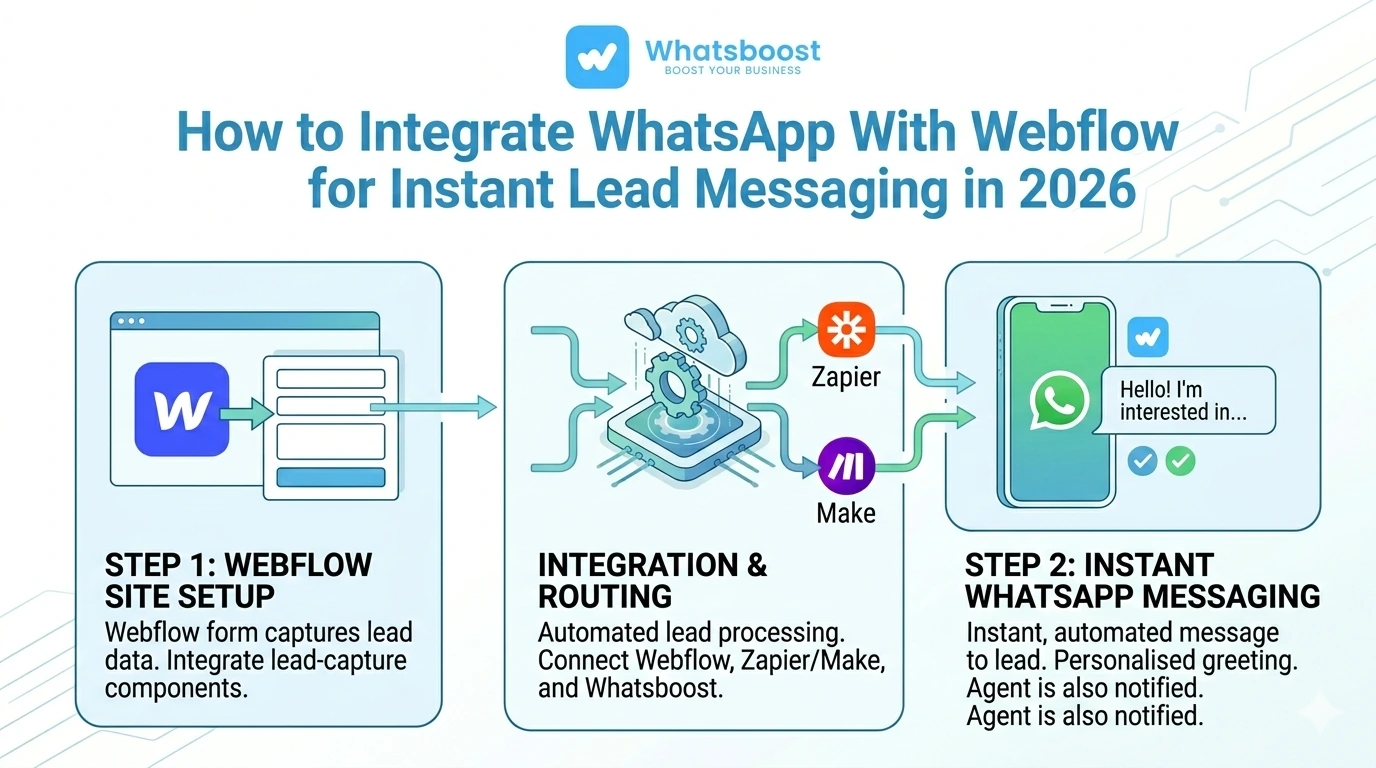
Webflow integrates with automation platforms like Zapier, Make, and Pabbly Connect via native connections or webhooks. In your automation platform, set your Webflow form submission as the trigger event — so every time a form is submitted, the automation fires.
Step 4: Map Form Fields to a WhatsApp Message via Whatsboost
Within your automation platform, connect the trigger to Whatsboost's WhatsApp API as the action. Map the form fields — such as the lead's name and phone number — to a pre-approved WhatsApp message template that personalises the outreach using the lead's own details.
Step 5: Set Up Sales Agent Notification
Add a second action step in your automation to send a WhatsApp notification to the assigned sales agent, including all the lead's submitted details and a prompt to follow up immediately.
Step 6: Test and Go Live
Submit a test form on your Webflow site and confirm that both the lead WhatsApp message and the agent notification arrive correctly. Once validated, your instant lead messaging system is live and running on autopilot.
4 Instant Lead Messaging Workflows for Webflow Businesses
1. Personalised Welcome Message on Form Submission
The moment a lead submits a Webflow contact or enquiry form, they receive a WhatsApp message that addresses them by name, references what they enquired about, and sets expectations for the next step — such as "Our team will reach out within the next 30 minutes."
This immediate, personalised response makes leads feel valued from the very first interaction and dramatically reduces the chance of them reaching out to a competitor in the meantime.
2. Lead Qualification via WhatsApp Chatbot
After the initial welcome message, Whatsboost's no-code chatbot can send a follow-up WhatsApp message asking one or two qualifying questions — such as budget range or timeline. The lead's responses are captured automatically, giving your sales agent full context before making the first call.
For Indian businesses handling large volumes of Webflow leads, this automated qualification layer saves hours of sales time each week.
3. Route Leads to the Right Agent Based on Form Data
Using the data captured in your Webflow form — such as service type, location, or company size — your automation can route the lead to the most appropriate sales agent and send that agent an instant WhatsApp notification. The right person follows up every time, without any manual sorting required.
Whatsboost supports custom routing logic through its API and webhook capabilities, ensuring that lead distribution is intelligent and consistent. Learn more at Whatsboost.
4. Automated Follow-Up Sequence for Unresponsive Leads
If a lead does not respond to the initial WhatsApp message within 24 hours, Whatsboost's automation triggers a follow-up message — a gentle nudge that keeps the lead warm without requiring any manual effort from your team. A second follow-up can be scheduled at 48 hours, ensuring no Webflow lead goes cold silently.

Best Practices for Webflow + WhatsApp Lead Messaging
Always use an approved WhatsApp message template. The WhatsApp Business API requires pre-approved templates for outbound messages to new contacts. Work with Whatsboost to create and get your templates approved before going live.
Keep your initial message concise and action-oriented. The first WhatsApp message should be brief — acknowledge the enquiry, set a clear expectation, and include one simple call to action. Long opening messages reduce engagement.
Collect the mobile number in the correct format. Ensure your Webflow form captures phone numbers in the international format (e.g. +91 for India) to ensure WhatsApp delivery without errors.
Use Whatsboost analytics to track and improve performance. Monitor which messages generate the highest response rates and refine your templates over time. Small improvements in your initial message can have an outsized impact on lead conversion.
FAQs: Integrating WhatsApp With Webflow for Instant Lead Messaging
Q1. Do I need coding skills to connect Webflow with WhatsApp? No. Using Webflow's native integration with Zapier or Make and Whatsboost's WhatsApp Business API, the entire setup can be configured through no-code, drag-and-drop interfaces. Whatsboost also provides onboarding support to help you get started smoothly.
Q2. Does this integration work with all Webflow form types? Yes. Whether you are using Webflow's built-in forms, embedded third-party forms, or custom forms built with Webflow Interactions, the integration can be configured to capture and process form submissions for WhatsApp automation.
Q3. How quickly does the lead receive a WhatsApp message after submitting the form? With the integration properly configured, the automated WhatsApp message reaches the lead within seconds of form submission — ensuring immediate engagement at the peak moment of interest.
Q4. Can I send WhatsApp messages in regional Indian languages to Webflow leads? Yes. Whatsboost supports multilingual WhatsApp message templates. You can create and use approved templates in Hindi, Tamil, Telugu, Kannada, or any other regional language — ideal for Indian businesses targeting non-English-speaking audiences.
Q5. What happens when a Webflow lead replies to the WhatsApp message? Replies land in Whatsboost's shared team inbox, where the assigned sales agent can continue the conversation directly — combining the speed of automation with personalised human engagement at exactly the right moment.
Q6. Is this integration secure and compliant with WhatsApp's policies? Yes. Whatsboost operates through the official WhatsApp Business API, which uses end-to-end encryption and requires pre-approved message templates for outbound communication — ensuring your lead messaging is both secure and fully compliant.
FAQs: Whatsboost Features
Q1. What is Whatsboost? Whatsboost is an authorised WhatsApp Business Solution Provider that helps businesses of all sizes activate the WhatsApp Business API and build powerful automation workflows — including instant lead messaging, chatbot qualification, follow-up sequences, and shared team inbox management.
Q2. Does Whatsboost support Webflow webhook integrations? Yes. Whatsboost accepts incoming webhook data from Webflow via automation platforms like Zapier, Make, and Pabbly Connect — enabling seamless real-time WhatsApp messaging triggered by Webflow form submissions.
Q3. Does Whatsboost offer a no-code chatbot builder for lead qualification? Yes. Whatsboost's no-code chatbot builder lets you create conversational WhatsApp flows that qualify leads automatically after form submission — asking relevant questions and routing responses to the right agent without any manual effort.
Q4. Can multiple team members manage WhatsApp lead conversations through Whatsboost? Yes. Whatsboost's shared team inbox supports multiple agents managing conversations simultaneously, with chat assignment, internal notes, and role-based access — keeping your team organised even as lead volume scales.
Q5. Does Whatsboost support multilingual WhatsApp messaging? Yes. Whatsboost supports WhatsApp message templates in multiple languages, making it suitable for Indian businesses communicating with leads across different regions and language preferences.
Q6. How do I get started with Whatsboost for my Webflow website? Visit Whatsboost, sign up for your account, and the Whatsboost team will guide you through WhatsApp Business API activation, Webflow integration setup, and message template creation — so your instant lead messaging system is live as quickly as possible.
Turn Every Webflow Form Submission Into an Instant Conversation
Your Webflow website attracts leads. The question is whether your business engages them fast enough to convert them. In 2026, the standard for lead response is measured in seconds — not hours.
By integrating WhatsApp with Webflow through Whatsboost, you ensure that every form submission becomes an instant, personalised WhatsApp conversation — giving your sales team the speed advantage needed to win in India's competitive market.
Visit Whatsboost and start turning your Webflow leads into WhatsApp conversations today.
Want to automate WhatsApp for your business?
Set up campaigns, replies, and follow-ups in minutes.