
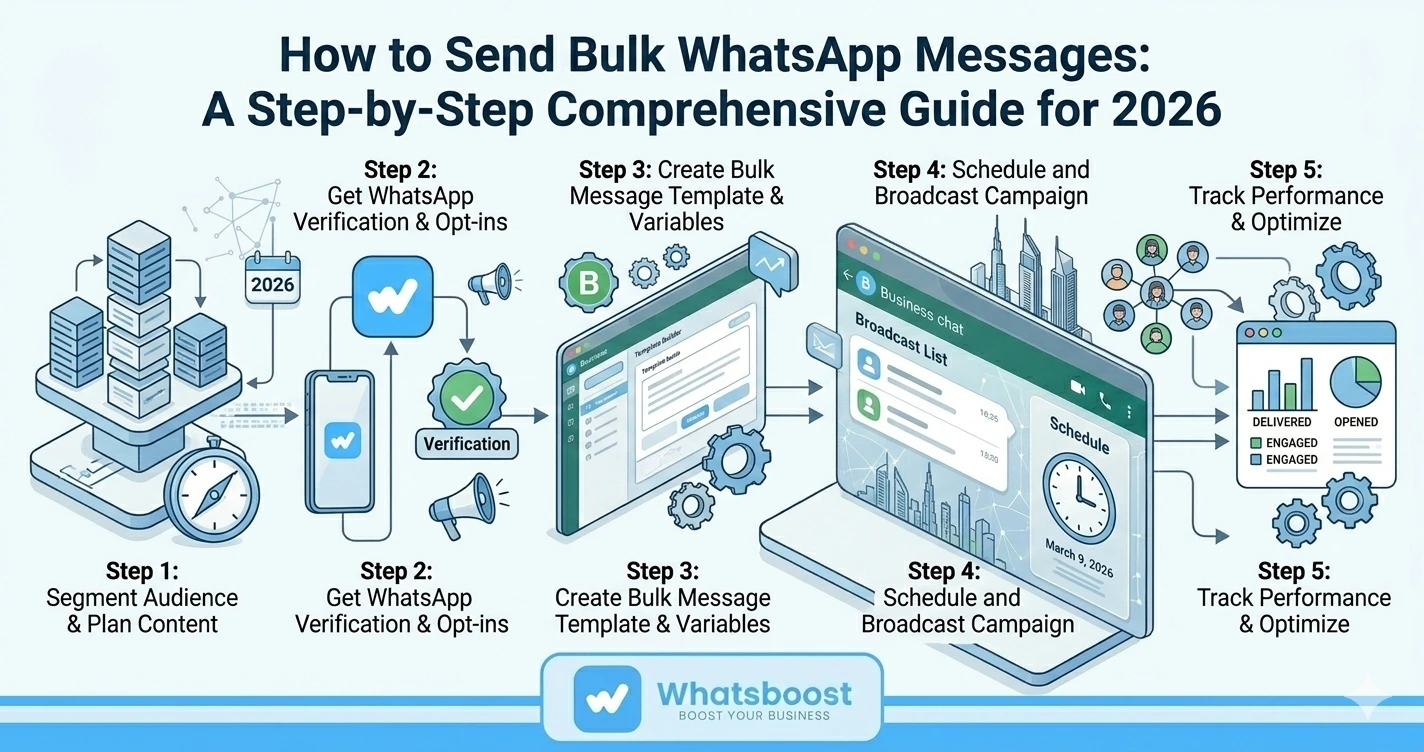
How to Send Bulk WhatsApp Messages: A Step-by-Step Comprehensive Guide for 2026
Learn how to send bulk WhatsApp messages in 2026 without violating WhatsApp's policies. A complete step-by-step guide covering the Business App, API, and Whatsboost automation.
If your business relies on WhatsApp to communicate with customers — and with over 3 billion active users on the platform in 2026, most businesses do — then knowing how to send bulk messages efficiently and compliantly is one of the most valuable skills you can develop. Done right, bulk WhatsApp messaging dramatically improves your reach, saves your team hours of manual effort, and delivers engagement rates that no other channel can match.
This guide walks you through exactly how to do it — from the simplest method using the WhatsApp Business App all the way through to full API-powered automation with Whatsboost.
What Is WhatsApp Bulk Messaging?
WhatsApp bulk messaging means sending a high volume of messages to multiple recipients simultaneously through the WhatsApp platform. It is widely used by businesses for marketing campaigns, customer engagement, order updates, promotional announcements, and general information sharing — all delivered directly to a channel customers check constantly.
To execute bulk messaging effectively and safely, you need to comply with WhatsApp's policies, use authorised tools or APIs, ensure your messages are relevant and personalised, and respect privacy regulations. When done correctly, bulk messaging campaigns can significantly enhance your outreach and drive measurable business results.
Method 1: Sending Bulk Messages Using the WhatsApp Business App
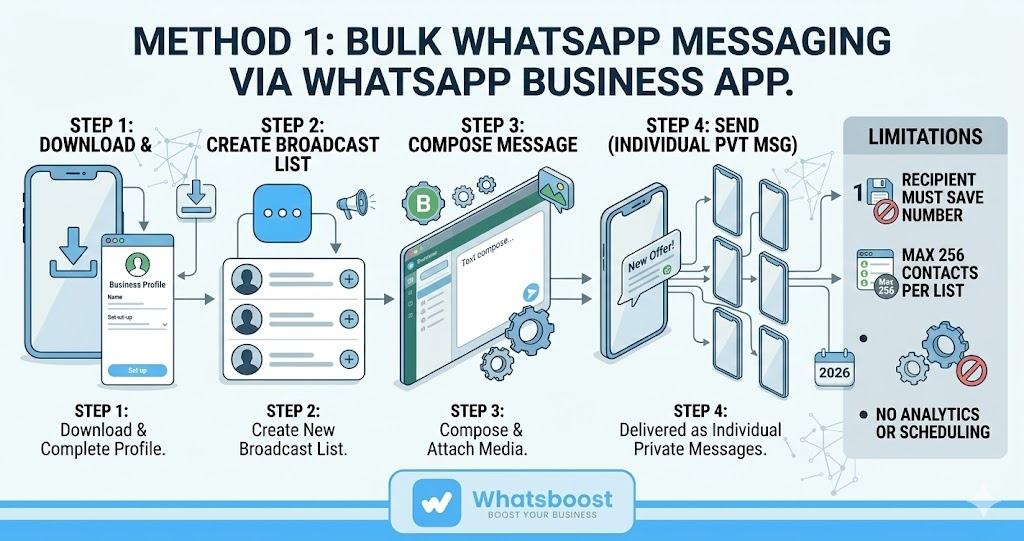
The WhatsApp Business App is the starting point for small businesses looking to send broadcast messages to multiple contacts without any technical setup. Here is how to do it step by step.
Step 1 — Install the WhatsApp Business App Download and install the WhatsApp Business App from the Google Play Store (Android) or the App Store (iOS).
Step 2 — Set Up Your Business Profile Create a complete business profile including your business name, description, address, website, and operating hours. A complete profile builds credibility and encourages customers to engage with your messages.
Step 3 — Create a Broadcast List Tap the three-dot menu (More Options), select "Broadcast Lists," then tap the "+" icon to create a new list. Add the contacts you want to include in this broadcast.
Step 4 — Compose and Send Your Broadcast Message Go to the Chats tab, open your Broadcast List, type your message in the text field, add any media such as images, videos, or documents, and tap send. Your message will be delivered to every contact on the list as an individual private message — not a group chat.
Important limitations to keep in mind:
- Recipients must have your number saved in their contacts for the broadcast to reach them
- WhatsApp Business App supports a maximum of 256 contacts per broadcast list
- Messages outside the 24-hour customer response window may require approved templates
- There is no built-in scheduling, segmentation, or analytics
For businesses that need to go beyond these limits — reaching larger audiences, automating campaigns, and measuring results — the WhatsApp Business API is the next step.
Method 2: Sending Bulk Messages Using the WhatsApp Business API
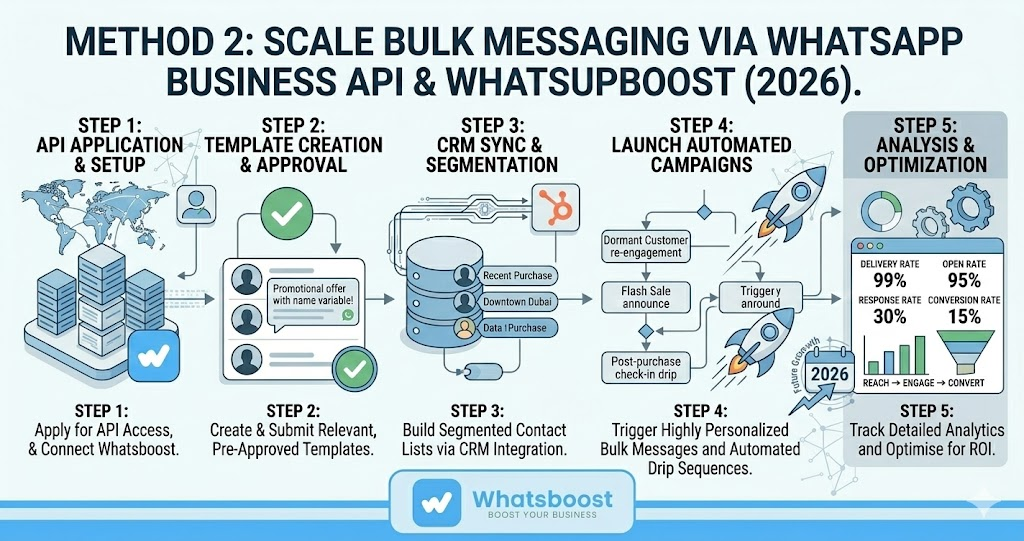
The WhatsApp Business API is designed for businesses that need to send bulk messages at scale, with full automation, CRM integration, and advanced analytics. Here is the process step by step.
Step 1 — Apply for WhatsApp Business API Access Apply through an authorised WhatsApp Business Solution Provider (BSP). Approval is subject to WhatsApp's criteria and typically takes a few business days.
Step 2 — Choose Your Provider and Set Up Select a BSP like Whatsboost to access the API and integrate it with your existing business systems — CRM, eCommerce platform, helpdesk, or marketing stack.
Step 3 — Create and Submit Message Templates The WhatsApp Business API requires pre-approved message templates for outbound communications. Templates must comply with WhatsApp's guidelines — they should be relevant, non-spammy, and serve a clear purpose for the recipient.
Step 4 — Build Your Contact Lists and Segments Organise your contacts into targeted segments based on behaviour, purchase history, location, or customer stage. Segmented campaigns consistently outperform generic broadcasts on both engagement and conversion.
Step 5 — Launch and Automate Your Campaign With the API integrated, you can send bulk messages programmatically — triggered by customer actions, scheduled in advance, or deployed as part of automated drip sequences.
Step 6 — Ensure Compliance Strictly follow WhatsApp's policies on message frequency, content type, and user consent. Non-compliance can result in account suspension. Always obtain explicit opt-in before adding contacts to any bulk campaign.
Step 7 — Track, Analyse, and Optimise Monitor delivery rates, open rates, response rates, and conversions. Use this data to continuously refine your messaging strategy for better results over time.
Scale Your Bulk Messaging With Whatsboost
While the WhatsApp Business App works for getting started, Whatsboost gives businesses the tools to take bulk messaging to a completely different level in 2026.
Whatsboost's broadcast feature allows you to send highly personalised bulk messages to your entire contact base simultaneously — with recipients not even needing your number saved in their contacts. Whether you are announcing a new product, running a flash sale, sharing an important update, or re-engaging dormant customers, Whatsboost makes mass messaging simple, targeted, and measurable.
Beyond broadcasts, Whatsboost's chatbot automation enables you to trigger personalised message sequences based on customer behaviour — abandoned cart follow-ups, post-purchase check-ins, appointment reminders, and lead nurturing drips — all running automatically without manual effort from your team.
Whatsboost also provides message scheduling, audience segmentation, CRM integration, pre-built compliant templates, and detailed analytics — everything you need to run professional bulk messaging campaigns that comply with WhatsApp's policies and deliver real business results.
Best Practices for Bulk WhatsApp Messaging in 2026
Always get consent first. Only message contacts who have explicitly opted in to receive communications from your business. This protects your account and builds genuine trust with your audience.
Personalise every message. Use customer names, relevant product references, and tailored offers rather than generic broadcasts. Personalised messages significantly outperform one-size-fits-all content.
Respect message frequency. Avoid sending too many messages in a short period. Overwhelmed recipients report messages as spam, which can damage your sender reputation and account standing.
Use rich media strategically. Images, videos, documents, and catalogues can dramatically improve engagement — but only when they add genuine value to the message rather than cluttering it.
Monitor and iterate. Track performance metrics after every campaign. The data will show you what content, timing, and audience segments drive the best results — and where to improve.
Want to automate WhatsApp for your business?
Set up campaigns, replies, and follow-ups in minutes.