
How to Use WhatsApp Group API Adding Features to Build Niche Customer Communities in 2026 | Whatsboost
Learn how to use WhatsApp Group API adding features to build niche customer communities in 2026. Discover practical workflows, setup steps, and how Whatsboost helps Indian businesses create engaged, segmented WhatsApp communities automatically.
The most engaged customers Indian businesses have are not the ones on their email list — they are the ones in active conversations about topics they care deeply about. Niche customer communities built around specific interests, shared challenges, or product use cases create the kind of sustained engagement that transforms transactional customers into loyal brand advocates.
In 2026, WhatsApp is the natural home for these niche communities in India. And the WhatsApp Group API adding features — accessible through the WhatsApp Business API — give Indian businesses the programmatic control to build, populate, and manage niche customer communities at scale without the operational friction of manual group management.
This blog explains precisely how to use the WhatsApp Group API's adding features to build niche customer communities, and how Whatsboost provides the infrastructure and automation layer that makes community building systematic, scalable, and genuinely valuable for Indian businesses.
What Are WhatsApp Group API Adding Features and Why Do They Matter?
The WhatsApp Group API is a set of programmatic capabilities within the WhatsApp Business API that allows businesses to manage group and community membership through automated API calls rather than manual WhatsApp interface interactions. The adding features specifically refer to the ability to add members to WhatsApp groups and communities programmatically — triggered by external events, data conditions, or scheduled automation — without a human needing to open WhatsApp and add each contact individually.
For Indian businesses building niche customer communities, these adding features are transformative because they solve the fundamental scaling problem of community management. Manually adding members to a WhatsApp group works for communities of 20 or 30 members. It becomes an operational bottleneck for communities of 200 members — and is simply not viable for communities of 2,000 or more.
The WhatsApp Group API adding features remove this ceiling entirely. A new customer makes a purchase that qualifies them for a product user community — they are added automatically. A lead achieves a qualification score that makes them eligible for a prospect community — they are added automatically. A partner completes onboarding and qualifies for the partner network community — they are added automatically. Community building becomes a continuous, automatic process rather than a periodic manual effort.
Whatsboost is an authorised WhatsApp Business Solution Provider that activates the WhatsApp Business API and Group API adding features for Indian businesses — with the no-code automation tools, webhook integrations, and analytics that make community building workflows operational from day one. Visit Whatsboost.in to explore the platform.
Designing Niche Customer Communities Worth Building on WhatsApp
Before activating the WhatsApp Group API adding features, the strategic design of the community matters enormously. A poorly conceived community — one without a clear niche, a compelling value proposition, or a consistent content experience — will see high early churn even with perfect technical execution. A well-designed niche community, on the other hand, becomes a self-sustaining engagement asset that grows in value as membership grows.
Define the Niche Precisely
The power of a niche community is specificity. A generic "customers" WhatsApp group offers every member the same undifferentiated experience. A niche community built around a specific use case, interest, challenge, or customer profile offers members the experience of being understood and connected to people exactly like them.
For Indian businesses, effective niche community definitions include: urban homeowners managing renovation projects, working mothers balancing career and childcare, independent consultants growing their first client base, gym owners scaling their fitness businesses, or farmers in a specific region growing a specific crop. The more precisely the niche is defined, the more relevant the community content is — and the more engaged the members become.
Define the Value Exchange Clearly
Every niche customer community needs to answer one question for potential members: what will I get from being here? Exclusive industry insights, early product access, peer networking, expert Q&A sessions, curated content, member-only offers, and community recognition are all compelling value propositions for Indian WhatsApp communities. Define this clearly before the first member is added — because the welcome message sets the expectation that the community must consistently deliver on.
Structure Sub-Groups Around Member Journey Stages
For communities with significant membership, use the WhatsApp Community feature to organise members into niche sub-groups that reflect different engagement stages, geographic locations, product use cases, or experience levels. New members join the introductory sub-group. Active, engaged members progress to the core community sub-group. Power users and advocates are invited to an inner circle sub-group with exclusive access and peer recognition. The WhatsApp Group API adding features make this multi-tier structure automated and scalable.
Using WhatsApp Group API Adding Features With Whatsboost: Step-by-Step
Step 1: Activate WhatsApp Business API and Group API via Whatsboost
Whatsboost activates your WhatsApp Business API and Group API as an authorised WhatsApp Business Solution Provider — the essential infrastructure layer that makes programmatic community management possible. Without API access, the adding features are not available. Start at Whatsboost.in.
Step 2: Create Your Niche Community Structure in WhatsApp
Set up your WhatsApp Community with the sub-groups that reflect your niche segmentation design — welcome sub-group, core community sub-group, and any product, location, or journey stage specific sub-groups your community design requires. Generate a unique invite link for each sub-group and document the sub-group ID for each — these IDs are what your automation workflow passes to the Group API adding call to specify which sub-group a new member should join.
Step 3: Map Your Member Qualification Triggers
Identify the specific events that qualify a contact for community membership and determine which sub-group each qualifying event maps to:
Purchase completion — A customer who completes a purchase of a specific product is automatically added to the product user community sub-group relevant to that product.
Lead score threshold reached — A prospect whose CRM lead score crosses a defined warm threshold is automatically added to the prospect nurture community sub-group.
Event registration confirmed — A registrant who confirms attendance at a webinar or workshop is added to the event community sub-group for that event.
Onboarding milestone achieved — A new customer who completes a specific onboarding step is moved from the welcome sub-group to the core community sub-group — signalling their transition from new member to active participant.
Partner tier upgrade — A reseller or partner who achieves a new tier in your partner programme is added to the corresponding partner community sub-group with the privileges and content access that tier provides.
Step 4: Build the Automation Workflow in Zapier or Make
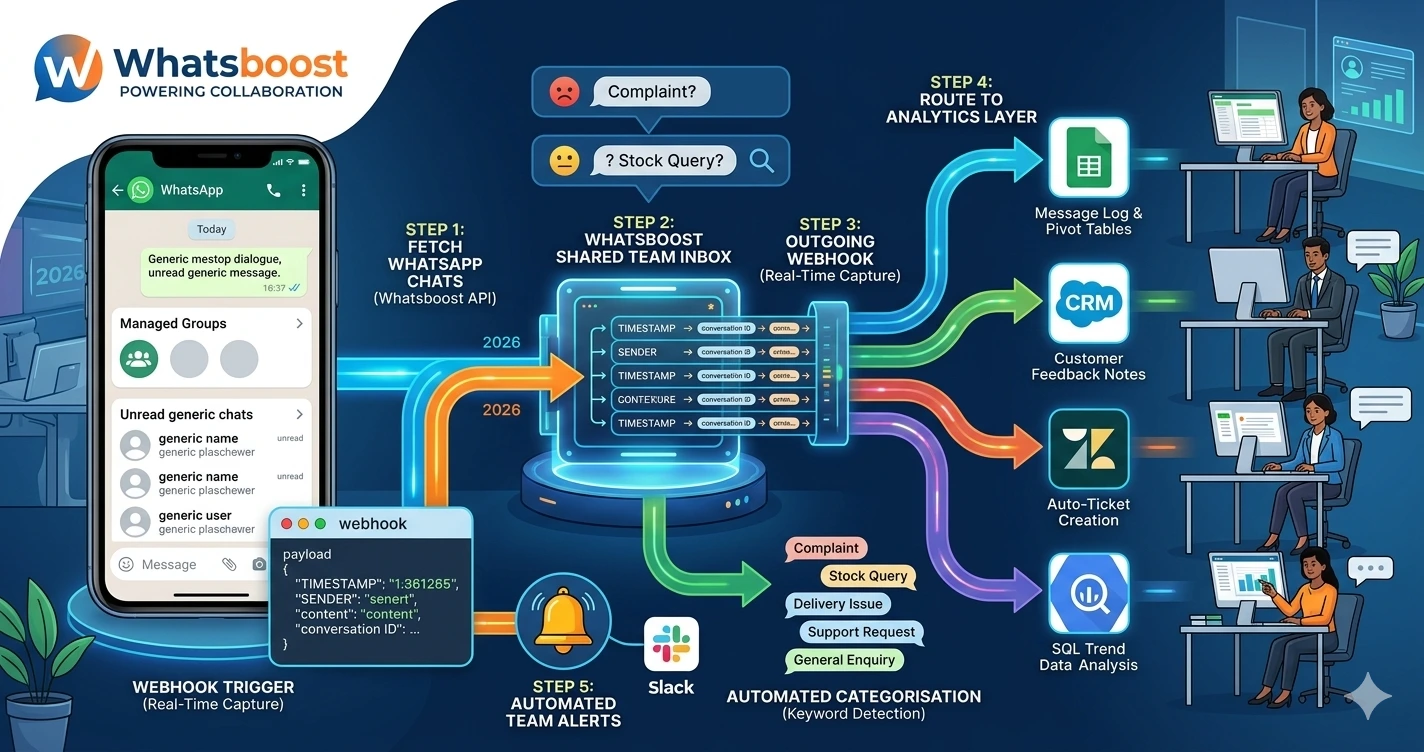
Connect your CRM, e-commerce platform, or event registration system to Whatsboost using Zapier, Make, or Pabbly Connect. For each qualifying trigger event, build an automation workflow that:
- Extracts the contact's phone number and formats it in international format
- Identifies the correct community sub-group based on the trigger event type
- Makes the WhatsApp Group API adding call via Whatsboost to add the contact to the identified sub-group
- Triggers Whatsboost to send a personalised welcome message to the new member immediately after the addition is confirmed
- Updates the contact's CRM record with their community membership status and sub-group assignment
Step 5: Automate Community Content and Engagement Cadence
Adding members is only the beginning. The community delivers value through consistent, relevant content posted on a regular schedule. Use Whatsboost's broadcast and scheduling tools to automate the content cadence for each sub-group — industry insights on Mondays, member spotlights on Wednesdays, expert Q&A threads on Fridays — so the community experience is consistently valuable without requiring daily manual effort from your team.
Configure automated monthly polls within each sub-group — gathering member feedback on content preferences, community topics, and product needs — and use the poll response data to continuously refine the content experience and strengthen community relevance over time. Visit Whatsboost.in for more on community content scheduling.

Niche Community Types That Thrive With WhatsApp Group API Automation
Product user communities — For SaaS, hardware, or consumer product businesses, a niche user community built around a specific product use case drives adoption depth, reduces churn, generates peer-to-peer support, and surfaces product improvement insights directly from your most engaged customers.
Professional development communities — For EdTech, coaching, and training businesses, niche communities built around specific career stages, industries, or skill development goals create sustained learner engagement between courses — increasing repeat enrolment and referral rates significantly.
Loyalty and advocate communities — For consumer brands and e-commerce businesses, niche communities built around brand values, lifestyle alignment, or exclusive member benefits create a cohort of vocal brand advocates whose peer recommendations generate high-trust acquisition that paid advertising cannot replicate.
B2B industry communities — For B2B service providers, a niche community built around a specific industry vertical — restaurant owners, independent pharmacies, garment exporters — creates a trusted thought leadership platform that positions your business as the go-to resource for that segment's specific challenges and needs.
Best Practices for Building Niche WhatsApp Communities With Group API
Set a minimum viable community size before opening up content. Launching community content into a group of five members creates a sparse, low-energy experience that makes early members less likely to engage. Use the Group API adding features to build membership to 25 to 30 members before activating the content schedule — ensuring the community feels alive from the first post.
Onboard every new member with a personal first message. The automated welcome message is essential — but for high-value niche communities, consider following up the automated welcome with a brief, genuine personal message from a community manager within the first 24 hours. This human touch in the early experience dramatically increases member engagement and retention rates.
Track community health metrics weekly, not monthly. WhatsApp community health — measured by message read rates, poll participation, member retention, and sub-group progression rates — can deteriorate quickly if content relevance drops or posting frequency becomes inconsistent. Weekly monitoring through Whatsboost analytics enables rapid course correction before disengagement becomes entrenched.
Build Communities That Convert — Automatically and at Scale
Niche customer communities built on WhatsApp are one of the highest-engagement, lowest-cost retention and conversion assets available to Indian businesses in 2026. The WhatsApp Group API adding features, activated and automated through Whatsboost, transform community building from a manual, limited-scale activity into a systematic, continuously growing engagement engine — adding the right members to the right communities automatically, delivering consistent value through scheduled content, and progressing members through the community journey as their relationship with your business deepens.
Visit Whatsboost.in and start building your niche WhatsApp customer community today.
Want to automate WhatsApp for your business?
Set up campaigns, replies, and follow-ups in minutes.