N8N Automation Implementation Services for Enterprises: Workflows, Integrations & Business Automation (2026)
Discover how enterprises use N8N automation services to streamline workflows, integrate CRMs, automate WhatsApp communication, and improve operational efficiency across teams.
Enterprise Teams Are Drowning in Manual Processes
Most growing businesses today deal with:
- Repetitive workflows
- Disconnected tools
- Manual follow-ups
- Scattered customer communication
As operations scale:
❌ Teams become overloaded
❌ Delays increase
❌ Errors become common
👉 The biggest issue is not lack of software.
👉 It’s lack of automation between systems.
Why Enterprises Are Moving Toward Workflow Automation
Modern businesses use multiple platforms:
- CRMs
- Google Sheets
- ERPs
- Email tools
- Payment systems
- Internal dashboards
But these systems often don’t communicate properly.
Example 👇
A lead enters the CRM…
But then someone manually:
- Assigns the lead
- Sends a WhatsApp message
- Updates spreadsheets
- Creates follow-up tasks
👉 This creates operational inefficiency at scale.
What is N8N?
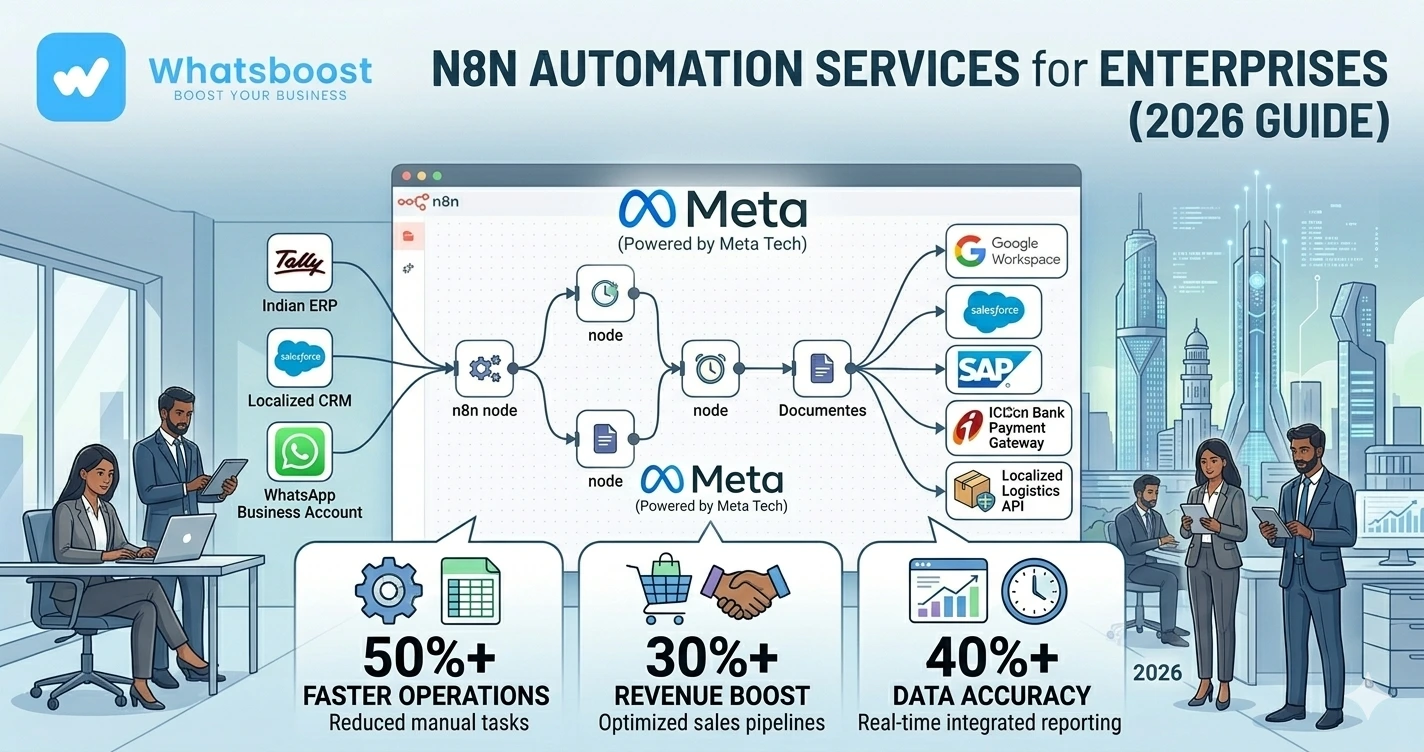
N8N is a workflow automation platform that helps businesses connect apps, automate repetitive tasks, and create powerful business workflows without heavy manual work.
It allows enterprises to:
✔ Connect multiple tools
✔ Automate workflows
✔ Build custom integrations
✔ Reduce repetitive operations
👉 Businesses use N8N to create scalable automation systems across departments.
Why Enterprises Prefer N8N
1. Flexible Workflow Automation
Unlike rigid automation tools:
✔ N8N allows custom workflows
✔ Supports advanced logic
✔ Handles complex automation scenarios
2. Open & Scalable Architecture
Enterprises prefer solutions that offer:
✔ Greater control
✔ Scalability
✔ Integration flexibility
👉 N8N supports enterprise-grade customization.
3. Multi-App Integrations
N8N can connect:
- CRMs
- WhatsApp systems
- APIs
- Databases
- Internal software
👉 This creates centralized automation ecosystems.
4. Reduced Operational Costs
Automation reduces:
❌ Manual coordination
❌ Repetitive tasks
❌ Human errors
👉 Teams become more productive without increasing headcount.
Why WhatsApp Automation + N8N is Becoming Popular
Many enterprises now use WhatsApp as a core business communication channel.
They automate:
✔ Lead responses
✔ Customer support
✔ Follow-ups
✔ Notifications
✔ Internal alerts
If you're still managing communication manually, first understand how WhatsApp automation without Business API works because this is often the foundation of scalable WhatsApp workflows.
What Enterprises Automate Using N8N
1. Lead Management Workflows
Example workflow 👇
Lead enters CRM → WhatsApp message sent → Sales task assigned → Follow-up reminder created
👉 This reduces response delays dramatically.
Businesses improve conversions using WhatsApp lead qualification systems
2. Customer Support Automation
Enterprises automate:
✔ Ticket routing
✔ Customer notifications
✔ Escalation workflows
✔ Status updates
👉 Many businesses even create WhatsApp group ticketing systems for structured support communication.
3. Task Delegation & Team Coordination
As organizations scale:
❌ Manual coordination becomes inefficient
Automation helps:
✔ Assign tasks automatically
✔ Notify teams instantly
✔ Track workflow progress
👉 Learn how task delegation on WhatsApp improves operational efficiency.
4. Employee Alert Systems
Enterprises automate:
- HR updates
- Internal notifications
- Approval reminders
- Operational alerts
👉 Businesses improve coordination using automated employee alerts via WhatsApp
5. CRM & ERP Synchronization
N8N helps synchronize data across:
✔ CRM systems
✔ ERP tools
✔ Internal dashboards
👉 This eliminates manual data entry.
6. Finance & Payment Workflows
Automate:
✔ Payment reminders
✔ Invoice notifications
✔ Collection follow-ups
👉 Learn how businesses automate payment reminders on WhatsApp
Common Enterprise Use Cases for N8N
🏢 B2B Enterprises
Lead management & sales workflows
🛒 E-commerce Businesses
Order & support automation
🎓 Education Companies
Student onboarding & notifications
🏭 Manufacturing Businesses
Internal coordination & dealer communication
🧑💼 Agencies & Service Businesses
Client workflows & task automation
Step-by-Step: How N8N Implementation Services Work
Step 1: Business Process Audit
Identify:
- Repetitive tasks
- Operational bottlenecks
- Communication gaps
👉 Automation starts with process clarity.
Step 2: Workflow Mapping
Define:
✔ Triggers
✔ Actions
✔ Team responsibilities
✔ Automation logic
👉 Structured workflows reduce confusion.
Step 3: Integration Setup
Connect systems like:
- CRM
- Google Sheets
- Email tools
- APIs
👉 Enterprises often integrate using CRM + WhatsApp automation workflows
Step 4: Automation Deployment
Implement workflows with:
✔ Testing
✔ Validation
✔ Error handling
👉 Reliability is critical for enterprise operations.
Step 5: Analytics & Optimization
Track:
- Workflow efficiency
- Response times
- Conversion performance
- Operational improvements
👉 Continuous optimization improves ROI.
Real Workflow Example (Simple Table)
| Trigger | Automated Action | Business Impact |
| New lead captured | WhatsApp follow-up sent | Faster response |
| Invoice overdue | Payment reminder triggered | Better collections |
| Support ticket raised | Team alert created | Faster resolution |
| Task assigned | Employee notified | Better accountability |
Why Enterprises Need Professional N8N Implementation Services
Many businesses fail because they:
❌ Build unstructured automations
❌ Ignore scalability
❌ Create unstable workflows
Professional implementation helps ensure:
✔ Scalable architecture
✔ Reliable workflows
✔ Better integrations
✔ Security & operational stability
Advanced Enterprise Automation Strategies
🔁 Multi-Step Workflow Automation
Example:
Lead captured → Qualification → Follow-up → CRM update → Manager notification
👉 This creates fully automated operational pipelines.
🧠 AI-Powered Workflow Automation
AI can:
✔ Analyze customer intent
✔ Prioritize leads
✔ Generate automated responses
👉 Enhance systems using Gemini AI WhatsApp integration
📊 Enterprise Analytics Dashboards
Track:
- Team productivity
- Automation efficiency
- Workflow bottlenecks
👉 Data improves decision-making.
🔗 Cross-Department Automation
Connect:
✔ Sales
✔ Support
✔ HR
✔ Finance
✔ Operations
👉 Automation removes communication silos.
Before vs After Enterprise Automation
| Factor | Manual Operations | Automated Workflows |
| Speed | ❌ Slower | ✔ Faster |
| Accuracy | ❌ Lower | ✔ Higher |
| Scalability | ❌ Limited | ✔ Strong |
| Team efficiency | ❌ Reduced | ✔ Improved |
👉 Automation creates operational scale.
Common Mistakes Enterprises Make
❌ Automating without strategy
❌ Overcomplicated workflows
❌ Poor integration planning
❌ No analytics tracking
❌ Ignoring workflow scalability
👉 These reduce automation effectiveness.
Pro Tips (From Real Enterprise Implementations)
Start with High-Impact Workflows
Automate repetitive operations first
Keep Workflows Structured
Avoid unnecessary complexity
Monitor Performance Continuously
Optimization matters
Integrate Communication Systems
Centralized communication improves operations
Why WhatsBoost is Ideal for N8N + WhatsApp Automation
🚀 Enterprise Workflow Automation
Scalable business systems
🤖 Smart WhatsApp Integrations
Lead, support, and notification workflows
👥 Team Coordination Systems
Better operational visibility
📊 Analytics & Tracking
Measure workflow performance
👉 It transforms WhatsApp into an enterprise communication and automation layer
Real Insight
Most enterprises already have software.
What they lack is:
❌ Connected systems
❌ Automated workflows
❌ Operational visibility
Automation solves these problems at scale.
Final Conclusion
Enterprise growth creates operational complexity.
Without workflow automation:
❌ Teams become overwhelmed
❌ Communication slows down
❌ Processes become inefficient
With N8N implementation services:
✔ Workflows become automated
✔ Teams become more efficient
✔ Operations become scalable
👉 The future is:
👉 Enterprise Automation + WhatsApp Workflows = Operational Efficiency 🚀
Want to automate WhatsApp for your business?
Set up campaigns, replies, and follow-ups in minutes.