The Real Cost of RTO and Why Email Can’t Fix It
Every D2C founder deals with two major financial pressures.
First, ad costs on Meta and Google climb every quarter. Every customer you win costs more today than it did six months ago.
Second, Cash on Delivery drives most of your volume in Tier-2 and Tier-3 cities, but it bleeds your margins on the back end. Prepaid orders in India see return rates around 10 to 15 percent. Standard COD returns hover between 25 and 30 percent. During peak festive sales, Unicommerce data across thousands of brands showed COD returns surging up to 58 percent. When a COD parcel returns, you pay for the Facebook ad, the packaging, the courier fee out, and the courier fee back. You collect zero revenue, but your bank account takes a direct hit.
You cannot stop offering COD because your customers expect it. The solution is verifying that the order is genuine before handing it to the courier.
Email cannot do this because promotional emails land in buried tabs that nobody checks. SMS fails because it is a one-way text block. A customer cannot tap a button on an SMS to confirm their address, so your team ends up making manual verification calls.
WhatsApp changes this completely. Over 500 million people in India use WhatsApp every day. Messages arrive instantly with buttons, product images, and tracking links, allowing customers to respond in seconds.
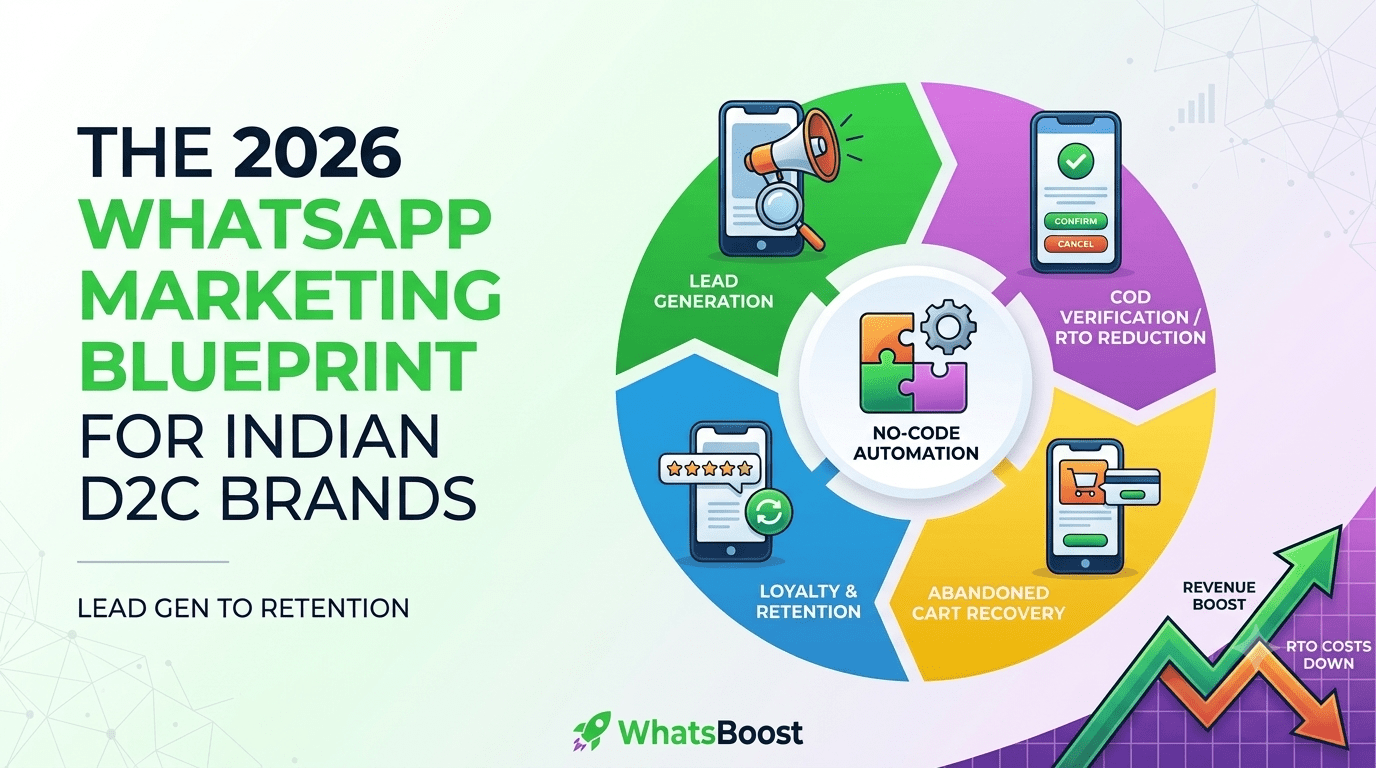
Stage 1: Capturing High-Intent Leads with Click-to-WhatsApp Ads
Most D2C ad campaigns send traffic to a Shopify or WooCommerce landing page. The user scrolls, gets distracted, and leaves without buying. You pay for the click, but you get no phone number or contact data.
Click-to-WhatsApp ads fix this leak. When a user clicks your Facebook or Instagram ad, it opens a direct chat thread on WhatsApp instead of a website.
The moment they click Send on the pre-filled message, you capture their verified phone number. Even if they do not buy immediately, that lead is saved in your database for future follow-ups.
Inside the chat, an automated flow presents interactive buttons. The customer can tap options like View Best Sellers, Check Available Sizes, or Talk to Support.
If they pick a product, the bot sends a direct checkout link that pre-fills their selection on your store. This shortens the buying journey from five web pages down to two taps inside a chat app.
Stage 2: Stopping COD Cancellations Before Dispatch
The single fastest way to protect your profit margin is automated COD verification.
When a customer places a COD order on your website, WhatsBoost triggers an instant WhatsApp message. The message displays the exact order summary, shipping address, and total amount, along with two simple buttons: Confirm Order and Cancel Order.
If the customer taps Confirm, your store marks the order as verified and moves it to the packing queue. If they tap Cancel, the order is flagged before your warehouse packs it, saving you forward freight, packaging materials, and reverse logistics costs.
To make this even more effective, offer a small incentive to convert COD orders into prepaid purchases.
On the confirmation message, add a prompt: Pay now via UPI and get an instant 5 percent extra discount or free express shipping.
A significant portion of buyers take this offer. Every order you convert from COD to prepaid instantly drops out of the high-risk return pool and protects your cash flow.
Stage 3: Recovering Abandoned Carts in Minutes
Sending an abandoned cart email four hours after a customer leaves your site does not work anymore. By the time they read it, they have already bought from a competitor or forgotten about the product.
With WhatsBoost integrated into your eCommerce platform, a dropped cart triggers a WhatsApp notification within 15 minutes.
The message includes the actual photo of the item left in the cart, a short note reminding them that stock is limited, and a direct checkout link.
If the customer hesitates due to price, a second message can fire 3 hours later offering a limited-time coupon code. Because WhatsApp open rates hover above 80 percent, cart recovery sequences on WhatsApp consistently recover 3 to 4 times more lost revenue than email sequences.
Stage 4: Building Post-Purchase Loyalty and Driving Reorders
The sale does not end when the parcel leaves your warehouse. The post-purchase period determines whether a customer buys from you once or stays with you for a year.
Use automated post-purchase workflows to handle delivery updates and repeat orders.
As soon as the courier updates the package status, send automated WhatsApp notifications for Order Dispatched, Out for Delivery, and Delivered. This cuts down on customer support tickets asking Where is my order?
Three days after delivery, trigger an automated review request. Ask the customer to rate their purchase directly inside the chat using star buttons.
Thirty days later, send a replenishment broadcast based on what they bought. If a customer ordered a 30-day supply of skincare or supplements, an automated reminder on day 25 with a 1-tap reorder link brings them back before they run out.
How to Execute This Strategy on WhatsBoost Without Coding
Setting up this entire funnel does not require hiring a developer or writing code.
You start by connecting your Meta Business Manager account to WhatsBoost to get your official WhatsApp Business API approval. Once approved, install the native WhatsBoost plugin on your Shopify or WooCommerce store. Inside the WhatsBoost dashboard, use the visual drag-and-drop workflow builder to map out your journeys. You can select pre-built templates for COD Verification, Abandoned Cart Recovery, and Delivery Notifications.
Set your delays, customize your message text, add interactive reply buttons, and turn the campaigns on. Your store will begin automating customer communication and protecting your profit margins from day one.