
Using WhatsApp Communities and Groups for Wedding Event Coordination (2026 Guide)
Learn how to use WhatsApp Communities and Groups for wedding event coordination, guest management, reminders, vendor communication, RSVP tracking, and automated wedding workflows.
Using WhatsApp Communities and Groups for Wedding Event Coordination
Wedding planning looks beautiful from the outside.
But behind the scenes?
It often becomes a communication nightmare.
❌ Guests asking the same questions repeatedly
❌ Family members missing updates
❌ Vendors not receiving instructions
❌ RSVP confusion
❌ Last-minute coordination chaos
❌ Hundreds of messages across multiple groups
And as wedding size increases…
The communication becomes harder to manage manually.
Especially in Indian weddings where:
- Multiple functions happen over several days
- Different families coordinate together
- Vendors require constant updates
- Guests travel from multiple locations
- VIP guests need personalized communication
That’s why more wedding planners and families are now using:
✔ WhatsApp Communities
✔ WhatsApp Groups
✔ WhatsApp Flows
✔ AI automation systems
to manage wedding communication more efficiently.
👉 Modern weddings are no longer managed through scattered chats.
They are managed through structured communication systems.
Why WhatsApp Works Perfectly for Wedding Coordination
Most wedding guests already use WhatsApp daily.
Which means:
✔ Faster visibility
✔ Higher response rates
✔ Easier reminders
✔ Real-time coordination
✔ Better guest engagement
Compared to:
❌ Emails
❌ SMS
❌ Phone calls
❌ Spreadsheet-based coordination
WhatsApp creates a much smoother guest experience.
This is why businesses across industries are increasingly moving toward WhatsApp-first communication systems.
You can also explore:
- Your Customers Are Ghosting Emails and Calls — Why WhatsApp Follow-Ups Work
- How to Run a 5-Person Business Like a 50-Person Team Using WhatsApp Automation
The same operational benefits apply to wedding management too.
What Are WhatsApp Communities for Weddings?
WhatsApp Communities allow organizers to manage multiple groups under one central structure.
Instead of creating random disconnected groups…
Wedding organizers can structure communication properly.
Example:
Wedding Community Structure
Main Wedding Community
- Family Group
- Bride Side Group
- Groom Side Group
- Vendor Coordination Group
- VIP Guest Group
- Outstation Guest Group
- Event Updates Group
This creates centralized communication while reducing confusion.
Why Traditional Wedding Communication Fails
Most weddings still depend on:
- Manual calls
- Individual messages
- Random family groups
- Excel sheets
- Broadcast forwarding
This quickly becomes unmanageable.
Common Wedding Communication Problems
| Problem | What Happens |
| Too many chats | Important updates get missed |
| No guest segmentation | Wrong people receive wrong updates |
| Repeated guest questions | Families waste hours replying |
| Vendor confusion | Delays and coordination problems happen |
| No reminder system | Guests forget schedules |
Manual coordination starts breaking down.
Best Ways to Use WhatsApp Communities for Weddings
1. Create Separate Groups for Different Purposes
Avoid putting everyone into one giant group.
Instead, organize communication strategically.
Recommended Group Structure
| Group Type | Purpose |
| Main Announcement Group | Major updates |
| Family Coordination Group | Internal planning |
| Vendor Group | Operational coordination |
| VIP Guest Group | Premium communication |
| Outstation Guest Group | Travel & stay updates |
| Event-Specific Groups | Haldi, Sangeet, Reception etc. |
This reduces unnecessary message overload.
2. Use Announcement-Only Groups
Large wedding groups can become chaotic.
Too many:
- “Congratulations”
- Random forwards
- Unrelated messages
can hide important updates.
That’s why announcement-only groups work better for:
✔ Venue updates
✔ Timing reminders
✔ Schedule changes
✔ Parking instructions
✔ Emergency updates
3. Automate RSVP Collection
Manual RSVP tracking creates confusion quickly.
Instead…
Use WhatsApp automation workflows.
Example workflow:
Invitation Sent → Guest Opens WhatsApp Flow → RSVP Submitted → Guest Added to Correct Group Automatically
This simplifies guest management significantly.
Related reading:
- How to Automate Wedding Guest Communication Using WhatsApp Flows
- How to Automate WhatsApp Replies From Google Forms
4. Segment Guests Properly
Different guests require different communication.
For example:
| Guest Type | Communication Needed |
| Family | Full coordination updates |
| VIP Guests | Personalized assistance |
| Vendors | Setup instructions |
| Outstation Guests | Travel & hotel updates |
| Friends | Event schedules & fun updates |
Segmentation improves guest experience dramatically.
5. Use Automated Reminder Sequences
Wedding guests often forget:
- Timings
- Venues
- Dress codes
- Travel instructions
Automation solves this.
Examples:
✔ Mehendi reminder
✔ Sangeet timing update
✔ Reception venue navigation
✔ Parking instructions
✔ Hotel check-in reminders
This reduces repeated guest questions massively.
6. Coordinate Vendors Through Dedicated Groups
Vendor coordination is one of the biggest wedding operational problems.
Using dedicated WhatsApp groups helps manage:
✔ Decor teams
✔ Caterers
✔ Photographers
✔ Makeup artists
✔ Transportation teams
✔ Event managers
Everyone receives updates instantly.
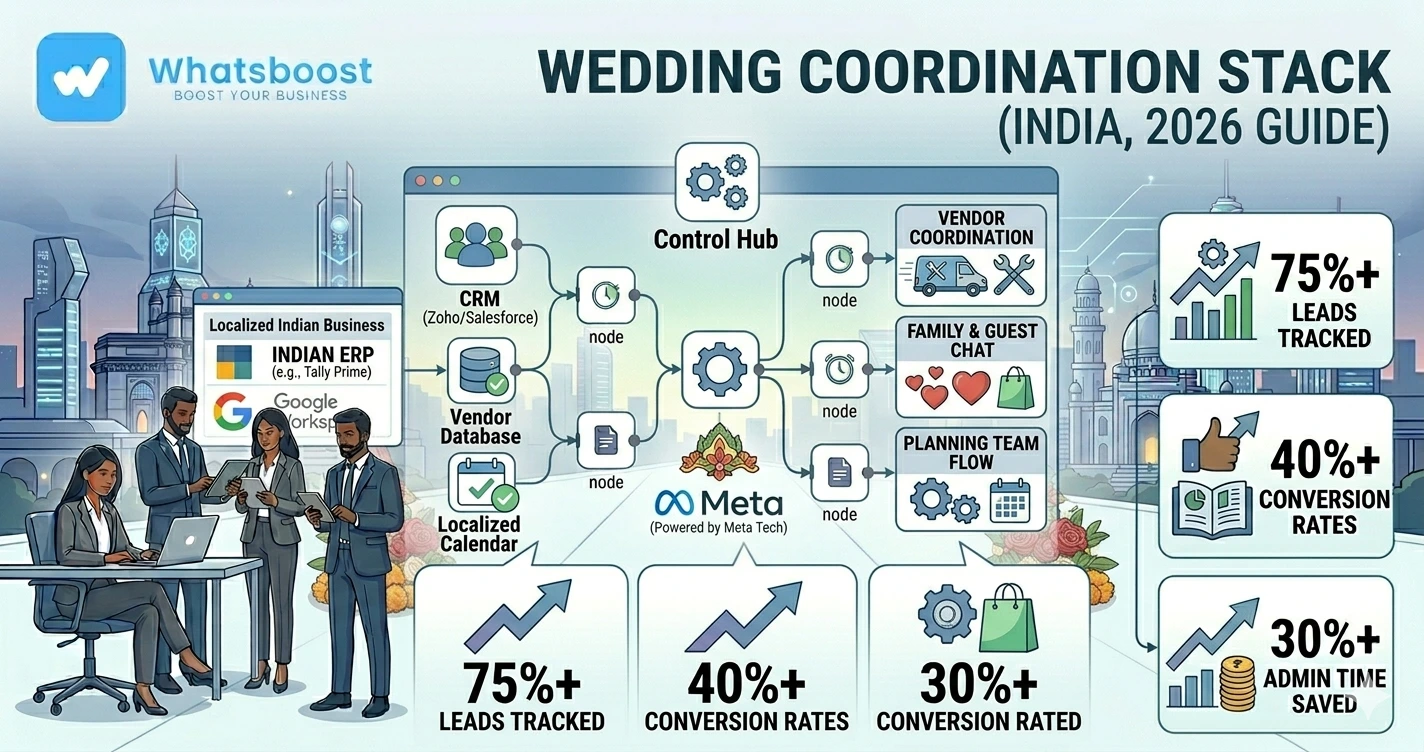
How Wedding WhatsApp Automation Works
Example Workflow
Guest Receives Invitation → RSVP Submitted → Guest Categorized → Added to Relevant Groups → Automated Reminder Sequence Starts
This entire workflow can be automated using:
- WhatsApp API
- n8n
- Google Sheets
- CRM systems
- AI workflows
Tools Used for Wedding Coordination Automation
| Tool | Purpose |
| WhatsApp Communities | Central communication |
| WhatsApp Groups | Segmented coordination |
| WhatsBoost | Workflow automation |
| n8n | Backend automations |
| Google Sheets | Guest database |
| Claude AI | Smart guest replies |
| CRM | Guest management |
WhatsApp + AI + Automation
to manage large-scale events smoothly.
Related blogs:
- n8n WhatsApp Integration Without API
- WhatsApp + n8n + Claude Automation Ideas
- How to Integrate CRM With WhatsApp for Automation
Using AI for Wedding Guest Support
AI can automate repetitive guest communication.
Guests can ask questions like:
- “What time does the ceremony start?”
- “Where is parking available?”
- “What is the dress code?”
- “Can I bring extra guests?”
- “Where is the hotel located?”
AI replies instantly.
This reduces manual coordination workload significantly.
You can also explore:
- Building an AI WhatsApp Coach Using Claude AI and n8n
- How to Integrate Gemini With WhatsApp
Real Wedding Coordination Example
Destination Wedding Workflow
Guest Added to Community → RSVP Collected → Hotel Details Shared → Airport Pickup Group Created → Event Reminders Automated → Live Event Updates Sent
This creates a structured digital guest experience.
Before vs After WhatsApp Wedding Coordination
| Before Automation | After Automation |
| Random family groups | Structured Communities |
| Manual RSVP tracking | Automated workflows |
| Repeated guest questions | AI support systems |
| Vendor confusion | Centralized coordination |
| Missed updates | Automated reminders |
Common Mistakes Wedding Organizers Make
1. Using One Large Group for Everything
This creates confusion very quickly.
Segment communication properly.
2. Sending Too Many Messages
Overmessaging reduces engagement.
Keep communication useful.
3. No Automated Reminder System
Guests forget schedules constantly.
Automated reminders are critical.
4. No Vendor Coordination Structure
Vendor confusion causes operational delays.
Dedicated groups improve efficiency.
Advanced Wedding WhatsApp Automation Ideas
1. AI Wedding Concierge
Guests receive instant support 24/7.
2. Smart Guest Group Assignment
Guests automatically join relevant groups based on RSVP selections.
3. Automated Venue Navigation
Guests receive maps and directions automatically before events.
4. Post-Wedding Photo Distribution
Photos and albums can be shared automatically after events.
Why WhatsApp Is Becoming Essential for Wedding Operations
Modern weddings involve massive communication complexity.
That’s why wedding planners increasingly use:
✔ WhatsApp Communities
✔ AI workflows
✔ CRM integrations
✔ Guest segmentation systems
✔ Reminder automations
to manage weddings professionally at scale.
How WhatsBoost Helps Wedding Businesses
WhatsBoost helps automate:
✔ Wedding guest communication
✔ RSVP systems
✔ WhatsApp Communities workflows
✔ Vendor coordination
✔ Reminder automations
✔ AI guest support
✔ Group management workflows
Using:
- WhatsApp automation
- AI workflows
- CRM integrations
- Google Sheets systems
- n8n automation
Wedding planners can manage large-scale wedding communication without operational chaos.
Final Conclusion
Wedding communication becomes difficult when managed manually.
As guest count increases:
❌ Messages become chaotic
❌ Updates get missed
❌ Vendors become confused
❌ Families get overwhelmed
That’s why modern wedding planners and event businesses are increasingly using WhatsApp Communities and automation systems.
Using WhatsApp Groups, Communities, AI workflows, CRMs, and automation tools like n8n…
Businesses can coordinate weddings more smoothly from invitation to post-event engagement.
👉 The future is: WhatsApp + AI + Automation = Scalable Business Operations 🚀
Want to automate WhatsApp for your business?
Set up campaigns, replies, and follow-ups in minutes.