
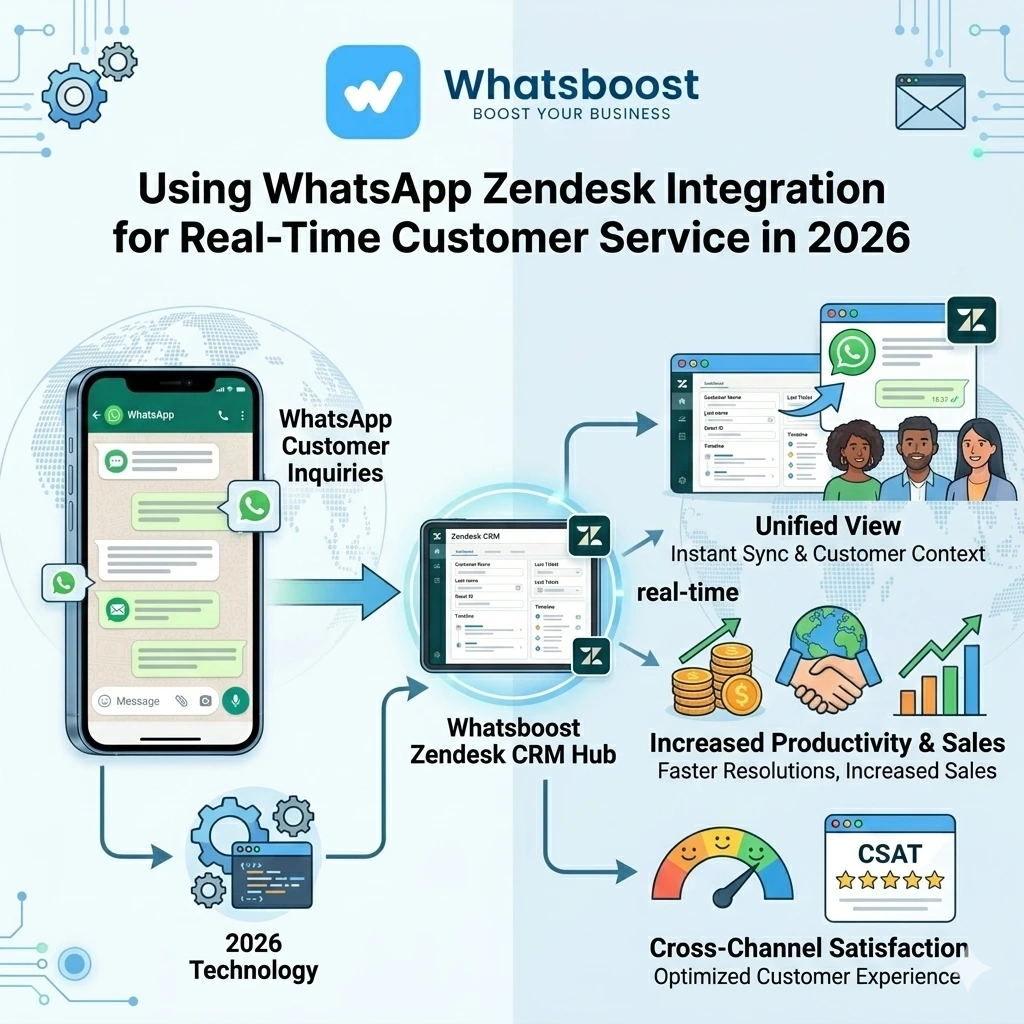
Using WhatsApp Zendesk Integration for Real-Time Customer Service in 2026 | Whatsboost
Discover how to use WhatsApp Zendesk integration for real-time customer service in 2026. Learn practical workflows, setup steps, key benefits, and how Whatsboost powers faster, smarter customer support for Indian businesses.
Customer service expectations have fundamentally shifted. In 2026, Indian customers do not wait patiently for email replies or endure long phone queues. They send a WhatsApp message and expect a response within minutes — ideally within seconds. For businesses using Zendesk to manage customer support, the challenge is bridging the gap between where customers communicate and where support teams operate.
WhatsApp and Zendesk integration solves this precisely. It connects the platform where your customers reach out with the platform where your support team resolves issues — creating a seamless real-time customer service experience that meets modern expectations without adding operational complexity.
This blog walks you through how to use WhatsApp Zendesk integration for real-time customer service, the practical workflows that make it impactful, and how Whatsboost powers the WhatsApp Business API layer that makes it all work.
Why Real-Time Customer Service on WhatsApp Requires Zendesk Integration
WhatsApp is exceptional for initiating conversations. Customers use it instinctively — it is faster than email, more personal than a support portal, and accessible on any smartphone. Indian businesses that offer WhatsApp as a support channel see significantly higher customer engagement than those relying solely on email or phone.
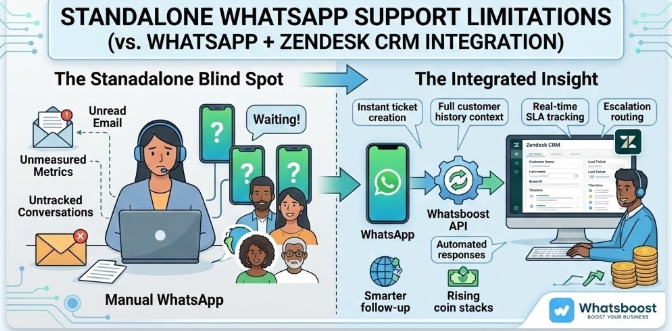
But WhatsApp alone has serious limitations for real-time customer service at scale. Without Zendesk integration, WhatsApp support is unstructured — conversations are untracked, resolution times are unmeasured, agent accountability is unclear, and customer history is invisible to anyone beyond the individual who last replied.
Zendesk provides exactly what standalone WhatsApp lacks: ticketing structure, SLA tracking, agent assignment, customer history, and performance reporting. When the two are integrated through Whatsboost, businesses get real-time WhatsApp communication with the organisational backbone of a professional support platform — the best of both worlds for Indian customer service teams.
What WhatsApp Zendesk Integration Enables for Real-Time Customer Service
When WhatsApp and Zendesk are connected through Whatsboost, here is what your real-time customer service operation gains:
Instant ticket creation from WhatsApp messages — Every incoming customer WhatsApp message automatically creates or updates a Zendesk ticket — so support agents work from a structured queue rather than an unmanaged chat inbox.
Complete customer context before the first reply — Agents respond to WhatsApp messages through Zendesk with the customer's full interaction history visible — previous tickets, past resolutions, product purchases, and any earlier WhatsApp exchanges already synced to the record.
Real-time SLA tracking for WhatsApp conversations — Zendesk's SLA policies apply to WhatsApp-generated tickets, ensuring that real-time customer service standards — first response time, resolution time — are measured and managed the same way as every other support channel.
Automated responses for instant acknowledgement — When a customer messages on WhatsApp outside business hours or during high-volume periods, Whatsboost's automation sends an instant acknowledgement message — confirming receipt and providing an estimated response time — before a human agent is available.
Escalation routing based on message content — WhatsApp messages containing escalation signals are automatically routed to senior agents or specialist queues in Zendesk — ensuring urgent customer issues receive priority handling without manual triage.
How to Set Up WhatsApp Zendesk Integration With Whatsboost
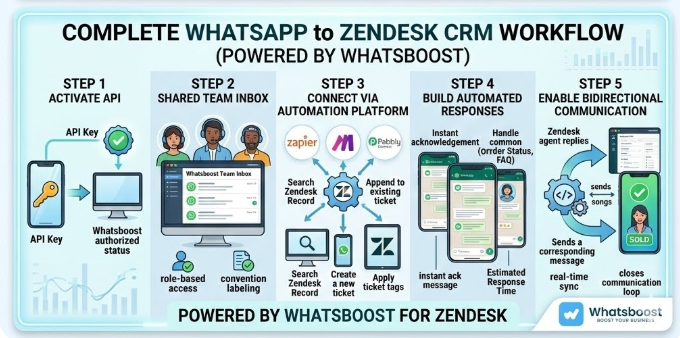
Step 1: Activate WhatsApp Business API via Whatsboost
The foundation of the entire integration is the WhatsApp Business API. Whatsboost is an authorised WhatsApp Business Solution Provider that activates your API quickly, with full setup support. Without the API, WhatsApp cannot communicate programmatically with Zendesk. Start at Whatsboost.in.
Step 2: Configure Whatsboost Shared Team Inbox
Set up Whatsboost's shared team inbox as the central hub for all incoming WhatsApp customer messages. Assign your support agents to the inbox, configure role-based access so agents only see relevant conversations, and establish internal labelling conventions — such as "Billing," "Technical," "Returns" — that will drive routing logic in Zendesk.
Step 3: Connect Whatsboost to Zendesk via Webhook or Automation Platform
Enable outgoing webhooks in Whatsboost that fire on every incoming WhatsApp message. Connect these webhooks to Zendesk using Zapier, Make, Pabbly Connect, or Zendesk's own API to trigger the following actions:
- Search Zendesk for an existing customer record matching the WhatsApp phone number
- Create a new ticket if no open ticket exists for this customer
- Append the message to an existing open ticket if one is active
- Apply ticket tags based on Whatsboost message labels for accurate routing
Step 4: Build Automated Response Workflows in Whatsboost
Use Whatsboost's no-code automation builder to create instant response workflows — so every incoming WhatsApp customer message receives an immediate acknowledgement before a human agent responds. These automations can also handle common queries entirely on their own — such as order status checks, FAQ responses, or operating hours — freeing agents to focus on complex, high-value support interactions.
Step 5: Enable Bidirectional Communication Between Zendesk and WhatsApp
Configure your workflow so that when a Zendesk agent updates a ticket — changing status, adding a note, or sending a reply — a corresponding WhatsApp message is sent to the customer automatically via Whatsboost. This closes the communication loop, keeping customers informed in real time without agents having to manually switch between Zendesk and WhatsApp to send updates.
4 Real-Time Customer Service Workflows for WhatsApp Zendesk Integration
1. Instant Support Ticket Creation From WhatsApp
A customer messages your WhatsApp number with a product complaint at 9 AM. Within seconds, a Zendesk support ticket is created automatically — populated with the customer's name, phone number, message content, and an assigned priority level based on keywords detected by Whatsboost. The agent assigned to the ticket sees the complete message and the customer's full history and can respond directly through Zendesk — with the reply delivered back to the customer on WhatsApp automatically.
2. AI-Powered First Response for Common Queries
Before a human agent responds, Whatsboost's chatbot automation handles the most common customer queries — order status, refund policy, service hours, appointment availability — instantly and accurately. Only queries the chatbot cannot resolve are escalated to a Zendesk ticket for human handling. For Indian businesses receiving hundreds of WhatsApp customer messages daily, this automated first response layer dramatically reduces agent workload while maintaining a real-time customer experience.
3. Priority Escalation for High-Urgency Customers
When a customer sends a WhatsApp message containing escalation language — "urgent," "still waiting," "third time contacting" — Whatsboost's keyword detection triggers an immediate priority upgrade in the corresponding Zendesk ticket and sends a WhatsApp notification to the support manager. High-urgency customer situations are identified and escalated in real time, not discovered during end-of-day reviews.
For Indian businesses managing large customer bases across diverse product categories, this automated escalation workflow is one of the most valuable elements of the WhatsApp Zendesk integration. Whatsboost makes this straightforward to configure without developer involvement.
4. Automated Resolution Confirmation and CSAT Request
When a Zendesk ticket is marked resolved, an automated WhatsApp message is sent to the customer via Whatsboost — confirming the resolution, providing a brief summary of what was done, and inviting a satisfaction rating: "Was your issue resolved? Reply 1 for Yes, 2 for No." The rating is captured and automatically logged back to the Zendesk ticket as a CSAT score — completing the real-time service loop from initial contact to post-resolution feedback without any manual step required from the support team.
Best Practices for WhatsApp Zendesk Real-Time Customer Service
Set clear SLA expectations on WhatsApp. When customers message on WhatsApp, they expect fast responses. Configure your automated acknowledgement messages to set honest, specific expectations — "Our team will respond within 30 minutes during business hours" — that you can consistently meet.
Use Whatsboost labels as Zendesk ticket tags. Standardised labels applied by agents in Whatsboost — such as issue type, urgency, or product category — should map directly to Zendesk tags, enabling meaningful filtering, reporting, and routing within Zendesk.
Monitor real-time agent response metrics. Whatsboost's analytics combined with Zendesk reporting give you a complete picture of real-time customer service performance — WhatsApp-specific response times alongside Zendesk's broader SLA compliance data. Review both weekly to identify bottlenecks.
Train agents to work from Zendesk, not WhatsApp. The integration is most effective when agents stop managing conversations in WhatsApp and work entirely from Zendesk — where full customer context, SLA tracking, and collaboration tools are all available. The WhatsApp messages appear in Zendesk; agents reply from Zendesk; Whatsboost delivers the response to the customer on WhatsApp automatically.
Real-Time Customer Service Is the Standard — WhatsApp Zendesk Integration Is How You Meet It
In 2026, customers define excellent service as fast, contextual, and channel-agnostic. They expect the business to know who they are and what has happened before — regardless of whether they are messaging on WhatsApp today or called yesterday.
WhatsApp Zendesk integration, powered by Whatsboost, delivers exactly this. Every WhatsApp message is captured, contextualised, and managed within Zendesk's professional support infrastructure — giving your team the tools to deliver genuinely real-time customer service at scale.
Visit Whatsboost.in and build your WhatsApp Zendesk real-time customer service system today.
Want to automate WhatsApp for your business?
Set up campaigns, replies, and follow-ups in minutes.