WhatsApp Business App vs WhatsApp Automation Software: Which Does Your Business Need in 2026?
WhatsApp Business is ideal for simple customer conversations, while automation software helps businesses manage leads, follow-ups, CRM workflows, and scalable customer communication. Discover which solution is right for your business.
WhatsApp has become one of the most important customer communication channels for businesses.
From small retailers and consultants to real estate companies, educational institutions, clinics, agencies, and e-commerce brands, businesses increasingly use WhatsApp to communicate with leads and customers.
For many small businesses, the journey begins with the WhatsApp Business App.
It is simple, familiar, and useful for managing everyday customer conversations.
But as a business grows, a new question often appears:
Is WhatsApp Business enough, or does the business need WhatsApp automation software?
The answer depends on the complexity of your customer communication and business processes.
If you receive a manageable number of messages and personally handle most customer conversations, the WhatsApp Business App may be sufficient. But if your team needs automated follow-ups, lead qualification, CRM integration, customer onboarding, team routing, reminders, or multi-step workflows, WhatsApp automation software can provide capabilities that go beyond basic messaging.
This guide explains the difference between the WhatsApp Business App vs WhatsApp automation software, when each option makes sense, and the signs that indicate your business may be ready for automation.
What Is the WhatsApp Business App?
The WhatsApp Business App is designed for businesses that want to communicate with customers through WhatsApp while presenting a more professional business presence.
Depending on the features available to the account and region, businesses can use tools such as business profiles, product or service information, quick replies, labels, and other communication features to organize customer conversations.
It is particularly useful for small businesses where customer communication is relatively simple.
For example, a local salon may use WhatsApp Business to:
Answer customer questions
Share service information
Confirm appointments
Send product images
Respond to inquiries
Communicate with existing customers
A consultant may use it to respond to prospects, share documents, schedule calls, and answer questions.
In these situations, the WhatsApp Business App can be a practical solution.
However, the requirements change when WhatsApp becomes part of a larger sales, support, or customer-management process.
What Is WhatsApp Automation Software?
WhatsApp automation software enables businesses to automate predefined communication and workflows around WhatsApp.
Instead of requiring an employee to manually perform every action, businesses can create workflows in which a particular event triggers a specific action.
For example:
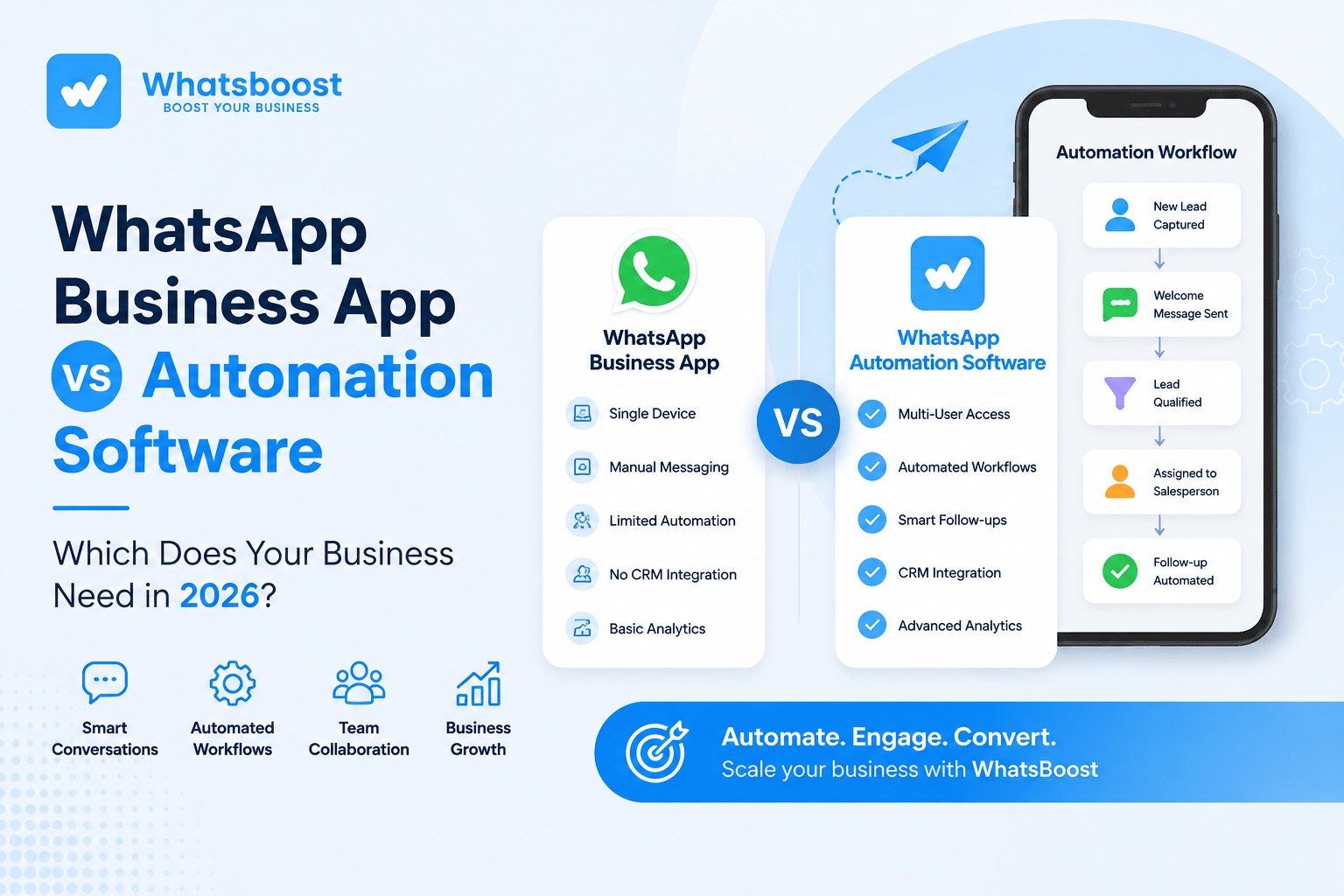
New lead submits a form → WhatsApp message is sent → lead answers qualification questions → lead is assigned to a salesperson → follow-up is triggered → salesperson takes over when human intervention is required.
This is significantly different from simply sending an automatic reply.
WhatsApp automation can support processes such as:
Lead capture
Lead qualification
Automated follow-ups
Appointment reminders
Customer onboarding
Sales notifications
Support workflows
Renewal reminders
Customer re-engagement
CRM-triggered messaging
Internal team notifications
The real value of WhatsApp automation is therefore not just automated messaging. It is the ability to connect WhatsApp conversations with repeatable business processes.
WhatsApp Business App vs WhatsApp Automation Software: Key Differences
The simplest way to understand the difference is to compare what each solution can do as your business becomes more complex.
| Feature | WhatsApp Business App | WhatsApp Automation Software |
|---|---|---|
| Direct customer conversations | Yes | Yes |
| Business profile | Yes | Depends on setup |
| Quick replies | Yes | Yes |
| Basic conversation organization | Yes | Yes |
| Automated workflows | Limited | Yes |
| Automated follow-ups | Limited | Yes |
| Lead qualification workflows | Limited | Yes |
| CRM integration | Limited | Yes |
| Lead routing | Limited | Yes |
| Multi-step workflows | Limited | Yes |
| Event-based communication | Limited | Yes |
| Team collaboration | Limited | Yes |
| Customer segmentation | Basic | Advanced |
| Business-process automation | Limited | Yes |
| Sales workflow automation | Limited | Yes |
| Scalable communication processes | Limited | Yes |
The important distinction is not simply the number of messages a business can send.
It is what happens around those messages.
A WhatsApp Business App helps a business communicate.
WhatsApp automation software can help a business systematize and automate communication.
When Is WhatsApp Business App Enough?
Not every business needs WhatsApp automation software.
The WhatsApp Business App may be sufficient if:
1. You receive a small number of inquiries
If your business receives only a limited number of customer messages each day, manually responding may not create a major operational problem.
2. One person handles most conversations
A freelancer, consultant, local business owner, or small service provider may be able to manage customer conversations personally.
3. Most conversations are simple
If customers usually ask a question and receive a straightforward answer, there may be little need for complex automation.
4. You don't need CRM integration
If customer information is not managed through a CRM such as HubSpot, Salesforce, Zoho CRM, or another system, a basic WhatsApp setup may be adequate.
5. Your follow-up process is simple
If you can easily remember and manage your follow-ups without relying on automated reminders or workflows, you may not need additional software.
In short, WhatsApp Business is a good starting point for simple customer communication.
The need for automation generally emerges when communication becomes repetitive, high-volume, team-dependent, or connected to other business systems.
5 Signs Your Business Has Outgrown WhatsApp Business
There is no universal number of customers or messages that determines when you need WhatsApp automation.
Instead, look at the problems your team is experiencing.
1. Your team keeps missing follow-ups
A potential customer contacts your business.
Your salesperson responds.
The customer says they will think about the offer.
Then nothing happens.
The salesperson becomes busy with other leads, and the follow-up is forgotten.
This is one of the clearest use cases for WhatsApp automation.
Instead of depending entirely on someone's memory, a business can create a workflow that triggers an appropriate follow-up after a defined period.
A structured WhatsApp automation solution for customer onboarding and follow-ups can help businesses create more consistent communication throughout the customer journey.
The goal is not to send unnecessary messages.
The goal is to make sure important follow-ups do not disappear simply because someone forgot to perform a manual task.
2. Multiple employees need to manage customer conversations
As a business grows, customer conversations may involve sales representatives, support executives, account managers, operations teams, or other employees.
This creates coordination problems.
One employee may respond to a customer without another team member knowing what was discussed. A customer may have to repeat information. Two employees may accidentally follow up with the same person.
Automation and structured team workflows can help assign conversations and actions to the right people.
This becomes particularly important when WhatsApp is no longer being used by one person but by an entire team.
3. Leads arrive from multiple sources
Businesses increasingly receive leads from:
Websites
Landing pages
Google Ads
Meta Ads
Instagram
Facebook
Referrals
Online forms
Existing customers
WhatsApp itself
If employees have to manually copy every lead into a spreadsheet or CRM and then initiate communication, delays can occur.
A more structured workflow can connect the lead source with WhatsApp.
For example:
Website form → CRM → WhatsApp acknowledgment → qualification → salesperson assignment → follow-up
This allows WhatsApp to become part of the sales process instead of remaining an isolated communication channel.
4. Your team repeatedly sends the same messages
Consider how many times your employees send messages such as:
"Your appointment is confirmed."
"Here are the documents required."
"Your demo is scheduled for tomorrow."
"Your payment is due."
"Your order has been confirmed."
"Would you like to continue with the proposal?"
"Your onboarding process has started."
If the same communication is sent repeatedly, it may be suitable for automation.
The purpose is not to remove people from customer communication.
It is to allow employees to spend their time on conversations that require judgment, empathy, negotiation, or expertise.
5. Your WhatsApp conversations need to connect with your CRM
This is one of the strongest reasons to consider WhatsApp automation.
A CRM stores information about leads, customers, deals, activities, and lifecycle stages.
WhatsApp contains the actual customer conversation.
If the two systems remain disconnected, your team may have to manually move information between them.
This creates data silos and increases the possibility of missed actions.
A properly designed WhatsApp CRM integration for Indian businesses can connect conversations with customer records and workflows.
For example:
Lead created → WhatsApp message
Deal stage changed → WhatsApp update
Appointment booked → WhatsApp confirmation
No response → Follow-up
Deal won → Onboarding message
This transforms WhatsApp from a standalone messaging channel into part of the business workflow.
WhatsApp Automation Is More Than Automated Replies
Many businesses assume that WhatsApp automation simply means sending an automatic reply whenever someone sends a message.
That is only one part of the picture.
Consider a business that receives a product inquiry through a website.
A basic setup might send:
"Thank you for contacting us. Our team will get back to you shortly."
A more sophisticated WhatsApp automation workflow could potentially:
Capture the lead.
Create or update the customer record.
Send an acknowledgment.
Ask qualification questions.
Categorize the lead.
Assign the lead to the appropriate salesperson.
Notify the sales team.
Trigger a follow-up if there is no response.
Update the CRM based on the interaction.
This is why WhatsApp workflow automation and WhatsApp messaging should not be treated as identical concepts.
Messaging is communication.
Workflow automation connects communication with business logic.
WhatsApp Business App vs Automation Software for Sales
For a small business with a few inquiries per day, the WhatsApp Business App may be perfectly adequate.
But consider a sales team receiving hundreds of inquiries every month.
The sales journey may look like:
New inquiry → Qualification → Demo → Proposal → Follow-up → Negotiation → Purchase → Onboarding
If every step depends on salespeople remembering what to do next, leads can fall through the cracks.
WhatsApp automation can connect communication with the sales pipeline.
For example:
Demo scheduled → WhatsApp confirmation
Proposal sent → WhatsApp follow-up
No response → Automated reminder
Deal won → Customer onboarding message
Inactive lead → Re-engagement workflow
This approach helps sales teams create a more consistent process without requiring employees to manually initiate every routine communication.
WhatsApp Business App vs Automation Software for Customer Support
WhatsApp automation is also useful beyond sales.
Customer support teams can use automated workflows for:
Ticket acknowledgments
Status updates
Appointment reminders
Frequently asked questions
Service notifications
Escalations
Feedback collection
Renewal reminders
For example:
Customer raises issue → Ticket created → WhatsApp acknowledgment → Ticket assigned → Status update → Resolution confirmation → Feedback request
The human support representative can still intervene when the customer has a complex or sensitive problem.
This is an important principle of effective WhatsApp automation:
Automate predictable processes. Keep humans involved where judgment is required.
WhatsApp Business App vs Automation Software for Marketing
Marketing is another area where the difference becomes important.
A business can use WhatsApp to communicate with customers, but automation becomes more powerful when communication is connected to customer data and behavior.
For example, an e-commerce business may have different customer groups:
New customers
Repeat customers
Inactive customers
High-value customers
Customers who abandoned a purchase
Customers approaching renewal
Each group may require different communication.
Instead of sending identical messages to everyone, automation can help businesses create more structured customer journeys.
This turns WhatsApp into more than a messaging channel. It becomes part of the customer lifecycle.
What Happens When WhatsApp Is Connected to CRM Workflows?
CRM integration becomes particularly valuable when the business wants WhatsApp communication to respond to events inside its CRM.
For example:
Deal moves to "Proposal Sent" → WhatsApp reminder
Ticket becomes "Resolved" → WhatsApp confirmation
Customer becomes inactive → Re-engagement message
Deal becomes "Won" → Onboarding workflow
This is where CRM workflows you can automate after integrating WhatsApp become important.
The automation is not based simply on receiving a WhatsApp message.
It is based on business events and customer data.
That distinction is critical for companies trying to scale their communication processes.
When Should You Move From WhatsApp Business to Automation Software?
There is no fixed customer count at which every business should adopt WhatsApp automation.
Instead, consider automation when:
Your lead volume is increasing.
Manual follow-ups are being missed.
Employees spend significant time sending repetitive messages.
Multiple team members handle WhatsApp communication.
Leads arrive from multiple sources.
You need CRM integration.
You want automated lead qualification.
You need multi-step workflows.
Customer onboarding involves repeated steps.
You need automated reminders or notifications.
You want structured sales or support workflows.
Your current communication process is difficult to scale.
The best time to introduce automation is when manual communication starts creating operational friction.
There is little value in implementing complex automation simply because it sounds advanced.
The purpose is to solve a real business problem.
Where Does WhatsBoost Fit?
For businesses that have moved beyond simple WhatsApp conversations, WhatsBoost provides a WhatsApp automation platform designed to connect communication with business workflows.
The platform can be used for use cases involving lead management, CRM workflows, automated follow-ups, customer onboarding, team communication, and other business processes.
For example, businesses can connect WhatsApp communication with CRM data so that customer interactions and business events can trigger appropriate workflows.
The objective is not simply to send more WhatsApp messages.
It is to help businesses create repeatable, structured, and scalable communication processes.
A business might therefore progress through three stages:
Stage 1: Manual communication
Customer sends a message → employee responds.
Stage 2: Basic WhatsApp Business
Customer communication becomes more organized with business-oriented messaging features.
Stage 3: WhatsApp automation
Customer interaction becomes connected to workflows, CRM data, lead management, follow-ups, notifications, and other business processes.
WhatsBoost is most relevant to businesses operating at the third stage.
WhatsApp Business App or Automation Software: Final Verdict
So, which is better: the WhatsApp Business App or WhatsApp automation software?
Neither is universally better.
The right choice depends on your business requirements.
Choose the WhatsApp Business App if:
You are a small business.
Your customer volume is manageable.
One or a few people handle conversations.
Most conversations are simple and personalized.
You don't need complex CRM integration.
Your follow-up process is easy to manage manually.
Consider WhatsApp automation software if:
Your business receives a growing number of leads.
Follow-ups are being missed.
Multiple employees manage customer conversations.
Your team repeatedly sends the same messages.
You need WhatsApp CRM integration.
You want automated lead qualification.
You need customer onboarding workflows.
You want automated sales follow-ups.
You need structured support workflows.
You want WhatsApp communication to respond to CRM events.
Ultimately, the question is not:
"Is WhatsApp Business better than WhatsApp automation software?"
The more useful question is:
"How complex has our WhatsApp-based business process become?"
If WhatsApp is simply where you answer customer questions, the WhatsApp Business App may be all you need.
If WhatsApp has become an important part of your sales, lead management, customer support, onboarding, and retention processes, automation can help turn those conversations into a structured and scalable system.
The goal of WhatsApp automation is not to replace people.
It is to automate the repetitive parts of communication so your team can focus on the interactions that genuinely require human attention.
Conclusion
The choice between WhatsApp Business and WhatsApp automation software ultimately depends on the complexity of your business.
For straightforward one-to-one customer communication, WhatsApp Business can be an effective starting point.
But when customer communication becomes a repeatable business process involving leads, sales teams, CRM data, follow-ups, onboarding, support, and retention, automation becomes significantly more valuable.
The transition is therefore not really about replacing one WhatsApp product with another.
It is about moving from manual communication to structured business workflows.
For businesses ready to make that transition, a platform such as WhatsBoost can provide the automation layer needed to connect WhatsApp communication with the processes that keep the business moving.
Want to automate WhatsApp for your business?
Set up campaigns, replies, and follow-ups in minutes.