
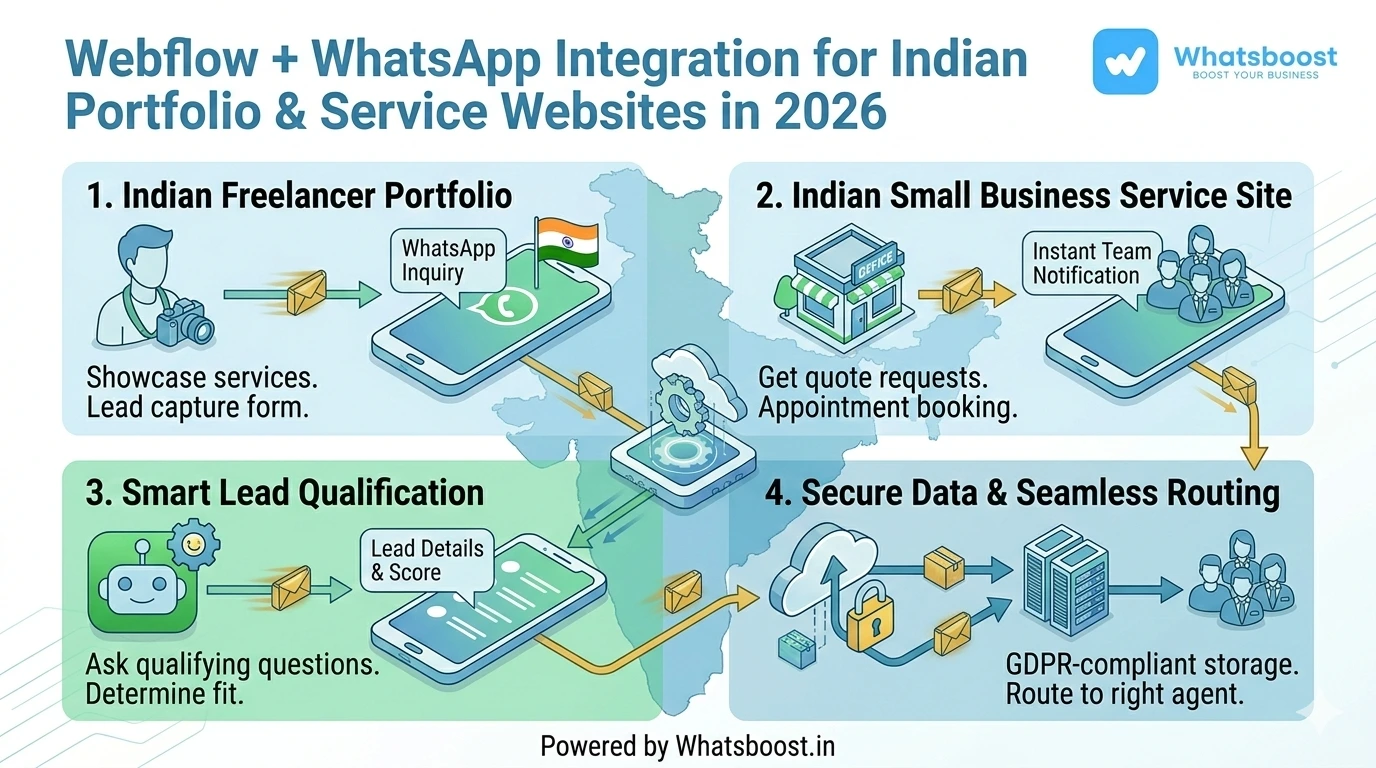
Webflow + WhatsApp Integration for Indian Portfolio & Service Websites in 2026 | Whatsboost
Discover how Indian portfolio and service websites built on Webflow can integrate WhatsApp to capture leads instantly, automate client messaging, and convert visitors into paying customers using Whatsboost.
For Indian freelancers, creative agencies, consultants, and service providers, a Webflow website is often the centrepiece of their professional presence. It showcases work, communicates expertise, and invites potential clients to get in touch. But here is the gap most Indian portfolio and service websites share: a visitor lands, browses, gets interested — and then hits a contact form that leads nowhere fast.
An email acknowledgement arrives hours later. The enquiry sits unread overnight. The potential client moves on.
In 2026, integrating WhatsApp with your Webflow website changes this dynamic entirely. Visitors can connect with you instantly on WhatsApp — the platform they already use and trust — and your business can automate responses, capture leads, and start meaningful conversations the moment interest is at its peak.
This blog covers everything Indian portfolio and service website owners need to know about Webflow and WhatsApp integration, and how Whatsboost powers it all seamlessly.
Why Indian Portfolio and Service Websites Need WhatsApp Integration
India's freelance and service economy is booming in 2026. Graphic designers, web developers, digital marketers, architects, legal consultants, fitness coaches, and thousands of other service professionals use Webflow to build polished, credible online presences.
The challenge they share is the same: converting a website visitor into a paying client requires fast, personal communication. Indian clients — whether they are small business owners in Surat or startup founders in Bengaluru — expect to connect on WhatsApp. It is familiar, immediate, and trusted in a way that email simply is not.
A Webflow and WhatsApp integration bridges this expectation gap. It transforms your portfolio or service website from a static showcase into an active lead-capturing and client-communication machine — running automatically in the background while you focus on delivering your work.
What Webflow + WhatsApp Integration Looks Like for Indian Service Websites
When you integrate WhatsApp with your Webflow site through Whatsboost, the experience is smooth for both you and your potential clients. Here is what it delivers in practice:
WhatsApp Chat Button on Your Website — A prominent WhatsApp button on your Webflow site lets visitors start a conversation instantly with a single tap — no forms to fill, no waiting for a callback. For mobile users, which account for the majority of Indian web traffic, this is the most frictionless path to contact possible.
Automated Lead Capture from Contact Forms — When a visitor submits a project enquiry or contact form on your Webflow site, their details are automatically captured and a personalised WhatsApp message is sent to them immediately — acknowledging their interest and initiating the conversation before a competitor gets the chance.
Instant Notification to You or Your Team — The moment a lead submits a form or clicks your WhatsApp button, you receive an instant WhatsApp notification with their details — so you can respond promptly, even if you are not sitting at your desk.
Automated Follow-Up Sequences — If a lead does not respond after the initial WhatsApp message, Whatsboost's automation sends a follow-up at 24 and 48 hours — keeping your pipeline warm without any manual effort on your part.

4 Practical Integration Workflows for Indian Portfolio and Service Websites
1. The Instant Project Enquiry Response
A potential client fills out your Webflow project enquiry form with their name, contact number, and a brief about what they need. The moment they hit submit, an automated WhatsApp message is sent to them — personalised with their name, acknowledging their specific enquiry, and letting them know you will be in touch shortly.
This immediate response signals professionalism and attentiveness — qualities that set Indian freelancers and agencies apart in a competitive market. And because it happens on WhatsApp, the likelihood of the client actually reading and responding is far higher than with email.
2. WhatsApp Click-to-Chat for Portfolio Browsers
Visitors browsing your Webflow portfolio often have questions that a static page cannot answer — timeline, pricing, availability, or process. A well-placed WhatsApp click-to-chat button on your portfolio pages invites these visitors to ask directly, converting passive browsers into active conversations without the friction of a formal contact form.
Through Whatsboost, you can pre-fill the opening WhatsApp message with a contextual prompt — such as "Hi, I saw your portfolio and I am interested in discussing a project" — making it even easier for hesitant visitors to take the first step. Explore more at Whatsboost.
3. Service Package Enquiry Automation
For Indian service websites with defined packages — such as a social media management agency or a legal consulting firm — you can build a Whatsboost chatbot flow that triggers when a visitor enquires about a specific service via WhatsApp.
The chatbot asks a few qualifying questions — business type, budget range, timeline — and based on the responses, either provides relevant package information automatically or routes the lead to you with full context. This saves you the back-and-forth of initial discovery conversations and ensures you only spend time on genuinely qualified leads.
4. Automated Testimonial and Review Request
After delivering a project, use Whatsboost's automation to send an automatic WhatsApp message to the client requesting a testimonial or Google review. Timing the message right — a few days after project completion when satisfaction is high — dramatically increases the response rate compared to an email request.
For Indian freelancers and agencies building their online reputation, this single automated workflow can accelerate review collection and strengthen the social proof on their Webflow portfolio significantly.
Setting Up Webflow + WhatsApp Integration with Whatsboost
Getting your Webflow and WhatsApp integration live is a straightforward process with the right tools in place.
Step 1 — Activate WhatsApp Business API via Whatsboost Whatsboost is an authorised WhatsApp Business Solution Provider that gets your API live quickly with full setup support. This is the essential foundation for all automated WhatsApp messaging from your Webflow site.
Step 2 — Add a WhatsApp Click-to-Chat Button on Webflow Embed a WhatsApp click-to-chat link or button on your Webflow site using a pre-filled message URL. This requires no coding — just a simple embed element in Webflow's Designer.
Step 3 — Connect Webflow Forms to Whatsboost via Automation Use Zapier, Make, or Pabbly Connect to connect your Webflow form submissions to Whatsboost's WhatsApp API. Map your form fields to the WhatsApp message template so each notification is personalised with the lead's own details.
Step 4 — Build Your Follow-Up Automation in Whatsboost Use Whatsboost's no-code automation builder to create follow-up sequences — so leads that do not respond to the initial message receive a gentle nudge at 24 and 48 hours automatically.
Step 5 — Test, Refine, and Go Live Submit a test enquiry through your Webflow form and confirm all messages fire correctly. Once validated, your automated lead messaging system runs continuously — capturing and engaging every website lead without any manual effort.
Best Practices for Indian Portfolio and Service Websites
Keep your WhatsApp button visible above the fold. On mobile devices — where the majority of Indian visitors browse — a WhatsApp button that requires scrolling will be missed. Place it prominently in your header or as a floating button across all pages.
Use a warm, conversational opening message. Automated WhatsApp messages for portfolio and service websites should not sound robotic. Use a natural, friendly tone that reflects your personal brand — clients are reaching out to a person, not a corporation.
Get your message templates approved in advance. The WhatsApp Business API requires pre-approved templates for outbound messages to new contacts. Whatsboost guides you through this process to ensure your templates are ready before you go live.
Respond to WhatsApp conversations promptly. Automation handles the initial response, but human follow-through is what converts leads into clients. Use Whatsboost's shared team inbox to ensure every WhatsApp conversation receives a timely personal reply.

FAQs: Webflow + WhatsApp Integration for Indian Portfolio & Service Websites
Q1. Do I need technical skills to add WhatsApp integration to my Webflow site? No. Adding a WhatsApp click-to-chat button requires only a simple embed in Webflow's Designer. Connecting Webflow forms to Whatsboost for automated messaging uses no-code platforms like Zapier or Make, with full guidance available from the Whatsboost team.
Q2. Can I use this integration as a solo freelancer, or is it only for agencies? It is ideal for both. Indian freelancers benefit enormously from automated lead capture and follow-up, as it ensures no enquiry goes unanswered even when they are deep in a project. Agencies benefit from the shared inbox and routing features that come with higher lead volumes.
Q3. Will the WhatsApp button work on mobile Webflow sites? Yes. WhatsApp click-to-chat links open WhatsApp natively on any mobile device. For the majority of Indian website visitors browsing on smartphones, tapping a WhatsApp button to start a conversation is the most natural and frictionless interaction possible.
Q4. Can I automate WhatsApp messages in Hindi or other Indian languages for my service website? Yes. Whatsboost supports multilingual WhatsApp message templates. Indian service providers targeting regional audiences can create and use approved templates in Hindi, Tamil, Marathi, Telugu, and other languages to communicate with clients in their preferred language.
Q5. How do I handle WhatsApp replies from multiple website leads at once? Whatsboost's shared team inbox centralises all incoming WhatsApp conversations from your Webflow website leads in one place. If you have a team, conversations can be assigned to different members. If you are a solo operator, everything is visible and manageable from a single dashboard.
Q6. Is it possible to collect client payments or share proposals via WhatsApp through this integration? While WhatsApp itself does not process payments, you can absolutely use automated WhatsApp messages to share proposal links, invoice links, or payment gateway URLs — making the entire client journey from enquiry to payment smoother and faster.
FAQs: Whatsboost Features
Q1. What is Whatsboost and how does it help portfolio and service website owners? Whatsboost is an authorised WhatsApp Business Solution Provider that helps Indian businesses and professionals activate the WhatsApp Business API and build automation workflows — including instant lead messaging, chatbot qualification, follow-up sequences, and review collection — tailored to their specific service or portfolio needs.
Q2. Does Whatsboost support the WhatsApp click-to-chat button for Webflow? Yes. Whatsboost provides the WhatsApp Business number and API infrastructure needed to power click-to-chat buttons on Webflow, ensuring all incoming conversations are captured and manageable through the Whatsboost platform.
Q3. Can Whatsboost automate follow-up messages for unresponsive leads? Yes. Whatsboost's no-code automation builder lets you create multi-step follow-up sequences that trigger automatically based on lead behaviour — such as sending a second WhatsApp message if a lead has not responded within 24 hours of their initial enquiry.
Q4. Does Whatsboost offer analytics to track lead messaging performance? Yes. Whatsboost provides detailed analytics on message delivery, open rates, response times, and agent performance — giving you the data needed to refine your Webflow lead messaging strategy continuously.
Q5. Is Whatsboost suitable for Indian freelancers with a small budget? Yes. Whatsboost offers plans suited to businesses of all sizes — from solo freelancers handling a handful of leads per week to large agencies managing hundreds of enquiries daily. Visit Whatsboost to explore pricing and plans that fit your needs.
Q6. How do I get started with Whatsboost for my Webflow portfolio or service website? Visit Whatsboost, sign up for your account, and the Whatsboost team will guide you through WhatsApp Business API activation, Webflow integration setup, and message template creation — so your automated lead messaging system is live as quickly as possible.
Make Your Webflow Website Work Harder — Automatically
Your Webflow portfolio or service website already tells your story beautifully. Now it is time to make it convert more of the visitors who land on it into real conversations and paying clients.
Integrating WhatsApp with your Webflow site through Whatsboost ensures that every visitor who shows interest hears from you instantly — on the platform they trust most, with a message that feels personal and professional.
In India's competitive service market in 2026, that responsiveness is your edge. Visit Whatsboost and start converting your Webflow visitors into WhatsApp conversations today.
Want to automate WhatsApp for your business?
Set up campaigns, replies, and follow-ups in minutes.