
WhatsApp Business Multiple Users vs Shared Inbox: Which Is Better for Teams?
A practical comparison of WhatsApp Business multi-user access versus a shared inbox, designed to help teams choose the right setup for scale, accountability, and workflow control.
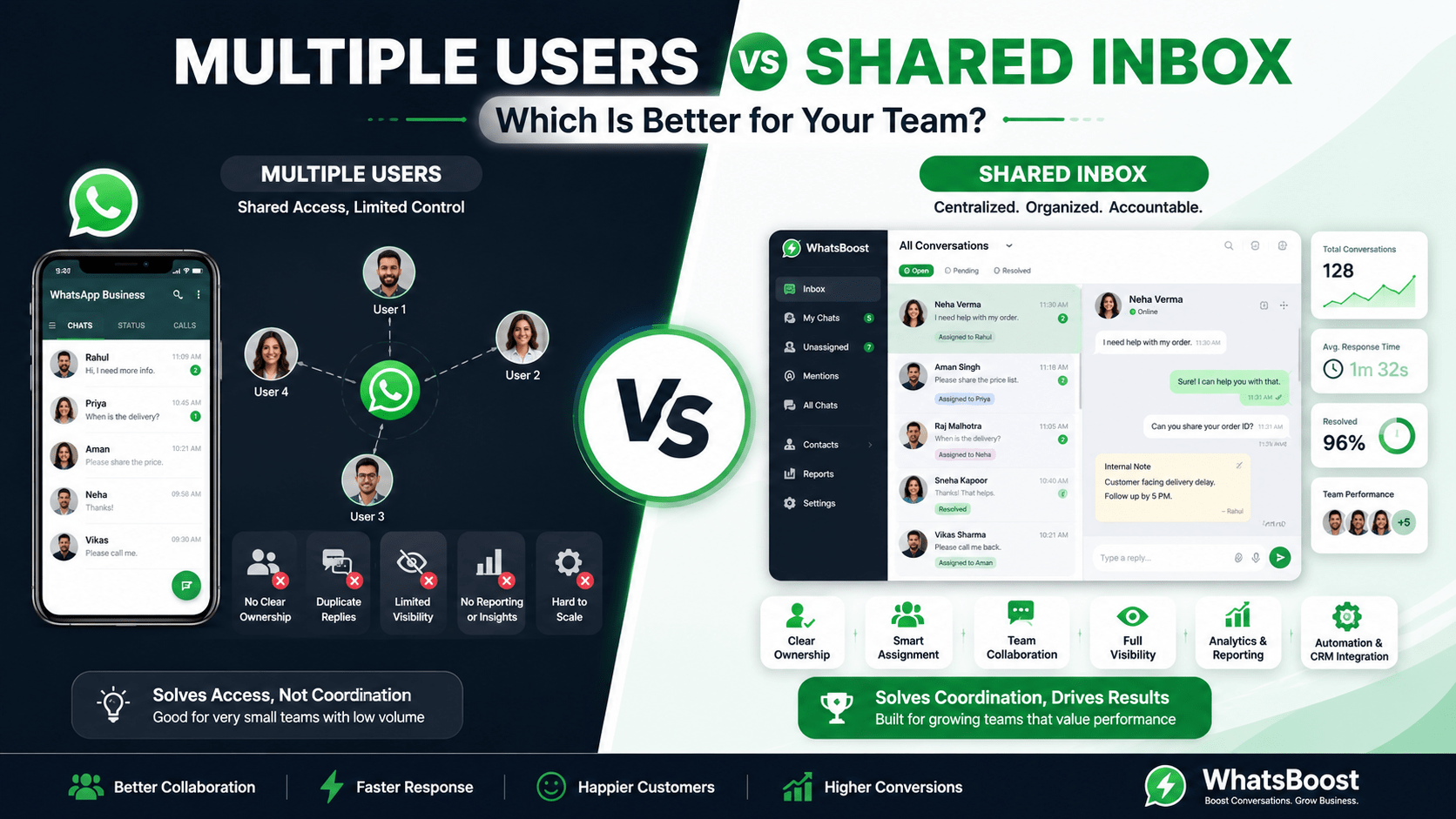
For small teams, the WhatsApp Business app can be enough. For growing teams, a shared inbox is usually the better operating model because it adds assignment, visibility, and workflow control.
The Real Difference
At first glance, “multiple users” and “shared inbox” sound like the same thing. They are not.
Multiple users means several people can access the same WhatsApp business number, usually through linked devices or a multi-user setup.
A shared inbox means every conversation is centralized in one dashboard, where teams can assign chats, track ownership, and manage collaboration more systematically.
Multiple users solve access. A shared inbox solves coordination.
That distinction matters because most team problems are not about whether people can see messages. The real issue is whether the team can respond without duplication, confusion, or dropped leads.
How Multiple Users Works
The WhatsApp Business app supports linked devices, which helps small teams share access to one account. This is useful when a business only needs a handful of people to monitor messages.
This model works best when:
The team is small.
Message volume is low to moderate.
There is minimal need for routing or reporting.
A simple setup is more important than process control.
But the limitations appear quickly:
Everyone shares the same conversation space.
There is little or no assignment structure.
It is harder to track who replied.
Team accountability is weak.
Scaling becomes messy as volume grows.
Multiple-user access is a basic collaboration layer, not a full team operating system.
That is why it works for some businesses and breaks down for others.
What a Shared Inbox Adds
A shared inbox centralizes all conversations into one workspace and gives teams more structure.
Typically, it includes:
Chat assignment.
Team roles and permissions.
Conversation status tracking.
Internal notes.
Handoffs between agents.
Manager visibility.
CRM or automation integration.
This is a very different operating model from simply linking a few devices. It lets sales, support, and operations teams work from the same queue without stepping on each other.
WhatsApp Business Multiple Users: Seamless Team Collaboration with WhatsBoost in 2026
How to Use WhatsApp Business With Multiple Users for Customer Support Teams
How to Set Up WhatsApp Business for Multiple Agents or Team Members
Comparison Table
The bigger your team gets, the more a shared inbox becomes a necessity rather than a nice-to-have.
Which Teams Should Use Multiple Users
Multiple-user access is usually enough when:
You are a very small business.
Only a few people need visibility.
Your support volume is light.
You do not need complex workflows.
You just want everyone to see incoming messages.
This is often the right starting point for:
Solopreneurs with a helper.
Micro-businesses.
Early-stage local businesses.
Small offices that mainly need backup access.
The problem is that many businesses stay in this setup too long. They keep using “shared access” even after their communication volume and lead value make coordination more important than convenience.
Which Teams Should Use a Shared Inbox
A shared inbox is the better choice when the team needs structure.
It is a better fit for:
Sales teams handling multiple leads at once.
Support teams with response SLAs.
Agencies managing multiple client conversations.
Multi-location businesses.
Education institutes, clinics, real estate teams, and service brands.
Any team that needs accountability across roles.
If the conversation matters enough to track, assign, and report on, you need a shared inbox.
That is the practical threshold.
Business Impact of Each Model
The business difference is larger than it seems.
Multiple users
This improves convenience, but the process can remain informal. It helps teams respond faster than a single-device setup, but it does not solve ownership or workflow design.
Shared inbox
This improves not just speed but operating discipline. Teams know who owns the conversation, managers can review performance, and the business can build repeatable processes around communication.
In other words:
Multiple users reduce friction.
Shared inbox creates control.
The real value of a shared inbox is not that everyone can see the same messages; it is that everyone can work from the same system.
Recommendation by Team Size
Final Verdict
If your business only needs shared access to a WhatsApp number, multiple users can work. But if your team needs accountability, routing, reporting, and scalability, a shared inbox is the better choice.
Multiple users are about sharing access. Shared inbox is about managing work.
For most growing businesses, that difference decides everything. The moment customer communication becomes operationally important, the shared inbox wins.
Want to automate WhatsApp for your business?
Set up campaigns, replies, and follow-ups in minutes.