
How E-commerce Brands Use WhatsApp Zendesk Integration for Order Support in 2026 | Whatsboost
Discover how e-commerce brands use WhatsApp Zendesk integration for seamless order support in 2026. Learn practical workflows, setup tips, and how Whatsboost powers real-time WhatsApp order support automation for Indian online businesses.
For Indian e-commerce brands, order support is the front line of customer experience. Shipping delays, return requests, payment failures, wrong deliveries — these are the moments that define whether a customer becomes a loyal repeat buyer or a one-time purchase who never returns. And in 2026, the channel where Indian customers bring these moments is overwhelmingly WhatsApp.
The challenge for growing e-commerce brands is that WhatsApp, while brilliant for initiating conversations, was not designed to manage the volume, structure, and accountability that professional order support requires. That is where Zendesk comes in. And when the two are connected through Whatsboost's WhatsApp Business API, e-commerce brands get a support operation that is fast, structured, and scalable — without asking customers to move to a different channel.
This blog covers exactly how Indian e-commerce brands are using WhatsApp Zendesk integration for order support in 2026, and the workflows making the biggest impact.
Why Order Support on WhatsApp Needs Zendesk Behind It
Indian e-commerce customers default to WhatsApp for support because it is instant, familiar, and requires no login. They send a message about their order the same way they message a friend — and they expect a response that feels just as immediate.
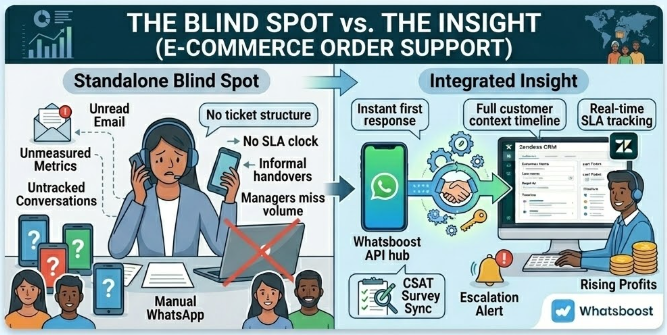
But from the brand's perspective, WhatsApp alone creates serious operational gaps for order support. Without Zendesk integration, there is no ticket structure to track resolution progress. No SLA to ensure timely responses. No way for a manager to see which orders are generating the most support queries. No historical record of a customer's previous support interactions to inform the next one.
Zendesk provides all of these capabilities. When integrated with WhatsApp through Whatsboost, it gives e-commerce support teams the structure and visibility they need without removing the WhatsApp experience customers prefer. Visit Whatsboost.in to explore how the integration works.
Core Order Support Workflows E-commerce Brands Are Using
1. Automatic Order Support Ticket Creation From WhatsApp
When a customer sends a WhatsApp message about their order — "Where is my order?" "I received the wrong item" "Can I return this?" — Whatsboost captures the message and automatically creates a Zendesk support ticket, pre-tagged with the customer's phone number, message content, and an "Order Support" category label.
The ticket enters the support queue immediately, subject to the brand's SLA policy — ensuring no order query sits unacknowledged while the support team is busy. For Indian e-commerce brands handling hundreds of WhatsApp order queries daily, this automatic ticket creation is the foundation of every other workflow built on top of it.
2. Order Status Lookup and Instant WhatsApp Response
When a customer asks for their order status on WhatsApp, Whatsboost's no-code chatbot automation asks for their order number and then queries the brand's order management system via API. Within seconds, the chatbot returns the current order status — "Your order is out for delivery and will arrive today" — directly on WhatsApp, without any human agent involvement.
This single automation resolves the most common order support query — "Where is my order?" — entirely automatically, at any hour of the day or night. For Indian e-commerce brands that experience spikes in order status queries after dispatch notifications, this workflow alone can reduce support ticket volume by a significant margin.
3. Return and Refund Request Processing
A customer messages on WhatsApp requesting a return for a damaged product. Whatsboost's chatbot collects the order number, reason for return, and preferred resolution — refund or replacement. The collected details are automatically populated into a Zendesk return ticket, tagged with the relevant category, and routed to the returns processing team.
The customer receives an instant WhatsApp confirmation — "Your return request has been registered. Reference: #12345. Our team will arrange a pickup within 24 hours." — while the Zendesk ticket moves through the returns workflow in the background.
Whatsboost supports the chatbot qualification flows and webhook triggers that make this end-to-end return automation possible without developer involvement. Learn more at Whatsboost.in.
4. Escalation Routing for Damaged or High-Value Order Issues
When a customer sends a WhatsApp message about a damaged, lost, or significantly delayed high-value order, Whatsboost's keyword and order-value detection automatically flags the Zendesk ticket as high priority and routes it to a senior support agent. A simultaneous WhatsApp notification goes to the support manager.
High-value order issues receive senior attention within minutes of the customer's first message — not after sitting in a standard queue. For Indian e-commerce brands where a single high-value order complaint can translate to a public review or a social media post, this rapid escalation workflow is a brand protection mechanism as much as a support one.
5. Proactive Order Update Notifications Reducing Inbound Volume
Instead of waiting for customers to message asking about their orders, e-commerce brands can use Whatsboost's broadcast messaging to proactively send WhatsApp order updates at key stages — order confirmed, dispatched, out for delivery, delivered.
These proactive notifications — sent through Whatsboost and logged against the customer's Zendesk profile — reduce inbound "where is my order?" queries significantly. For brands managing thousands of daily orders, reducing inbound query volume through proactive communication is one of the highest-ROI support investments available.
6. Post-Delivery CSAT Collection and Review Request
After a Zendesk order support ticket is marked resolved — or after a delivery notification is sent — Whatsboost automatically sends a CSAT survey to the customer on WhatsApp: "How was your order and support experience? Tap to rate: 1–5."
Satisfied customers are then prompted with a follow-up message inviting them to leave a Google or platform review. Dissatisfied customers trigger an alert to the customer success team for proactive recovery. The entire feedback loop runs automatically, building the review base and satisfaction database that fuel the brand's growth.
Setting Up WhatsApp Zendesk Order Support Integration With Whatsboost
Getting this integration live for an Indian e-commerce brand requires three core components:
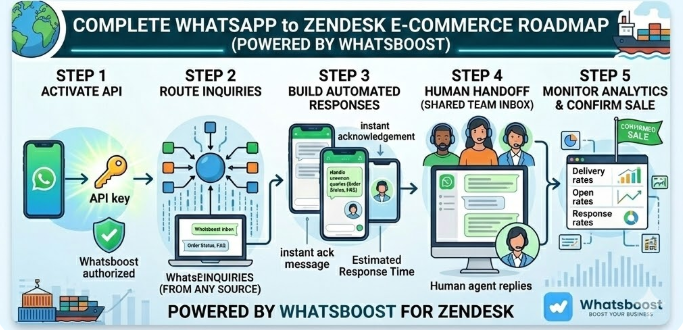
WhatsApp Business API via Whatsboost — Whatsboost activates your API as an authorised WhatsApp Business Solution Provider, giving your support team the messaging infrastructure all order support workflows run on.
Zendesk Account With Order Support Configuration — Set up Zendesk with order-specific ticket categories, SLA policies, and routing rules for different query types — order status, returns, refunds, damaged goods — so automated tickets land in the right queues from the first interaction.
Automation Platform Connecting the Two — Zapier, Make, or Pabbly Connect bridges Whatsboost's webhooks to Zendesk's API, processing the workflow logic that creates tickets, routes them, triggers customer WhatsApp notifications, and logs satisfaction scores.
Once configured, the entire order support system operates automatically — creating tickets, routing queries, updating customers, and collecting feedback — while your human support agents focus on the complex, high-value interactions that genuinely require a personal touch.
Best Practices for E-commerce WhatsApp Zendesk Order Support
Build your chatbot qualification flows around your most common order queries. For most Indian e-commerce brands, the top five WhatsApp order queries are order status, return requests, refund timelines, wrong item received, and delivery address changes. Build dedicated chatbot flows for each of these before tackling less frequent query types.
Personalise automated WhatsApp messages with order-specific details. A message that includes the customer's name and their specific order number — "Hi Priya, your order #45678 has been dispatched" — drives significantly higher engagement and trust than a generic notification. Use Whatsboost's dynamic message fields to personalise every automated touchpoint.
Set SLA standards for WhatsApp that match your other support channels. If your email support SLA is four hours, your WhatsApp support SLA should be no longer. Customers who choose WhatsApp expect faster service, not slower. Use Zendesk's SLA tracking across WhatsApp-generated tickets to hold your team to the same standard.
Use Whatsboost analytics to identify your highest-volume order query types. Review weekly which order support queries are generating the most WhatsApp messages and Zendesk tickets. These are your highest-priority automation targets — resolve them at the chatbot level and your human support team's workload drops immediately.
Order Support Is Where E-commerce Loyalty Is Won or Lost
In 2026, Indian e-commerce customers have more choices than ever. The brands they return to are not always those with the lowest prices — they are the brands that made them feel supported when something went wrong with their order.
WhatsApp Zendesk integration, powered by Whatsboost, gives your e-commerce brand the system to deliver exactly that: instant acknowledgement, intelligent automation, structured resolution, and proactive communication — across every order support interaction, at any volume, on the channel your customers already use every day.
Visit Whatsboost.in and build the order support system your e-commerce customers deserve today.
Want to automate WhatsApp for your business?
Set up campaigns, replies, and follow-ups in minutes.