
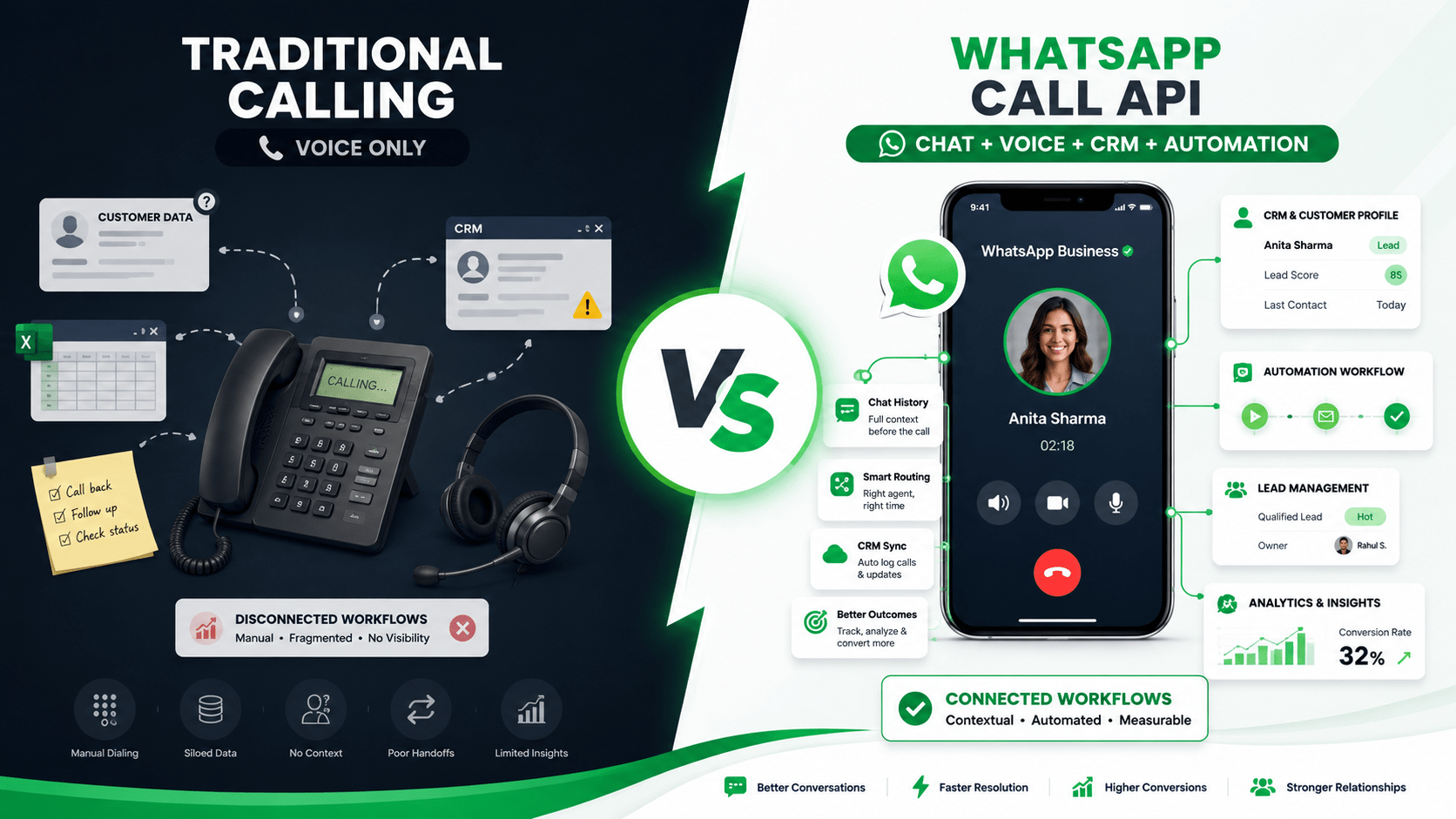
WhatsApp Call API vs Traditional Calling Systems: What's Better for Businesses?
A strategic comparison of WhatsApp Call API and traditional calling systems for businesses that want faster follow-up, better visibility, and more scalable customer communication.
Businesses are moving from isolated phone-based calling to integrated communication systems. The real question is not whether voice matters, but which voice stack gives you better control, visibility, and conversion outcomes.
The Core Difference
Traditional calling systems are built around phone numbers, manual dialing, and standalone call flows. WhatsApp Call API is built inside a customer communication workflow, where chat, call, CRM, and automation can work together.
That difference changes everything. With traditional calling, teams often work in silos: a lead fills a form, someone calls later, notes are written separately, and follow-up happens inconsistently. With WhatsApp Call API, the call can sit inside the same journey as the chat that created it, which makes the interaction easier to track and act on.
Traditional calling is a channel. WhatsApp Call API is a communication layer embedded inside a workflow.
That one distinction is why businesses are evaluating it seriously.
What Traditional Calling Does Well
Traditional calling systems still have strengths.
They are familiar, widely adopted, and simple to understand. Most businesses already know how to assign phone lines, set up IVR, record calls, and route incoming traffic. For basic outbound and inbound voice operations, that remains useful.
Traditional systems are often a good fit for:
General office communication.
Basic customer support.
Internal calling.
Sales teams that rely heavily on manual outreach.
Businesses that do not yet need deep CRM integration.
But the limitations become visible as soon as scale and coordination matter. Traditional systems tend to create fragmented data, poor handoff visibility, and weak linkage between the call and the customer journey.
What WhatsApp Call API Adds
WhatsApp Call API brings voice into the WhatsApp environment, which already has contextual customer data, chat history, and permission-based engagement. That makes it especially useful when a business wants to move from chat to call without forcing the customer to leave the channel.
According to current WhatsApp business guidance, the Calling API supports business-customer voice interactions inside the WhatsApp platform and is designed to work with consent-based workflows. Meta-linked coverage also emphasizes that calling inside WhatsApp is meant to supplement chat-based journeys rather than replace every voice system.[moobicast]
This creates practical advantages:
The customer recognizes the business inside a familiar interface.
The call can be connected to previous chat context.
The business can route calls based on workflow rules.
Teams can coordinate voice with CRM and automation.
WhatsApp Call API is strongest when the call is the next step in an existing conversation, not a cold interruption.
That makes it especially relevant for lead follow-up, support escalation, appointment confirmation, and renewals.
Best Use Cases For Each
WhatsApp Call API works best when the business wants calls to be part of a broader customer journey. Traditional systems work best when the business just needs voice without deeper workflow logic.
Business Impact and ROI
The value of WhatsApp Call API is not just convenience. It is operational clarity.
When calls are tied to WhatsApp conversations, businesses can see:
Which message led to the call.
Which agent handled the escalation.
Which lead source produced the best conversations.
Which follow-up step triggered conversion.
That gives leadership a much better view of customer communication than a standalone phone system ever can.
The biggest ROI of WhatsApp Call API is not cheaper calling; it is better conversion tracking and lower coordination loss.
Traditional systems still win in situations where the business needs high-volume voice throughput or established call-center infrastructure. But when the goal is customer journey continuity, WhatsApp Call API has the stronger strategic advantage.
Decision Framework
Choose WhatsApp Call API if your business relies on:
Chat-first customer journeys.
Lead qualification before calls.
Appointment booking.
Support escalation.
CRM-linked follow-up.
Retention and renewals.
Choose traditional calling systems if your business relies on:
Large outbound call volumes.
Basic telephony.
Internal office calling.
Voice-first operations with no need for WhatsApp context.
Existing PBX or call-center infrastructure that already works well.
If your workflow starts in WhatsApp, your calling system should probably end there too.
That is the simplest way to think about it.
What Businesses Should Avoid
A common mistake is treating WhatsApp Call API as a replacement for every calling need. It is not.
Some businesses still need traditional calling for:
Internal staff communication.
Large-scale telephony campaigns.
Reception routing.
Contact center queues.
Another mistake is using traditional calling without any customer context. That often creates cold, disconnected conversations that feel less relevant to the customer. The future is not voice alone; it is voice inside a system.
WhatsApp Call API vs AI Calling Systems | Complete Business Guide
Calling API Explained: Complete Guide for Businesses (2026)
Combining WhatsApp Call API, CRM, and Automation for Faster Lead Conversion
Final Verdict
Traditional calling systems are still useful, but they are increasingly limited when businesses need context, automation, and measurable outcomes. WhatsApp Call API is the better choice when voice is part of a larger customer communication journey.
Traditional calling manages calls. WhatsApp Call API manages customer conversations that happen to include calls.
For most modern businesses, especially those using WhatsApp as a primary engagement channel, that difference is decisive. The better system is the one that helps you respond faster, route smarter, and connect voice directly to the customer workflow.
Want to automate WhatsApp for your business?
Set up campaigns, replies, and follow-ups in minutes.