
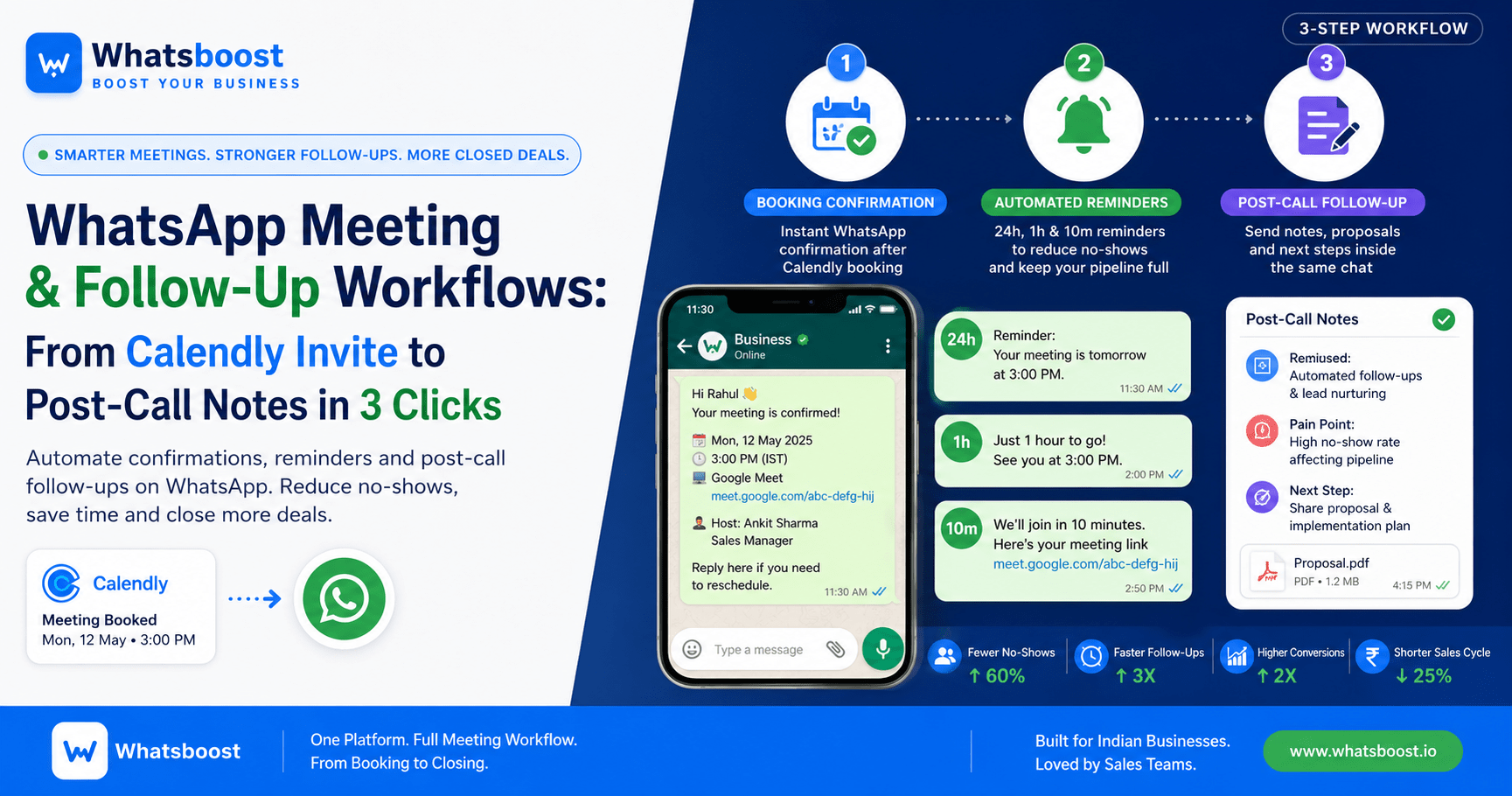
From Calendly Booking to WhatsApp Follow‑Up: A Smoother Meeting Workflow for Indian Businesses
Turn Calendly meetings into a smooth WhatsApp workflow with instant confirmations, automated reminders, and post‑call follow‑ups that reduce no‑shows and keep deals moving.
Most Indian sales teams obsess over getting the meeting booked.
Very few obsess over what happens between booking, reminder, and follow‑up.
A prospect fills a form, books a slot on Calendly, receives an email, and the rep stays in the background hoping the meeting happens.
Too often, that setup leads to:
Last‑minute no‑shows
Forgotten reminders
Manual WhatsApp follow‑ups
Disconnected notes across notebooks, spreadsheets, and chat threads
This is why many businesses lose momentum after the meeting should already be live, not before it.
Why Meeting Workflows Break Today
Meetings Are Not One‑Time Events
A meeting is now just one node in a much longer journey:
Initial WhatsApp or website inquiry
Booking a slot
Reminder and confirmation
Live call (Google Meet / Zoom)
Post‑call follow‑up and notes
Proposal and negotiation
Closing or re‑engagement
Every time that chain includes a manual switch (copy‑pasting links, sending WhatsApp messages by hand, or updating CRM later), friction increases and conversion drops.
The Cost of Ignoring Follow‑Up
Missed calls are not “just one lost meeting.”
They are:
Lost time and sales bandwidth
Weaker trust from the customer
Higher no‑show ratios across the pipeline
Slower average sales cycle
In WhatsApp‑first markets like India, customers expect fast, conversational coordination.
If your system feels slow and fragmented, they quietly move to businesses that feel quicker and more organized.
How a WhatsApp‑First Meeting Workflow Helps
WhatsApp is no longer just a chat app.
For Indian businesses, it is:
The preferred channel for follow‑ups
The default place where reminders are seen
The most natural way to keep deals alive
By anchoring the entire meeting workflow inside WhatsApp, you can keep the conversation moving, reduce no‑shows, and make follow‑ups feel frictionless.
The 3‑Step WhatsApp Meeting Workflow
Step 1 — Booking Triggers Instant WhatsApp Confirmation
Instead of leaving the customer inside an email, the moment a slot is booked on Calendly, a WhatsApp message should be delivered automatically.
A good confirmation includes:
Meeting date and time
Google Meet or Zoom link
Host name and role
A short note that the meeting is confirmed
A gentle reminder to reply if they need to reschedule
This keeps the customer on WhatsApp instead of sending them back to their inbox, and it reinforces that your business is organized and responsive.
For Indian teams using Calendly, integrating it with WhatsApp through a no‑code solution like WhatsBoost lets you send instant WhatsApp confirmations without needing an API.
Step 2 — Automated WhatsApp Reminders Reduce No‑Shows
A single reminder is rarely enough.
High‑performing teams use a simple reminder sequence:
24‑hour reminder
Gives the customer time to block the slot and prepare.1‑hour reminder
Catches people who forgot or have a busy day.10‑minute reminder
Anchors the meeting at that exact time and reduces last‑minute drop‑offs.
The key is tone.
Messages that feel robotic (“Your meeting is at 3 PM”) push people away.
Messages that feel personal and contextual increase attendance and build trust.
Teams that design WhatsApp appointment reminders with clear timing and context tend to see far fewer no‑shows than those relying only on email or one‑off messages.
Step 3 — Post‑Call Follow‑Ups Happen Inside the Same Conversation
After the meeting, most teams switch to:
Sending a separate proposal over email
Writing notes in notebooks or Excel
Updating CRM later, often vaguely
This creates context gaps between the live call and what happens next.
A better approach is:
Sending a summary message on WhatsApp right after the call
Linking any proposals or offers directly inside the chat
Assigning internal tasks so someone on the team knows what happens next
Keeping the lead history attached to the same conversation
This keeps the pipeline alive and prevents “ghosting” caused by delays or ambiguity.
If you want to extend this workflow into a full zero‑human sales funnel on WhatsApp, you can build a system that qualifies leads, sends confirmations, delivers reminders, and follows up automatically — all without manual copy‑pasting.
How WhatsApp Follow‑Ups Improve Conversion
For Indian businesses, WhatsApp follow‑ups consistently outperform email because:
Messages are read faster
Conversations feel personal and contextual
Customers are already active on the app
There is no extra friction (like logging in to an email client)
This makes it easier to:
Answer objections quickly
Share updated proposals
Confirm next steps
Keep deals moving instead of letting them sit idle
Where This Fits Into a Larger WhatsApp Sales Funnel
Once you have a clean Calendly + WhatsApp confirmation and reminder flow, you can layer in a broader funnel:
Lead capture from website, ads, or chat widgets
Automated WhatsApp conversations that qualify interest
Meeting booking through Calendly
Instant confirmation and reminders on WhatsApp
Post‑call nurturing and closing
This structure is exactly how many Indian small businesses already use WhatsApp as a sales funnel — without calling it that.
If you want to see how to build a high‑converting WhatsApp funnel for small businesses, there is a step‑by‑step breakdown that maps leads, workflows, and follow‑ups across the entire journey.
How WhatsBoost Connects This Into One System
WhatsBoost helps Indian businesses centralize:
Calendly booking confirmations
WhatsApp reminders
Post‑call follow‑ups
Sales notes and task history
Lead qualification and nurturing
into a single, no‑code environment.
Instead of juggling Calendly, Google Meet, spreadsheets, and a CRM separately, teams can manage the entire meeting journey from:
booking
reminder
live call
follow‑up
closing
inside one connected workflow.
Want to automate WhatsApp for your business?
Set up campaigns, replies, and follow-ups in minutes.